UX for product managers: The key to building better products
Share UX for product managers: The key to building better products
Explore more from
Design basics
Create, collaborate, and ship in Figma
All your design work, in one place.

You’re three days from a sprint kickoff, and your designer keeps pushing back on the feature spec. They’re asking questions you don’t have answers to. Who’s the user? What problem are we solving? Why this solution?
You’re wondering how to bridge the gap between your business requirements and their design process without slowing down the launch. UX for product managers is the context that makes these conversations productive instead of painful.
Understanding user experience (UX) design doesn’t mean you need to start building screens. It means knowing enough to ask the right questions and make product decisions you can defend with more than instinct.
Read on to learn:
- How user experience drives business outcomes
- The foundational design skills to add to your product toolkit
- Strategies for building stronger partnerships with your design team
- Ways to measure and track usability success
Why UX matters for product managers

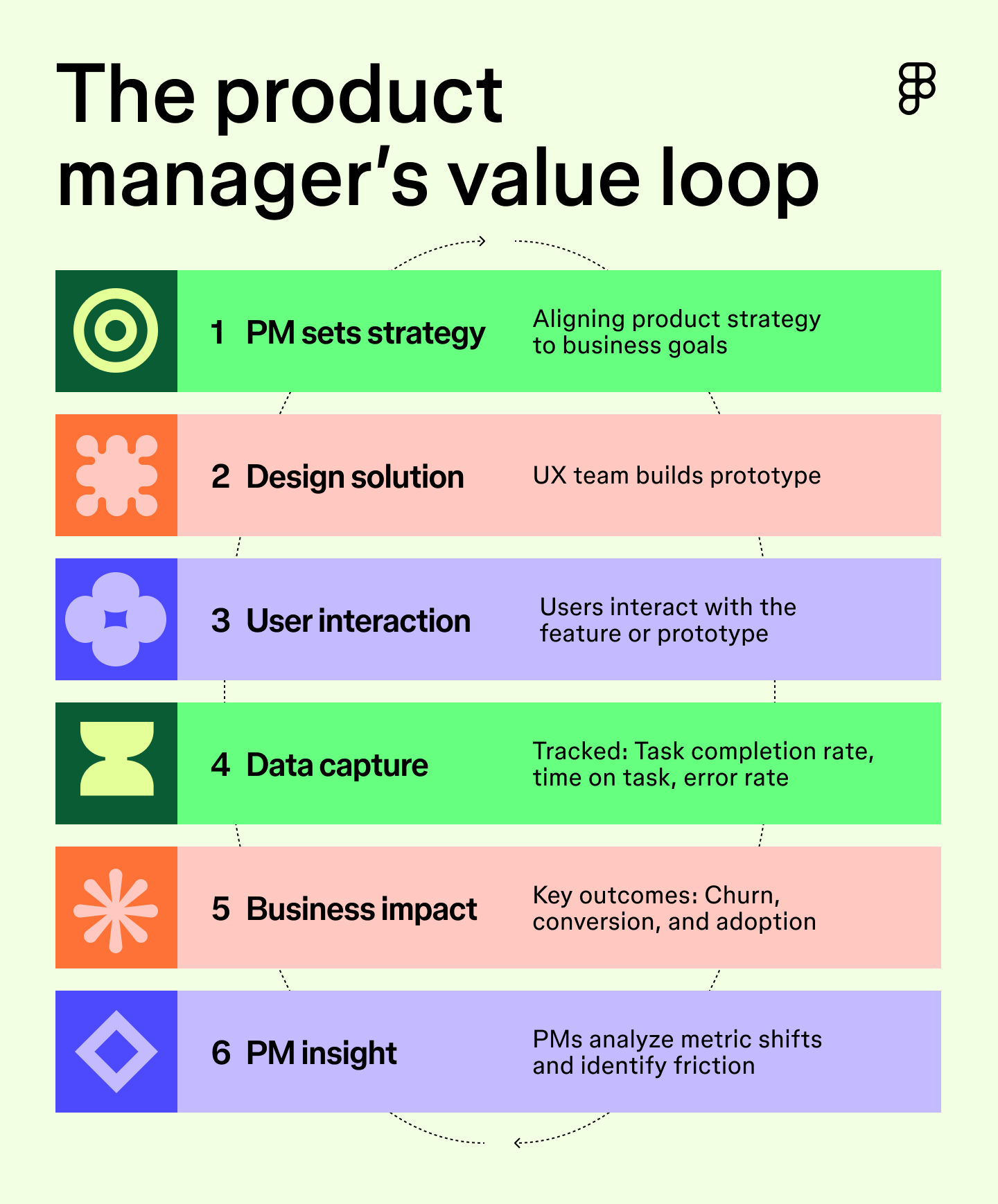
Your product’s success lives or dies on how people experience it, and those outcomes show up directly in the metrics your stakeholders watch. Friction in an onboarding flow tanks adoption, and a confusing checkout path kills conversion. When you can read a user journey and spot exactly where things go sideways, you start making more informed product decisions.
The best UX product managers bring that perspective into every conversation: roadmap reviews, sprint planning, and tough stakeholder conversations. Design fluency gives you the standing to explain why a UX decision matters, in terms that anyone can act on.
UX skills every PM needs
You don’t need to be an expert designer, but knowing enough UX to ask the right questions makes product decisions sharper. If you only add one skill to your toolkit, make it the ability to understand and evaluate user flows.
Pro tip from Figma: Understanding exactly how a user moves through a product to accomplish a task builds empathy, reveals friction early, and sharpens collaboration. To put this into practice, don't just rely on written feature descriptions. Try using simple prototyping to reason through interactions and experiences.
Here are a few other skills worth building:
- User empathy. Sit with users, watch where they hesitate, and let that change how you think about the problem.
- Basic wireframing. Sketching a rough flow forces you to pressure-test your logic before it becomes someone else’s problem.
- Information architecture (IA). A solid grasp of IA means you can spot when a structure is working against the user before it gets built.
- Usability testing. Knowing how to run a usability test means you’re making decisions on behavior rather than assumptions.
Put these skills to work
Figma’s product management templates give you a head start on journey mapping, wireframing, and more.
How PMs can collaborate with designers
Knowing the fundamentals is only half of what drives strong UX product development. The other half is knowing how to work with the people who live and breathe it every day. These habits will help you build better design partnerships.

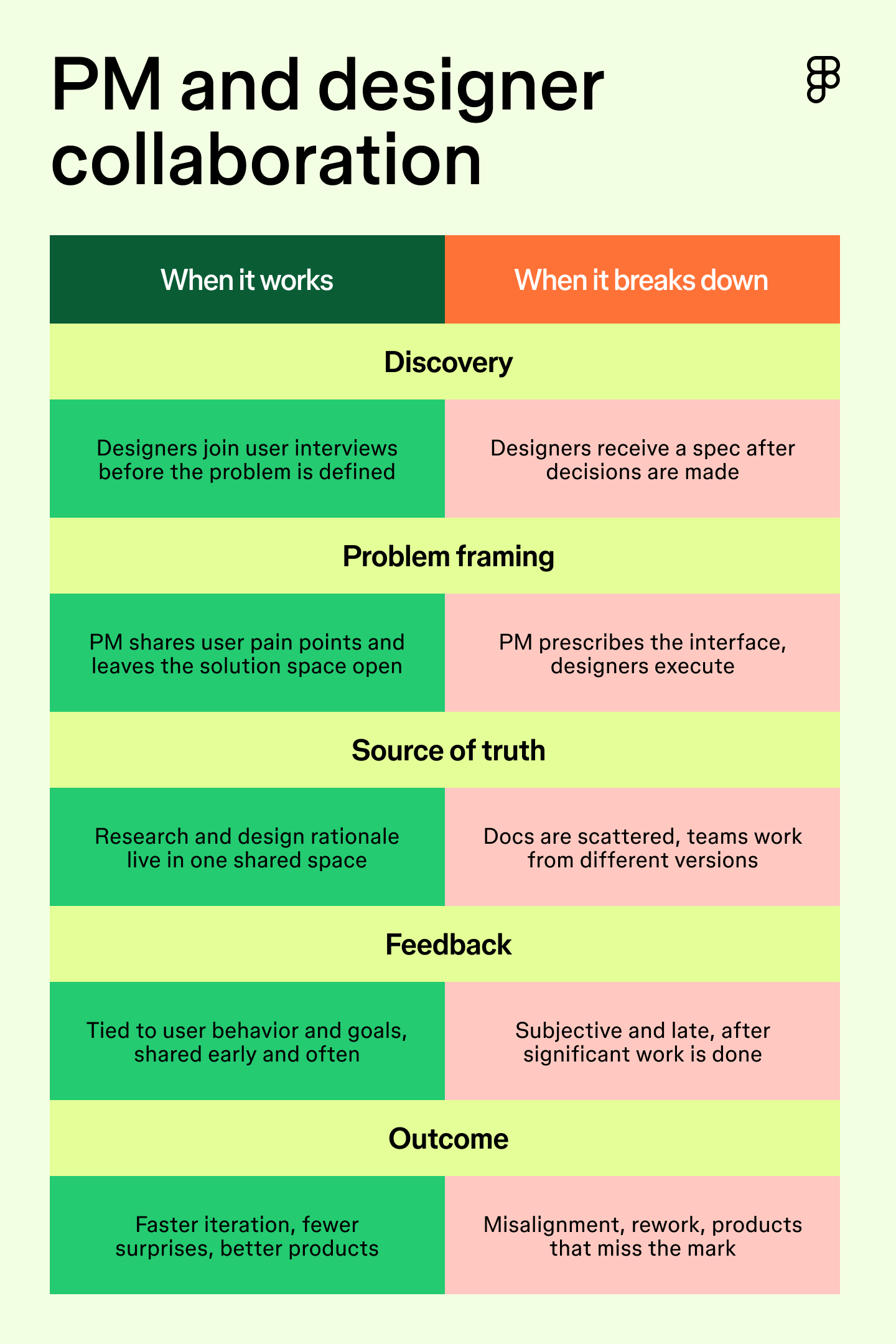
Involve design early in discovery
Most PMs bring designers in after the problem has already been defined. But when you hand over a rigid problem, you limit the design team. By bringing them in earlier to hear the raw user context, designers can help spot hidden assumptions, reframe the core issue, and find angles you hadn’t known to look for.
Instead, pull them into user interviews before wireframing. That’s where product UX development starts—with designers and PMs hearing from users directly.
Pro tip from Figma: Start by building shared context. Align on customer needs, business goals, prior research, and constraints together before anyone jumps into solution mode.
Lead with user problems
Give designers a clear picture of the user’s pain, the goals they’re trying to reach, and the constraints that matter. From there, trust them to find the solution. When PMs overprescribe the interface, designers spend their energy on execution rather than problem-solving. That’s a waste of their creative judgment.
Set the strategy and let your designers craft the interface. Brief your team on what users are struggling with, give them room to explore, and stay open to solutions you didn’t see coming.
Pro tip from Figma: One of the most common collaboration traps is bringing solutions or feature specs to your design team instead of the underlying problem. Treat design as a strategic partner, not a delivery function.
Create a shared source of truth
Scattered docs and five different versions of the same journey map slow everyone down. When everyone’s working from different versions, they make decisions on outdated context.
Instead, build a centralized space to map journeys, synthesize research, and brainstorm in real time. PMs use FigJam to bring all of this together. You can map user journeys, run async brainstorming sessions, and keep your research and design work connected in a shared space so nothing gets lost.
Pro tip from Figma: Don’t rely on written docs or specs. Testing multiple directions and flows in a shared prototype helps the whole team align faster.
Build a continuous feedback loop
Design reviews should feel like a conversation grounded in user workflows and business objectives. Keep them focused and frequent, and the whole team moves faster.
However, even the most concrete feedback loses its value if it comes too late. That’s why you should keep these check-ins low-stakes. A quick async comment early in the process is worth more than a detailed critique after a designer has spent two weeks on something. Check in early and keep the conversation going.
Pro tip from Figma: Anchor comments in user outcomes, business impact, and trade-offs. Frame your feedback around questions like, “Does this reduce onboarding friction?” Avoid subjective, non-actionable opinions like “I don’t like this,” or pixel-level critiques that don’t tie back to the project’s goals.
Tying UX metrics to product goals
Product managers constantly have to balance strict business goals with the design team’s case for the right user experience. The best way to navigate this tension is to ground your conversations in measurable UX data.
Pro tip from Figma: Align teams around outcomes like conversion, retention, and activation, rather than just shipping a feature in isolation. When deciding where to focus your resources, make trade-offs visible by using prototypes to compare options and understand the UX value versus the effort required.
To build that shared understanding of outcomes, here are the UX metrics you should be tracking:
Task success rate
Task success rate measures the percentage of users who complete an action, like checking out, setting up an account, or finding a setting. It’s one of the most direct signals you have that a design is working.
To get the most out of this metric, zoom in on individual features rather than looking at the product as a whole. A high overall success rate can mask friction in user flows. Breaking it down helps you make targeted improvements.
Time on task
Time on task measures how long it takes a user to complete a given action. In most cases, shorter is better. If someone’s spending three minutes trying to update their billing info, that’s a prioritization conversation waiting to happen.
It’s most useful when you track it alongside the task success rate. A user who completes a task slowly is still struggling, even if they eventually get there. Together, they give you the evidence you need to make the case for UX improvements on your product roadmap.
Customer satisfaction and NPS
Customer satisfaction (CSAT) and Net Promoter Score™ (NPS) measure how users feel about your product. CSAT tells you how an interaction landed in the moment, while NPS tells you whether users would recommend you. Together, they give you the emotional layer that behavioral metrics miss.
The catch is that both are lagging indicators. By the time scores drop, users have already had a bad experience. Pair them with task success rate and time on task so you can catch friction before it shows up in your retention numbers.
Bring PMs and designers together in Figma
UX for product managers is about building enough fluency to make better decisions, collaborate more effectively, and ship products that users want to return to. The fundamentals covered here are a starting point. Figma gives you the tools to put them into practice.
Here’s how to get started:
- Brainstorm and align on user problems in FigJam.
- Use Figma Design as your shared source of truth to review early concepts and build out a continuous feedback loop.
- Build compelling pitch decks using Figma Slides to share UX wins and product goals with your stakeholders.
Ready to validate your next idea?
Figma Make turns a text prompt into a working prototype in minutes.
Keep reading

6 stages of the product development process
Learn how to master the stages of the product development process, from concept to launch, and how FigJam can help in this step-by-step guide.

What is user experience (UX) design?
UX design is the creation of digital products around user needs and expectations. Learn key principles, skills, and how to use Figma for UX design.