No code vs. low code: Key differences and when to use each
Share No code vs. low code: Key differences and when to use each
Explore more from
Design basics
Bring designs to life with prototypes
Share flows, gather feedback, and iterate fast with Figma.


The demand for digital products keeps accelerating, but most development teams can’t hire fast enough to keep up. To move more quickly, many product teams are turning to visual tools that reduce or eliminate the need to write code. This shift raises an important question: when should you choose no-code vs. low-code tools?
Read on to learn:
- What no-code and low-code development are
- The key differences between the two approaches
- Benefits of each approach
- How to choose the right strategy for your team
| No code | Low code | |
|---|---|---|
| Target user | Non-technical business users and designers | Professional developers and IT teams |
| Best for | Simple internal tools, landing pages, and prototypes | Complex, scalable enterprise applications |
| Expertise required | None; relies on visual drag-and-drop tools | Basic understanding of coding logic and syntax |
| Customization | Limited to pre-built components | High; allows custom scripting and integration |
| Speed to launch | Fastest; immediate launch (minutes to days) | Accelerated; faster than manual coding (days to weeks) |
| Scalability | Best for departmental or low-traffic use | Best for high-traffic, mission-critical systems |
What is no code?
No-code development lets users build software applications, websites, and automated workflows without writing any code. Everything happens through a visual interface: dragging components, setting logic, and linking actions.
This removes the technical barriers, empowering anyone who understands a business problem to be a builder. Teams can respond to needs instantly, transforming ideas into functional tools in a matter of hours rather than waiting weeks for dev support.
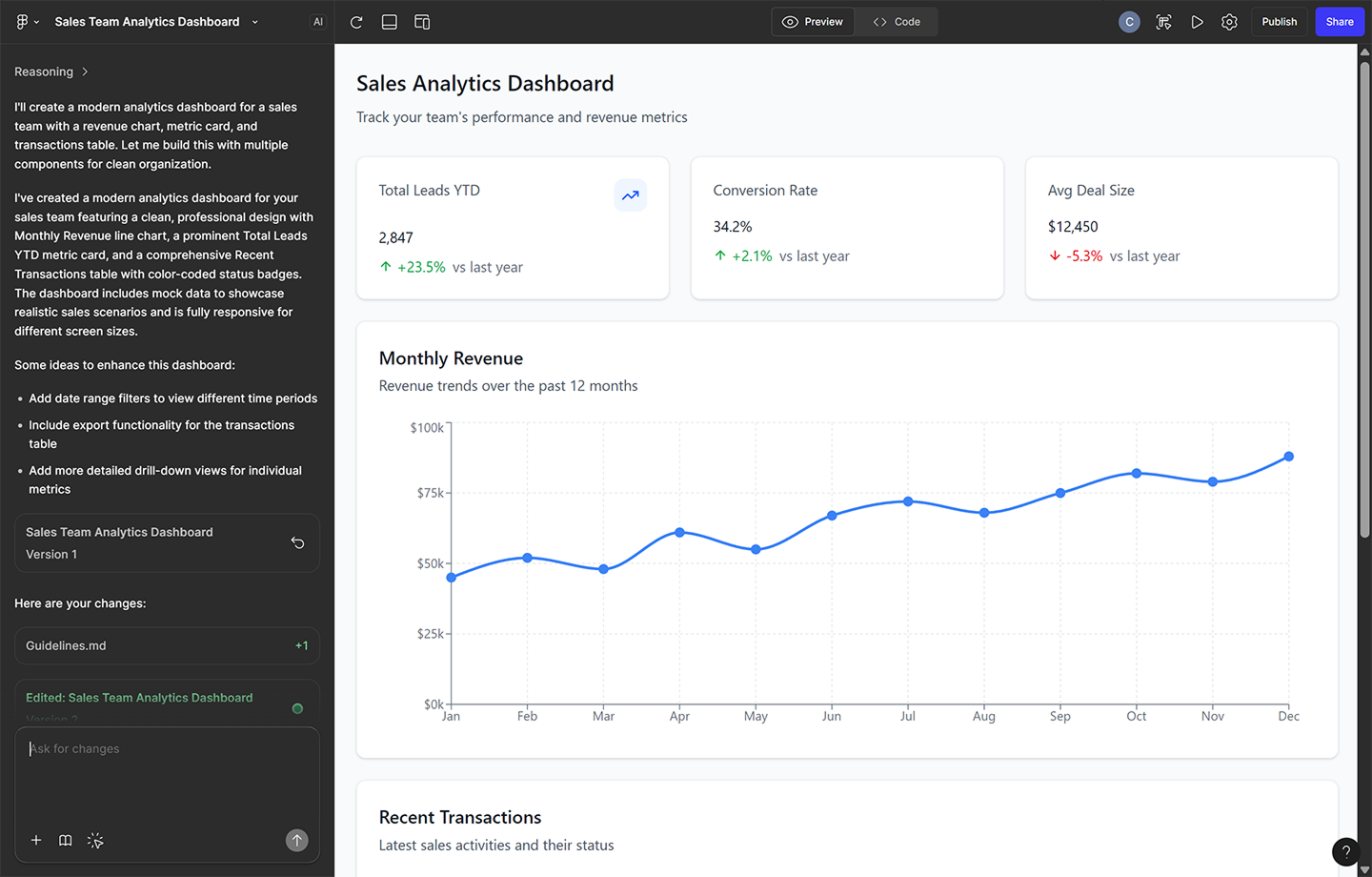
For example, Figma Make lets users instantly generate functional digital products—not just high-fidelity prototypes—with a simple prompt. This effectively turns a static design tool into a no-code builder, bridging the gap between visual concept and working code.

Who is no code for?
No-code apps are mainly designed for non-technical users—business stakeholders, designers, marketers, and even ops teams—who need to solve problems or build solutions without engineering support.
A marketing manager might spin up a landing page, an HR lead might build a self-serve onboarding flow, or a product designer could use no-code to turn static designs into functional, testable tools. The common thread: speed and independence, with no reliance on developer bandwidth.
What is low code?
Low-code development platforms combine visual building with direct access to the underlying code. They automate boilerplate elements, like user authentication flows, database connections, and standard security protocols, while still letting developers write and customize logic where needed.
This hybrid approach gives developers a solid foundation and reliable head start. Instead of reinventing the basics line by line for every project, they can focus on implementing features that require deeper logic or specific complexity.
When necessary, developers can drop into the code layer to add custom scripts, debug behavior, or fine-tune features and performance. As a result, teams can build faster without sacrificing customization.
Who is low code for?
Low code is primarily for technical teams and engineers who need to speed up their work. It allows them to skip repetitive setup tasks, freeing up more time for complex back-end logic and architecture.
For example, a developer might use a low-code platform to scaffold an internal admin panel quickly. They can visually arrange the layout in minutes, then focus their coding time on writing the secure API connections that pull in sensitive customer data.
Build and publish websites in Figma
With Figma Sites, you can go from visual design to a live, responsive website without writing a single line of code.
Key differences between no code and low code
The line between no code and low code can feel blurry. Many platforms offer capabilities from both. The differences might show up in the level of control you have, the expertise required, and how quickly you can launch. Each approach has trade-offs.
Expertise required
No-code platforms are built for non-technical users. They prioritize simplicity, offering fully visual interfaces where logic is configured using drag-and-drop components. If a user understands the business problem and the process to solve it, they can build a working solution.
Low-code tools add flexibility, but expect more from the user. While the interface is visual, these platforms allow for custom scripting when needed. Builders typically need some grasp of programming concepts, even if they’re not writing code from scratch.
Level of customization and flexibility
No-code tools prioritize speed and simplicity. You rely on the specific features and components the platform offers, and that can limit what you can change or build. If the functionality isn’t built in, you may hit a wall.
Low-code still moves faster than traditional development, but it requires more decisions. Even small amounts of custom logic introduce testing and deployment steps. You get more control, but at an added cost.
Speed of delivery
No code is the fastest way to go from zero to one. Because everything is visual and pre-configured, teams can launch an idea or prototype within minutes.
Low code is significantly faster than traditional coding, but it requires more decisions. Even small amounts of custom logic and integration introduce more testing and deployment steps and deployment to ensure stability. You get more control with added overhead.
Tools like Figma Make fall in an interesting middle space. They support no-code workflows—building layouts and prototypes from prompts or drag-and-drop tools—but they also generate exportable code that can slot into low-code environments. In that way, they can accelerate both sides of the process.
Scalability and governance
No-code platforms are great for quick wins—landing pages, forms, and prototypes—but aren’t always built for long-term stability. Apps are built and used without IT involvement can introduce risk if they grow too large or handle sensitive data.
Low-code tools are more likely to prioritize built-in compliance features from the start, like version control, access permissions, and audit trails. This allows IT teams to maintain governance over the system while still giving developers the speed they need, making them better suited for high-stakes applications, especially where security and scale are concerns.
Benefits of no-code and low-code platforms
Even though they target different users, low-code and no-code platforms share a common goal: helping teams build more efficiently. Here are the main benefits of using these tools:
- Faster time to market. Visual tools eliminate much of the setup and configuration work, allowing teams to launch apps and respond to market changes in days rather than months.
- Lower development costs. With less time spent building from scratch, teams can get more done with existing resources without hiring specialized help.
- Democratized innovation. These platforms enable more people—designers, marketers, product managers—to experiment, test, and design an app without waiting in a development queue.
- Alleviating IT backlog. By handling smaller requests independently, business users free up technical teams to focus on complex engineering challenges.
- Tighter collaboration. Visual interfaces give teams a shared language to align faster. It’s easier for designers, stakeholders, and developers to review, edit, and iterate when everyone’s working inside the same interface.
How to choose between no code and low code

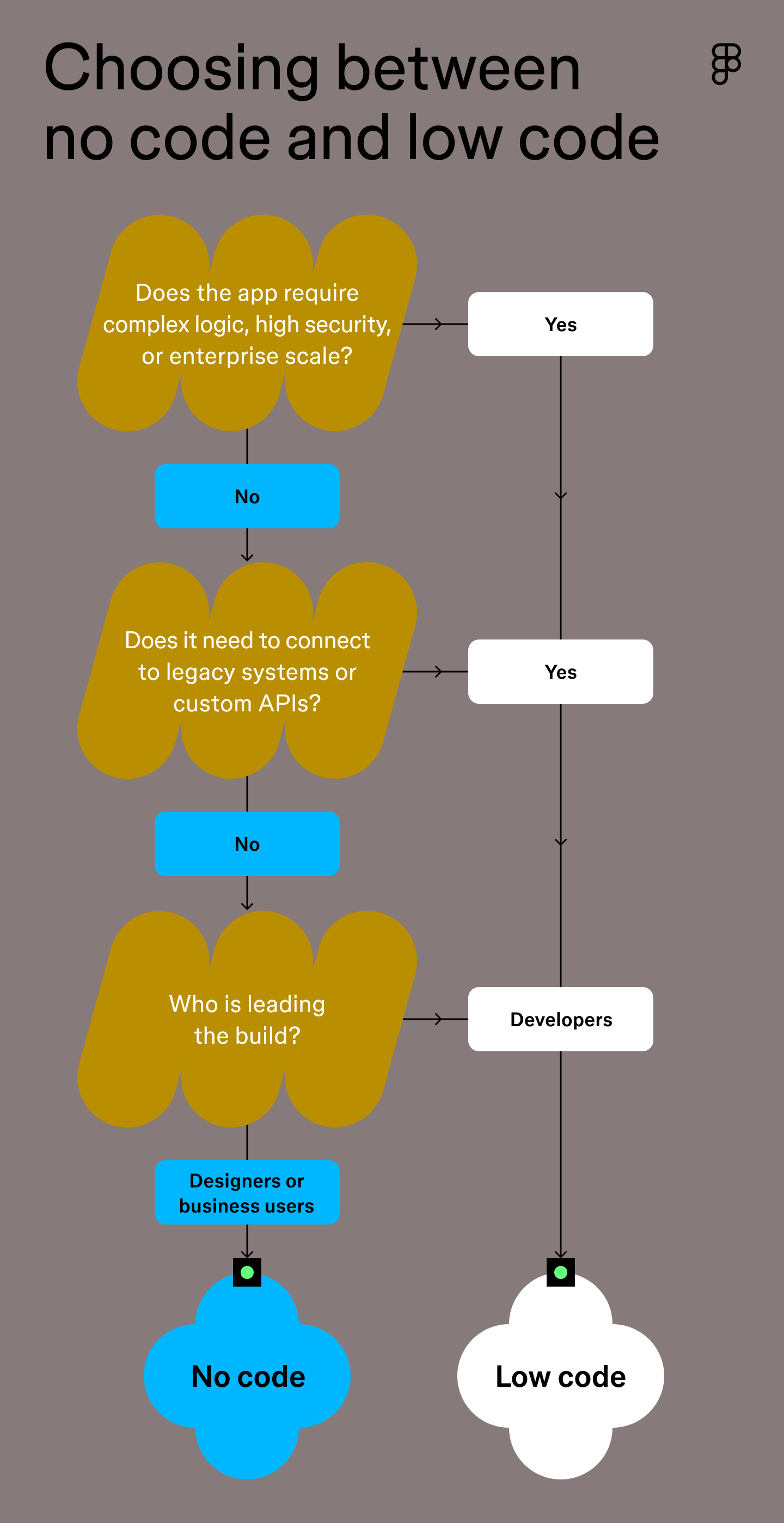
Knowing when to use low code versus no code depends on your project’s goals, but you don’t always need to pick one over the other—many teams combine both. But if you’re choosing a starting point for a specific project, these three questions can help clarify which approach fits best.
Step 1: Define the application’s required complexity and scale
Start by defining the scope of your application. If it’s a small internal tool, quick prototype, or one-off landing page, no-code tools are often enough.
But if your product needs to scale across teams, connect to custom data sources, or handle sensitive workflows, low code is likely a better match.
Step 2: Determine the need for custom coding and integration
Next, consider what your application needs to connect with. No-code tools often support common services (like Google Sheets or basic CRMs) out of the box. If that’s all you need, great. But if you’re integrating with custom APIs, pulling data from proprietary systems, or building unique workflows, low-code gives you more flexibility.
Step 3: Match the platform to the primary builder’s expertise
Finally, look at who will be doing the work. Match the platform to the skill set.
If non-technical users are leading, no code is the best choice. They can solve their own problems and validate ideas without waiting for a developer to become available. For engineering teams, low code eliminates repetitive UI design work, allowing them to focus their coding effort on critical logic and security.
Turn your designs into code with Figma
Whether you lean toward no code or low code, the goal is the same: build smarter, ship faster. Figma bridges design and development workflows so teams can move from mockups to real, working products without unnecessary friction.
Here’s how to get started:
- Use FigJam to diagram user flows, database structures, and logic trees before building.
- Use Dev Mode to Inspect designs and access production-ready code snippets for smoother handoff.
- Explore Figma’s component-based wireframe kits to prototype interfaces quickly, then export clean code to bring them to life.
Ready to turn your vision into reality?
Figma Make lets you generate functional prototypes and production-ready code instantly with simple text prompts.

What is vibe coding?
Vibe coding combines mood-driven design with seamless coding to create immersive digital experiences that connect emotionally and function flawlessly.


How to design an app in 5 steps
Building an app requires research and constant iteration to meet customer needs. Learn how to design an app effectively and how Figma can help in this guide.