What is RGB? How RGB color works in design


Share What is RGB? How RGB color works in design
Explore more from
Design basics
Master color to elevate your designs
Experiment, refine, and apply color palettes in Figma.

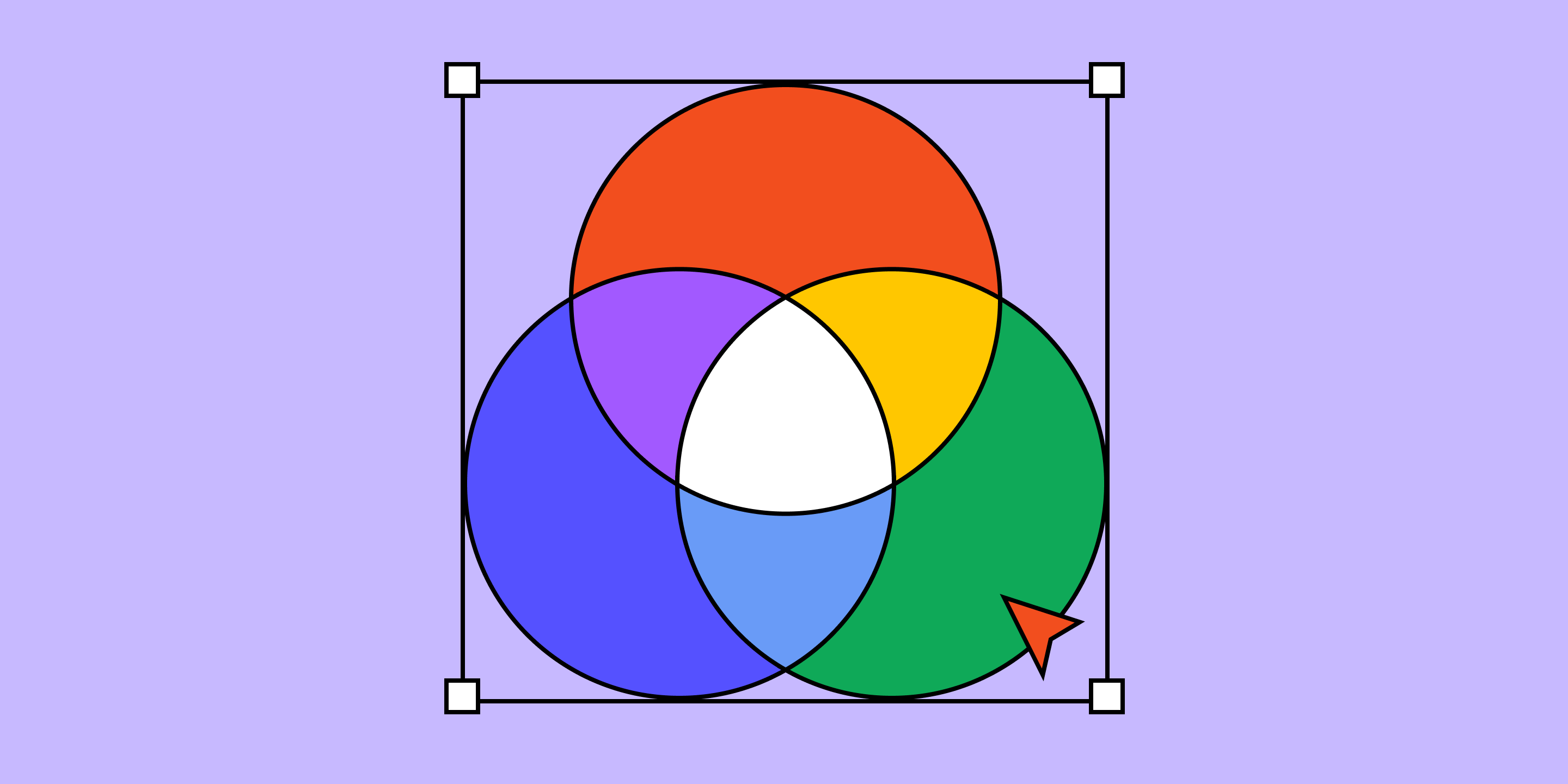
RGB (red, green, and blue) is the fundamental color model used in digital design. By combining red, green, and blue light in varying intensities, designers create the colors we see on screens—from TVs to laptops to mobile phones. Understanding how the RGB color model works ensures vibrant and consistent colors, creating an immersive and compelling digital experience. Ready to learn more about the RGB color system?
This article covers:
- How the RGB color model works and how it’s used.
- The difference between RGB and CMYK color systems.
- How Figma’s features make it easy to work with the RGB color model.
How does RGB work?
The RGB color model uses additive color mixing. It combines light from the primary colors of red, green, and blue to create an array of color shades.
Each color channel has an intensity ranging from zero (complete darkness) to 255 (maximum brightness). When all three colors are mixed at their lowest intensity, they create black. When they are combined at their maximum intensities, they yield white.
The beauty of the RGB color model lies in how these intensities blend to create a spectrum of colors ranging from dark shades to light tints.
How is RGB color used?
In the RGB color model, light is used to produce different color variations for digital design and technology. Anything that uses light to produce an image uses RGB colors.
Some common applications that use the RGB color model include:
Web design to create the different elements on a webpage.
- Graphic design to create logos, advertisements, and other design projects.
- Digital displays like LED screens, smartphones, and computer monitors.
- Digital photography, where cameras or phones capture images.
- Video editing to process and apply effects to videos.
RGB vs. CMYK
RGB and CMYK are the two main color models used for designs.
- RGB colors are used for on-screen viewing. RGB is an additive color model, meaning it adds red, green, and blue light together to create the different colors you see on a screen. The color of each pixel on a screen is determined by the amount of red, green, and blue light it emits.
- CMYK colors are used for color printing. CMYK is a subtractive color model, which includes cyan, magenta, yellow, and key (black)—the colors we see in ink cartridges. Unlike the RGB model, when combined at full intensity, the colors create black. When ink is printed onto white paper, the millions of overlapping dots create different combinations of colors.
RGB colors don’t translate the same on paper as on screen. So, to print a digital image or project, you must convert the colors from RGB to CMYK.
For example, let’s say you design a graphic for a promotion. You may have a version of it that lives in the digital space, but also need to print that same graphic for an event. To ensure the graphic prints in the hues you intended, you’ll need to convert it from RGB to CMYK. You can do this by changing the color profile in your design tool or using an online color converter.
Streamline the design process with Figma
RGB color is essential for creating colorful digital content across different devices. Whether you’re designing a new landing page for your website or creating a prototype, Figma can help. Here’s how:
- Use Figma’s color wheel to choose a color palette that best fits your next design.
- Browse color plugins within Figma’s design community for color scheme options and ideas.
- Use Figma’s Essential UI kit to bring consistency to your designs through premade color palettes and layouts.
Ready to use color to bring your designs to life? Create, share, and test designs for any device with Figma Design.
Keep reading


What is UI design
What is UI design today, and what role does it play in the design thinking process?
Learn more


What is visual hierarchy
If everything looks the same, then you see nothing. Visual hierarchy can change that.
Learn more


UI vs UX
Read on to find out what it takes to design engaging UI, and create a memorable UX.
Learn more
From the blog
The Figma design agent is here
Starting today, work with an agent that is built for Figma—directly on the canvas.

The TL;DR on MCP: Why context matters and how to put it to work
Figma’s MCP server brings your design decisions into the tools where code gets written—so what gets built actually matches what was designed. Here’s what that unlocks for everyone who builds products.
How to supercharge your design system with slots
Slots give you the ability to customize components without breaking the system. We’re sharing five field-tested tips from early users to help you unlock more freedom without giving up control.
The new business case for design systems
Design systems have evolved from static libraries to key drivers of business revenue, customer loyalty, and product strategy. Here’s what you need to know about how to track and communicate the value of your design system, based on new research from the Design Executive Council (DXC).


5 shifts redefining design systems in the AI era
As AI reshapes how we make products, design systems are evolving from libraries of reusable parts into living frameworks that scale taste and craft. We spoke with product leaders and practitioners about the shifts they’re seeing in how design systems are built, used, and maintained.


Schema 2025: Design systems for a new era
Design systems help teams push what’s possible while maintaining a high level of craft, polish, and performance. Here’s everything we announced at Schema by Figma to help teams design for the AI era.