A complete guide to flyer sizes and print dimensions


Share A complete guide to flyer sizes and print dimensions
Explore more from
Design basics
Bring your print ideas to life in Figma Buzz
Create, share, and iterate together seamlessly.


Designing a great flyer is half the challenge. The other half is printing it correctly. A layout that looks crisp on screen can come back stretched, pixelated, or poorly cropped if you don’t start with the right dimensions.
This guide breaks down the most common flyer sizes and how to prepare your designs for high-quality printing so your work looks as good in hand as it does on screen.
Read on to learn:
- The top 10 most popular flyer sizes
- What to include in a flyer
- Design and print considerations for flyers
- When, how, and why to use different flyer sizes
- How to choose the right flyer size for your needs
Why use flyer marketing?
Flyers remain one of the most effective and affordable ways to promote your business, event, party, or product. Here’s why:
- They’re budget-friendly. Flyers are generally inexpensive to produce, especially in bulk, making them accessible, cost-effective promotional tools for small businesses.
- They’re tangible and directly engaging. Handing out a flyer creates a direct personal interaction, which can be more impactful than digital ads. Unlike fleeting digital content, you can keep, share, and refer back to a physical flyer, increasing its longevity and impact.
- They allow for targeted distribution. You can strategically distribute flyers to specific demographics or locations, ensuring your message reaches the right people for a local marketing campaign. They’re also easy to distribute in high-traffic areas.
- They’re great for versatile communication. Flyers can be used for a wide range of purposes, from announcing sales and events to promoting new products or services. They’re ideal for quick-turn promotions and announcements.
Most common flyer sizes for print marketing
Flyer sizes vary by region and use case—but designers working in Figma or other digital tools need to think in pixels, especially when prepping for print at 300 DPI..
Flyer size also directly impacts how much information you can convey, the visual impact, and ultimately, the effectiveness of your marketing message.
Pro tip: To ensure sharp print results, set your resolution to 300 DPI, the industry standard for professional print jobs.

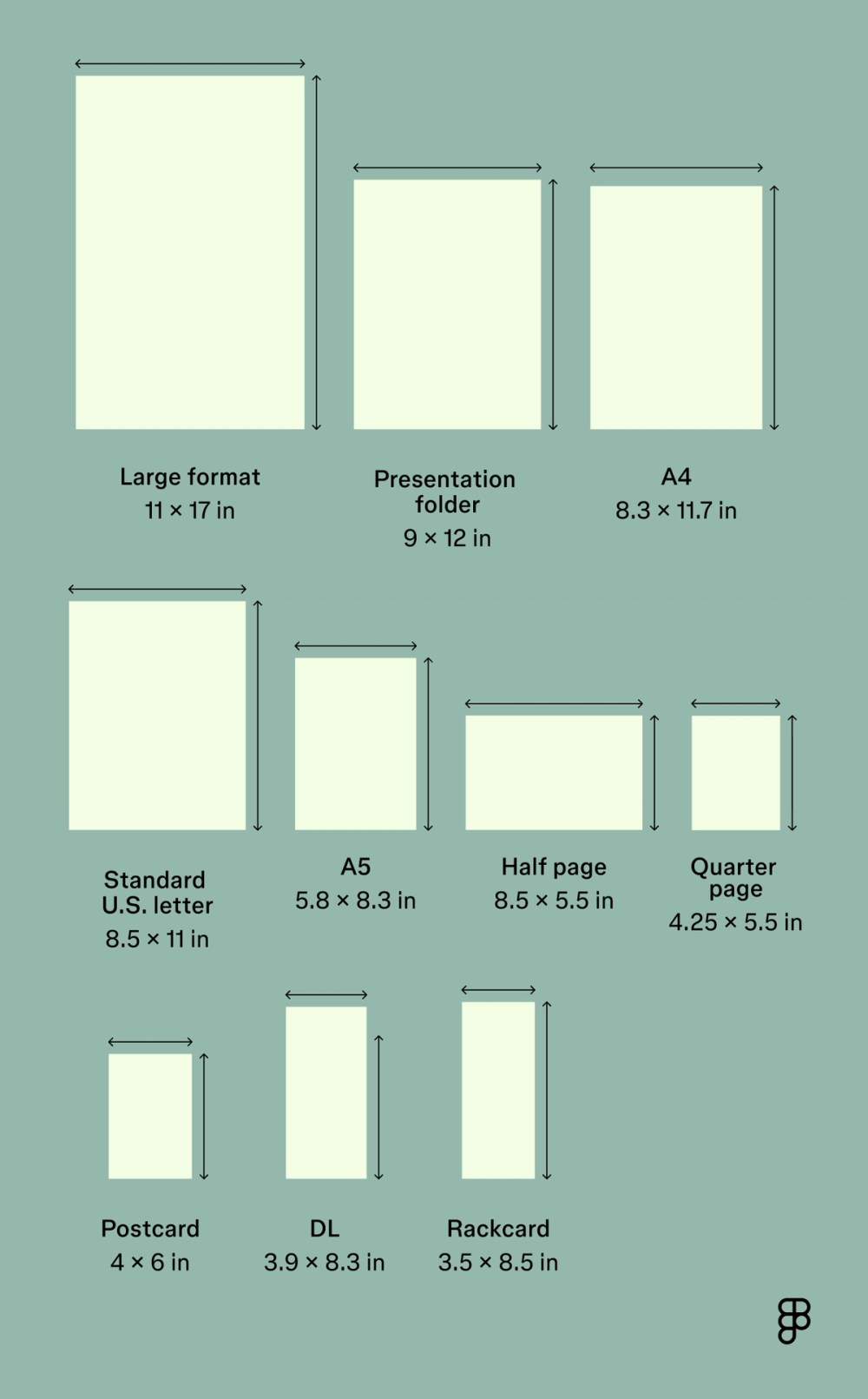
| Flyer size | Inches | Millimeters | Pixels (300 DPI) | Best for |
|---|---|---|---|---|
| A4 | 8.3 x 11.7 | 210 x 297 | 2480 x 3508 | Menus, catalogs, event flyers |
| Standard U.S. letter | 8.5 x 11 | 216 x 279 | 2550 x 3300 | General marketing, events |
| A5 | 5.8 x 8.3 | 148 x 210 | 1748 x 2480 | Invitations, promo offers, inserts |
| Half-page | 8.5 x 5.5 | 216 x 140 | 2550 x 1650 | Event/party promo |
| Quarter-page | 4.25 x 5.5 | 108 x 140 | 1275 x 1650 | Coupon flyers, compact promos |
| Postcard | 4 x 6 | 105 x 148 | 1200 x 1800 | Mailers, quick promos, invitations |
| DL | 3.9 x 8.3 | 99 x 210 | 1165 x 2480 | Restaurant menus, inserts |
| Rack card | 3.5 x 8.5 | 389 x 216 | 1050 x 2550 | Travel guides, takeout menus |
| Large format | 11 x 17 | 279 x 432 | 3300 x 5100 | Posters, maps, events, venue announcements, window displays |
| Presentation folder | 9 x 12 | 229 x 305 | 2700 x 3600 | Sales kits, press kits, portfolios, other corporate handouts |
A4 flyer size
- A4 flyer size in pixels (300 DPI): 2480 x 3508
- A4 flyer size in inches: 8.3” x 11.7”
- A4 flyer size in cm: 21.0 cm x 29.7 cm
- A4 flyer size in mm: 210 mm x 297 mm
Best for: Event flyers, restaurant menus, catalogs
A4 is a globally recognized flyer size that works well for layouts with more text or larger images. It’s ideal when you need ample space to convey a lot of information, including images, graphs, and extensive text.
Standard flyer size (U.S. letter)
- Standard flyer size in pixels (300 DPI): 2550 x 3300
- Standard flyer size in inches: 8.5” x 11”
- Standard flyer size in cm: 21.6 cm x 27.9 cm
- Standard flyer size in mm: 216 mm x 279 mm
Best for: Conferences, campaigns, and promoting sales, events, or products to new clients
This standard flyer size is popular in North America. With plenty of room for copy and visuals, it’s perfect for multipurpose marketing. Its commonality means most printers are well-equipped to handle this size, often at a cheaper rate. It’s a versatile option for both one-sided and double-sided designs.
A5 flyer size
- A5 flyer size in pixels (300 DPI): 1748 x 2480
- A5 flyer size in inches: 5.8” x 8.3”
- A5 flyer size in cm: 14.8 cm x 21 cm
- A5 flyer size in mm: 148 mm x 210 mm
Best for: Invitations, promo offers, inserts
Need to deliver a brief message without overwhelming the reader? The A5 flyer size offers a balance between portability and readability. It’s a great option for small business owners looking for a compact but memorable format. Since it’s small enough to be easily distributed and carried, it’s also a popular choice for street promotions or inclusion in gift bags.
Half-page/half-sheet flyer size
- Half-sheet flyer size in pixels (300 DPI): 2550 x 1650
- Half-sheet flyer size in inches: 8.5” x 5.5”
- Half-sheet flyer size in cm: 21.6 cm x 14.0 cm
- Half-sheet flyer size in mm: 216 mm x 140 mm
Best for: Event promotions, parties, venue handouts
This size is half of a standard U.S. letter sheet, offering a convenient and economical option. The small flyer size is highly versatile and fits well into brochures or as inserts. Its portability makes it an excellent choice for high-volume distribution and quick takeaways.
Quarter-page flyer size
- Quarter-page flyer size in pixels (300 DPI): 1275 × 1650
- Quarter-page flyer size in inches: 4.25” x 5.5”
- Quarter-page flyer size in cm: 10.8 cm x 14.0 cm
- Quarter-page flyer size in mm: 108 mm x 140 mm
Best for: Coupon handouts, small ads, quick product promos
These compact flyers are ideal for distributing in busy areas or inserting into product packaging. This size is effective for direct calls to action and simple, memorable messages, but keep in mind that every element counts due to limited space. As a small flyer size, the quarter-page requires a concise and impactful flyer design. Be meticulous with your bleed area, trim, and safe area so all essential details are visible.
Postcard flyer size
- Postcard flyer size in pixels (300 DPI): 1200 x 1800
- Postcard flyer size in inches: 4” x 6”
- Postcard flyer size in cm: 10.16 cm x 15.24 cm
- Postcard flyer size in mm: 101.6 mm x 152.4 mm
Best for: Direct mail campaigns, event invitations, save-the-dates, mini-advertisements
A postcard is a budget-friendly, small flyer size that makes a big impact when designed clearly. Its durability makes it ideal for mailing and handling. The compact size also encourages clear, impactful messaging.
DL flyer size
- DL flyer size in pixels (300 DPI): 1169 x 2480
- DL flyer size in inches: 3.9” x 8.3”
- DL flyer size in cm: 9.9 cm x 21.0 cm
- DL flyer size in mm: 99 mm x 210 mm
Best for: Inserts for envelopes, menus, vouchers
This slim, elegant size fits perfectly into standard DL envelopes, making it ideal for direct mail. Thoughtful flyer design can make a strong visual statement despite the narrow width.
Turn heads with flyers that make an impact
Start creating with flyer design templates.
Rack cards
- Rack cards size in pixels (300 DPI): 1050 x 2550
- Rack cards size in inches: 3.5” x 8.5”
- Rack cards size in cm: 8.9 cm x 21.6 cm
- Rack cards size in mm: 89 mm x 216 mm
Best for: Takeout menus, travel guides, marketing handouts
Rack cards are designed to fit in display racks. They’re a great tool for information-heavy content that needs to remain portable and eye-catching. They’re also highly effective for businesses that rely on foot traffic or partnerships with other establishments for cross-promotion. A strong header and clear, concise information are the highest priorities for this flyer design.
Large format flyer size
- Large format flyer size in pixels (300 DPI): 3300 x 5100
- Large format flyer size in inches: 11” x 17”
- Large format flyer size in cm: 27.9 cm x 43.2 cm
- Large format flyer size in mm: 279 mm x 432 mm
Best for: Posters, maps, events, venue announcements, window displays
Also known as a tabloid flyer or ledger flyer, a large format flyer emphasizes visual impact. This size is ideal for grabbing attention from a distance, and you have a lot of space for high-resolution images and prominent text. Proper handling of the bleed area, trim, and safe area is even more crucial for large prints, as any error will be highly visible.
Presentation folders
- Presentation folder size in pixels (300 DPI): 2700 × 3600
- Presentation folder size in inches: 9” x 12”
- Presentation folder size in cm: 22.86 cm x 30.48 cm
- Presentation folder size in mm: 228.6 mm x 304.8 mm
Best for: Sales kits, press kits, portfolios, welcome packets, other corporate handouts
While not a flyer in the traditional sense, presentation folders often serve a similar purpose by containing promotional materials. They’re suitable for organizing multiple documents for clients or partners. Design that’s cohesive with the materials inside adds a touch of professionalism. When printing, consider the bleed area, trim, safe area, and unique folding and pocket construction.

What to include in a flyer
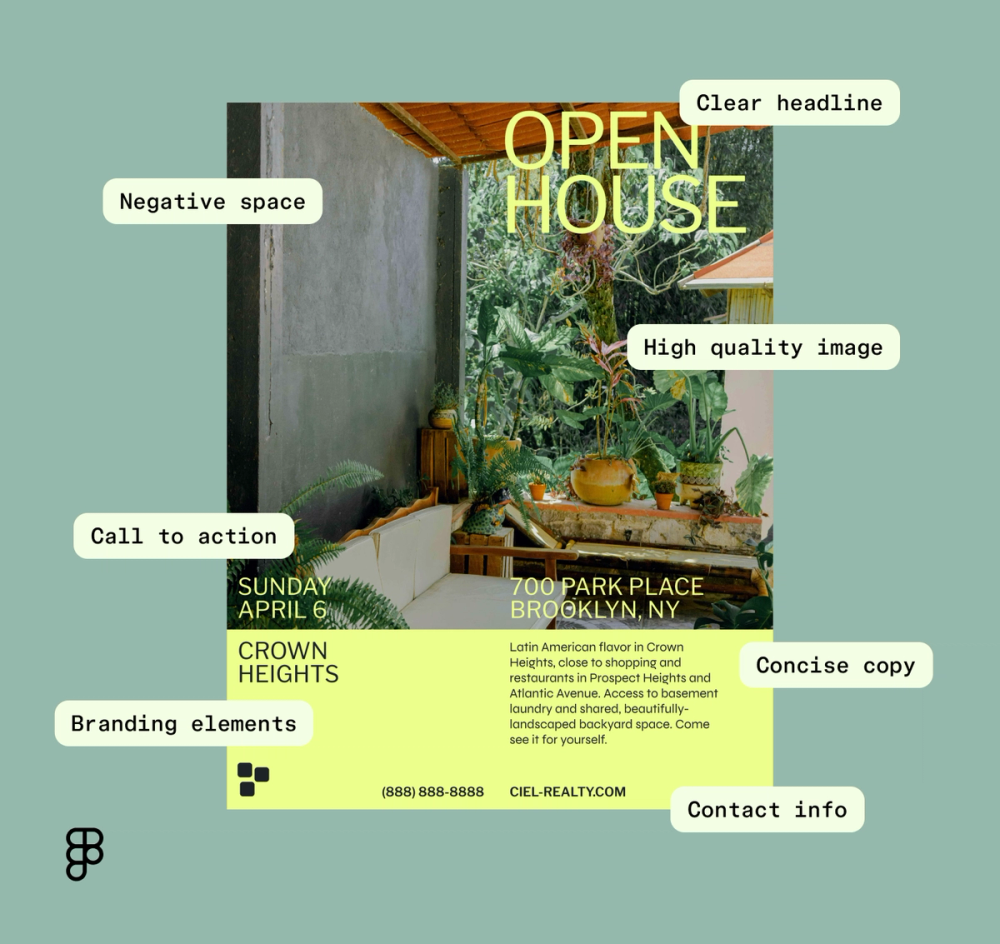
Choosing the right flyer size is only part of the equation. Your content and its presentation play a major role in whether or not your design delivers. Here are the essential elements to include:
- A clear and compelling headline. Since it’s the first thing people read, your headline should be concise, clear, and immediately communicate the main benefit or purpose of the flyer. Establish a clear visual hierarchy to guide the viewer’s eye.
- High-resolution imagery. Blurry or pixelated images can ruin your design, so use crisp, relevant, and visually appealing images that grab attention and convey your message quickly. Make sure they’re 300 DPI for sharp printing.
- Concise body copy. Get straight to the point. Use bullet points or short paragraphs to break up text and make it easy to digest.
- A call to action (CTA). Tell your audience exactly what you want them to do next, whether it’s “Visit our website,” “Call now,” “Scan for a discount,” or “Attend the event.” Make it prominent and easy to find.
- Contact information. Include all necessary contact details, like phone number, website, physical address, email, QR code, or social media handles. Carefully consider typography, making sure your chosen font size and style are easy for everyone to read. Always prioritize accessible and inclusive design.
- Branding elements. Use logo, brand colors, and typography that align with and reinforce your brand identity.
- Negative space. Avoid overcrowding your design. White space helps key elements stand out and keeps the layout clean.
How to choose the right flyer size for your needs
Start by considering your audience and distribution method. Will this flyer be handed out on the street? Mailed? Displayed on a rack? The flyer size you choose should support your message and fit the delivery method. For example, an A5 flyer size works well for door drops, while a tabloid flyer is better for wall posters.
Choosing the right flyer size also depends on your marketing goals, the amount of information you need to convey, your distribution method, and your budget.
If you have a lot of details to share, such as an extensive menu or a detailed event schedule, a larger format like A4 or standard U.S. letter might be appropriate. For quick announcements, coupons, or direct mail, a small flyer size like a postcard, DL, or A5 flyer size could be more effective due to their portability and lower printing costs.
Design and print considerations for different flyer sizes
Designing for print, especially when it comes to flyer sizes, introduces a whole new set of considerations. As a designer, you have the tools to create visually compelling content, but do you always know the optimal dimensions to ensure your vision translates flawlessly to paper?
Remember that the digital dimensions need to account for physical printing requirements when designing a standard flyer size in pixels for print.
Always account for:
- Bleed area. This is the extra space around the edge of your design that extends beyond the final trim line. You don’t want to end up with accidental white edges on your final product. Extend backgrounds/images at least 0.125 inches beyond the edge on all sides.
- Trim line. This is the actual line where your flyer will be cut. All important content should be kept away from this line to prevent it from being accidentally cut off.
- Safe area. Also known as the “live area,” this is the inner margin within the trim line where all critical text and images should be placed. Keeping content within the safe area (usually 0.125 to 0.25 inches from the trim line) guarantees it won’t get accidentally cropped during the printing process.
While your Figma canvas might be set to the exact final dimensions, adding bleed ensures professional results. Due to the limited canvas, maximizing the usable space within the safe area is vital for a smaller design, like an A5 flyer size.
Always export your final designs as high-resolution PDFs with bleed marks and crop marks to ensure your printer has all the necessary information for the final cut.
Flyer sizes FAQ
Keep reading for answers to some of the most frequently asked questions about flyer sizes.
What is the standard size of flyers?
The most common standard flyer size varies slightly by region. In the U.S., the standard flyer size is 8.5 × 11 inches, known as U.S. Letter. Internationally, A4 (8.27 inches x 11.69 inches) is commonly used.
What size flyer is most effective?
The most effective flyer size depends on your goal and how much information you need to convey. A5, half-sheet flyers, and postcards are among the most effective handouts because they balance space and portability.
Can I print my flyers full-bleed?
Yes, you can print your flyers full-bleed, which means the design extends to the very edge of the paper without any white borders. To achieve this, your design file must include a bleed area, which is an extra margin (usually 0.125 inches on all sides) around the design that will be trimmed off after printing. Make sure your printer supports full-bleed output.
How do I print a double-sided flyer?
Create two pages in your Figma design (front and back), then export as a two-page PDF. When sending to a printer, specify that it’s a double-sided print job, and make sure your files are set up with correct orientations, bleed, and trim marks for both sides.
What is the best paper for printing flyers?
The best paper for printing flyers depends on your budget and desired look. Matte or glossy coated stock between 100 and 170 gsm (grams per square meter) is typical. For premium flyers, you may choose heavier paper or even cardstock.
Can I upload my own flyer design in Figma?
Yes, you can import images, easily drag and drop PDFs, and work with vector shapes to build your flyer design directly in Figma.
What is the difference between a leaflet vs. a flyer vs. a booklet?
Keeping these names straight can be puzzling with so many different kinds of print materials. Here’s a cheatsheet:
- Flyers are always a single page, often one-sided.
- Pamphlets, brochures, and leaflets are unbound folded documents with more information spread across different panels.
- Booklets are bound multi-page documents with even more information.
Experiment with different flyer sizes in Figma
Whether you’re creating a bold announcement or sleek marketing material, understanding flyer sizes helps your message come through loud and clear.
With the best flyer design tools and templates at your fingertips, Figma makes it easy to start with the right dimensions and design with precision.
- Explore flyer design examples from Figma Buzz and the Figma Community flyer design template galleries.
- Browse more printable templates for cards, invoices, and more.
- Check out extensive resources on font types to find the perfect fit for your project.
Design eye-catching flyers with Figma Buzz
Ready to explore the best flyer design tools and templates?
Keep reading


How to design a flyer
Design eye-catching, professional flyers quickly—no graphic design experience needed.

Graphic design principles
Learn the 13 core graphic design principles and how to apply them.


Brochure examples using Buzz
Discover 32 brochure examples and design templates to bring your brochure styles to life.