Usability testing: The key to designing with confidence
Share Usability testing: The key to designing with confidence
Explore more from
Team productivity


Imagine watching a user interact with your prototype for the first time. It feels intuitive to you, but you notice they’re hesitating, unsure of which button to click next.
It’s a common trap for designers: being too close to the work to see its friction points. But this kind of hiccup is actually a golden opportunity.
During usability testing, small observations can spark big design improvements. By showing how real people navigate your work, it serves as a reality check that transforms design assumptions into user-centered certainty. This post will look at how usability testing uncovers weaknesses and opportunities for human-centered design early, saving you time and money.
Read on to learn:
- The usability testing definition and its benefits
- When to conduct usability testing
- Key components and testing methods
- How to conduct usability tests
- Usability testing questions
- How to use AI in usability testing
What is usability testing?
Usability testing involves real users interacting with your product while the product designers observe and gather feedback. Usability testing helps you pinpoint problem areas and drive user-centered design for an accessible end product that works effectively.
Not everyone interacts with products in the same way, and usability testing can reveal design biases that may alienate some users. Think about it this way: Japanese is read from right to left, while English is read from left to right. If you placed a blank book in front of a Japanese reader compared to an English reader, one might open it with the binding on the left and the other on the right. The same idea applies to product design—navigation that makes sense to a designer may differ from what makes sense to the user.
Usability teams should have at least two participants, but the more testers, the better. Usability testers focus on completing specific tasks and giving user experience (UX) feedback.
Consider this usability testing example: A participant is tasked with ensuring that all the buttons on a Web page work as expected. Product designers aren’t checking whether someone likes the color or font—they’re watching to see if users can actually get things done without friction.
User testing vs. usability testing: What’s the difference?
User testing is a broad term for any product testing that evaluates whether a product effectively solves a user’s problem. Usability testing falls under this umbrella but specifically evaluates product functionality.
For example, if you ask users to spend 20 minutes exploring a new design software and then ask them to review it, that would qualify as a form of user testing. If you asked a group of people to blur the background of an image in the same design software and observed them doing so, that would constitute a form of usability testing.
Usability testers complete a specific task so that designers can observe how users interact with the product and whether it functions as expected.
Benefits of usability testing
Usability testing provides actionable, real-world insight into product performance before it’s finished, saving QA resources and ensuring a better final product. Doing this work early makes sure your early users aren’t your unwitting guinea pigs, among other benefits:
- Identifies points of friction. Product designers working closely on a product can become too familiar with it—what feels obvious internally might be confusing for a new user. Usability testing helps uncover where users hesitate, get lost, or misinterpret your interface, so you can address issues before they impact adoption.
- Stress tests in real-world environments. Usability testing across different devices, screen sizes, connection speeds, and assistive tools can reveal performance gaps or display issues. This allows designers to make adjustments to ensure a consistent experience, such as ensuring the tool uses responsive design.
- Provides diverse perspectives from your user base. Even the most experienced designers can create a design that’s biased in some way. A diverse usability testing team ensures your product works for a diverse consumer base.
- Gives insights into a product’s strengths and weaknesses. Usability testing reveals weaknesses, but it also shows which flows, layouts, or labels are doing their job well. If users succeed more often on one version of a page than another, those learnings can be applied elsewhere.
- Designs for your user base. Especially for tools in specific verticals, there may still be some shared preferences among your customer base. For example, in a creative tool, users might expect a familiar toolbar layout based on other apps they use. Meeting those basic customer expectations can improve user satisfaction and reduce the learning curve.
- Improves accessibility. Testing with assistive technologies—like screen readers or accessible keyboards and computer mice—helps you catch accessibility issues early. This ensures your product can be used by everyone, regardless of ability, and avoids excluding potential users.
- Surfaces cognitive disconnects. Design logic doesn’t always match user logic. Just because something feels obvious to the team might not make sense to the users. Usability testing surfaces those disconnects so you can fix them before they turn into support tickets or drop-off points.
- Reduces developmental costs. Catching usability problems before engineering time is spent saves significant effort and budget. It’s far cheaper to rework a flow at the prototype stage than after launch.
- Inspires future opportunities or enhancements. Not everything a usability tester discovers is a fire drill. Sometimes, testing reveals small pain points that can lead to big ideas. Maybe users struggle with repetitive actions—and that insight leads to a time-saving bulk action feature. Usability testing isn’t just reactive; it can spark valuable innovation.
When to do usability testing
Don’t think of usability testing as a single point on your checklist. You can use it throughout the development process to maximize user satisfaction.
- Before you start designing. Conduct usability testing with competitors’ tools or early versions of your product to identify improvements most helpful to your users.
- Once you have a wireframe or prototype. A clickable prototype lets users explore your product in context. Think of it like walking a route before you pave it: testers can point out obstacles or dead ends before time and resources go into development.
- Right before launch. Conduct usability testing when a project is near completion to catch little details like confusing buttons, awkward interactions, or missing steps. It’s your last chance to ensure the product works as expected before it reaches real users..
- Regularly, after launch. Products evolve, and so do users’ expectations. Ongoing testing after a product is live helps you identify friction, monitor how users adapt to changes, and decide when it’s time for improvements or redesigns.
Key components of usability testing
Every usability test relies on a few essential parts:
- Environment. Usability testing requires a controlled setting, either in person or remote.
- Participants. These are real users who reflect your target audience. Their job is to complete assigned tasks and give feedback on how the product behaves—not how it looks or feels.
- Facilitator. The moderator conducts testing, informs testers of their assigned tasks, observes behavior, and gathers insights while staying neutral.
- Tasks. Tasks are at the core of usability testing. They should be realistic, specific, and tied to what your product is meant to help users do.
These essential elements form the universal framework of usability testing, even as their details adapt to different project needs.
Types of usability testing methods
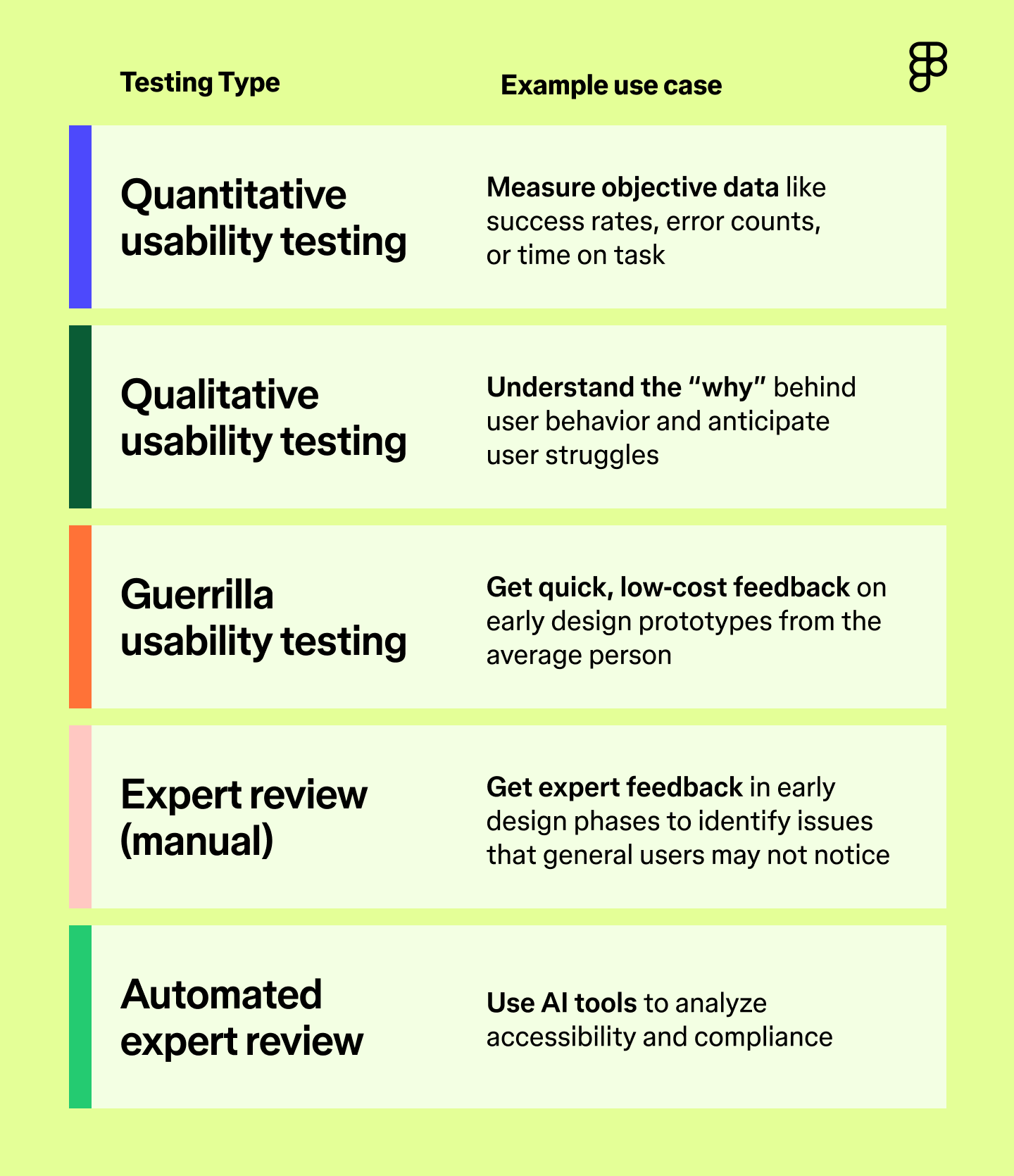
You have choices when it comes to how you want to conduct usability testing. The right method depends on your product, your timeline, and the kind of feedback you need. Here are some common types—and when to use them.

Quantitative usability testing
Quantitative usability testing helps you measure objective factors, like how easy it is for users to complete a task. This type of testing typically requires more participants, making it a great opportunity to use AI to scale your testing.
For example, you can ask participants to discuss their thought processes, using speech-to-text and natural language processing (NLP) tools to capture and interpret their experiences. A/B testing is also a type of quantitative usability testing method because users may prefer different interfaces or features.
Qualitative usability testing
Qualitative usability gathers subjective insights—how users feel, what they expect, where they get confused. Use it when you want to understand the why behind user behavior. You’ll often pair this with interviews or open-ended follow-ups. Combining this testing with AI can help create predictive tools to interpret results.
For example, maybe certain users have difficulty locating the “save” button, and you’re not sure why. Predictive modeling might reveal that these users are more familiar with a competitor’s tool that saves automatically.
Guerrilla usability testing
Also known as hallway testing, guerrilla usability testing is when you conduct tests with people you find in public spaces, like a local cafe, the library, or on the street.
Use it when you need fast gut-checks from everyday users. It won’t replace in-depth testing, but it can surface obvious blockers or UX issues before you move forward.
Expert review
This is when a UX specialist evaluates your design, typically before it’s live.
This method is particularly effective early on, such as with wireframes, when expert input can shape foundational decisions and help you revisit your UX strategy. Experts can spot structural issues or friction points that the average user might miss, but that can create problems later on.
Automated expert review
Automated expert reviews use AI or automated software to analyze accessibility without involving humans. This helps ensure your tool complies with WCAG guidelines. It checks for factors like proper color contrast ratios, alt text for images, and accessible navigation.
This type of test is better suited for catching technical errors and can be consistent, but it should always be paired with human usability testing.
Moderated or unmoderated
Any type of usability testing involving people can be moderated (with a facilitator present) or unmoderated (without a facilitator).
- Moderated usability testing includes a facilitator who guides the session, answers questions, and asks follow-ups.
- Unmoderated usability testing runs without a facilitator, often remotely. Users complete tasks on their own, which can reveal more natural behavior but may also introduce user error.
Remote or in-person
Remote participants may save costs and allow you to get a more diverse participant pool, but, like unmoderated testing, it can lead to some user error. In-person testing is more consistent and gives you greater control, but it also requires more resources, like securing a location and a facilitator for testing.
Ready to speed up your feedback loops?
Go from a static design to a functional, interactive prototype with Figma Make.
How to conduct a usability test
There are lots of ways to approach usability testing—but the right method depends on your product and goals. The key is to plan ahead, define what you’re trying to learn, and run your test in a way that leads to clear, actionable feedback.
Pro tip: Use the UserTesting Figma plugin to collect feedback on your Figma prototypes.
Step 1: Define a goal and target audience
Start with a very specific goal tied to a real task. Maybe you want to test whether your onboarding tutorial is detailed enough or if a new checkout page reduces cart abandonment. The more specific the task, the more useful the feedback.
You also need to think about your audience. Choose usability testers who represent your ideal user, not just whoever’s easiest to recruit. If you’re testing an enterprise-level data analysis tool, high schoolers might fly through the test—but they won’t give relevant feedback.
Step 2: Establish evaluation criteria
Once you have your goal and task in mind, decide how you’ll measure success. Set clear benchmarks so your findings are useful, not just anecdotal. Common criteria include:
- Task completion rates
- Time to completion
- Error rates
- Number of clicks to completion
- Customer satisfaction scores
These metrics help you spot patterns and know whether your design is working or where it’s breaking down.
Step 3: Recruit participants
The next step is to recruit participants. The type of users you’re looking for will depend on the type of test. Consider your budget, resources, and target audience, and secure three to five users per testing group.
You can recruit participants via:
- Social media
- UX research platforms
- Agency partners
- Your own customer base
Step 4: Write a usability testing script
A good usability script keeps your test consistent and feedback clean. It should include:
- Introduction. Explain the purpose of the session and what testers will be doing.
- Informed consent. Tell participants if you’re recording and what information you will collect from them. Make sure all participants consent to the testing before you begin.
- Questions. Leave space for follow-up questions, clarifications, or open-ended responses.
Keep the script tight and respectful of participants’ time. Long sessions can lead to fatigue, which can negatively impact your results.
Step 5: Run a pilot test
Start with a dry run. Use someone from your target audience to make sure the script flows, the tools work, and your instructions are clear. If something feels off, make adjustments before running the full test.
Step 6: Analyze and report your findings
After you’ve completed this round, analyze and report on the findings. Use tools like video playback, transcripts, and AI tagging to find patterns.
After you have your analysis, summarize your findings into easy-to-digest data points—whatever helps stakeholders quickly grasp what needs to change.
Step 7: Iterate and repeat
Usability testing isn’t a one-and-done process. As your product evolves, keep testing. New features, flows, or user expectations can all introduce friction. Regular testing helps you catch issues early and keeps your product aligned with real-world use.
Four types of usability test questions
To get useful, actionable feedback, you need to ask the right questions. Use a combination of these types of questions throughout your session to learn how users think, feel, and behave while using your product.
- Background questions. Ask users about their habits, workflows, and tool preferences so you can put their responses in context.
- Task-based questions. These questions guide users through the test. Keep instructions neutral and focused on outcomes (e.g., “Can you complete this task?”)—not suggestions. Avoid leading language so you can observe how users naturally interact with the design.
- Follow-up questions. Ask questions in the moment throughout the testing process, especially when something unexpected happens. Follow-up questions help you gain insight into the “why” behind the user’s actions.
- Reflection questions. Debrief after the testing process to allow users to share any additional information. What felt smooth? What was confusing? What would they change? Sometimes the most valuable feedback comes after the task is done.
How AI is being used in usability testing
Usability testing is about putting a prototype in front of a user to see if it works—the more realistic the prototype, the better. Figma Make uses AI to rapidly prototype, which quickly turns designs or prompts into functional, interactive Web apps or tools. These outputs have real code properties, allowing you to jumpstart usability testing without compromising the quality of your results.
Here’s how AI is improving the way teams usability test:
- Faster feedback loops. AI-powered tools like Figma Make drastically cut the time it takes to go from a static design to a functional, interactive prototype. You can test actual functionality—like navigation, inputs, and interactions—before writing production code. That means you can spot and fix usability issues earlier, without waiting for development resources.
- Realistic user interactions. Most prototypes can’t simulate things like live search, form validation, or data input. Figma Make’s code-based output can simulate these advanced interactions, making your usability tests feel closer to a real product. The result will be more useful feedback from testers.
- Immediate iteration. If a user struggles during a session (for example, “The button is hard to find” or “The search results aren't clear”), you don’t have to wait until the next round to fix it. With tools like Figma Make’s point-and-edit tool, you can adjust the prototype in real time and re-test immediately. This tightens the loop between observation, fix, and validation.
- Deeper metrics and behavioral data. Since a Figma Make prototype has real code behind it, it moves closer to a real product. You can use it to capture more detailed interaction data (such as actual form submissions or complex user flows), which, when paired with user session recordings, provides a powerful blend of qualitative and quantitative usability data.
- Simpler sharing and collaboration. AI builders like Figma Make generate shareable, fully interactive, apps or prototype links that work across browsers. You can easily send a test link to a developer, stakeholder, or participant, for review—no special software or setup needed. That makes it easier to run informal tests (like hallway testing) or get buy-in quickly.
Usability testing FAQ
Keep reading for answers to frequently asked questions about usability testing.
How many participants do I need for usability testing?
For reliable results, aim for three to five participants per usability testing group. If you have the resources, testing with more users can help you uncover statistically significant insights or gather more qualitative feedback.
What is the "rule of five" in usability testing?
The “rule of five” comes from Jakob Nielsen’s research, which suggests you only need five participants for accurate usability testing. In his study, Nielsen found that five participants are sufficient to find around 85% of usability problems. The key is to test in multiple small batches, rather than waiting to test with a large group all at once.
What are some usability testing tools?
Here are some popular usability testing services, based on their specific use cases:
- Zoom. This platform is helpful for conducting remote usability testing due to screen sharing and recording capabilities.
- Figma Make. It quickly transforms designs into testable prototypes to reduce the resources required to complete usability tests.
- Userlytics. This platform allows for moderated and unmoderated usability testing.
- Maze. The Figma integration with Maze lets you conduct usability testing with just a Figma Make link.
What is a good usability score?
The System Usability Score (SUS) is an industry-standard method for scoringproduct usability on a 0–100 scale:
- 80+: Excellent usability
- 68–79: Above average usability
- 60–68: Average usability
- 50–60: Okay usability
- 0–50: Poor usability
Make usability testing part of your design flow
Whether you’re designing a new onboarding flow or an entire app, usability testing ensures what you launch feels as intuitive as it looks. Think of it as a test run, giving your team space to adjust before the real users arrive.
Usability testing is an iterative process, so it’s important to find the right tools to help you conduct repeatable usability tests with accurate results. Figma can help. Here’s how:
- Bring your early product design ideas to life with Figma Design.
- Host brainstorm sessions to find the best way to resolve usability issues with the FigJam shared online whiteboard.
- Use Figma Slides to present findings, share feedback, and align stakeholders and teams.
Keep reading


What is interaction design?
Explore the five dimensions of interaction design and start building intuitive and enjoyable digital experiences with tools from Figma.

What is design thinking?
Design thinking helps companies understand users better and develop innovative ideas. Learn how to apply design thinking with Figma.