What is interaction design?


Share What is interaction design?
Explore more from
Design basics
Create, collaborate, and ship in Figma
All your design work, in one place.


Ever downloaded and opened a new mobile app only to find yourself aimlessly tapping and swiping, unsure how to complete even a simple task? Or landed on a website where the buttons didn’t work, the nav bar was chaotic, and the colors clashed? These friction points aren’t just bugs or oversights. They’re symptoms of interaction design that didn’t fully consider the user.
Whether you’re a designer, developer, or product owner, mastering the principles of interaction design is the first step toward designing meaningful, user-centric experiences.
Read on to learn:
- The definition of interaction design
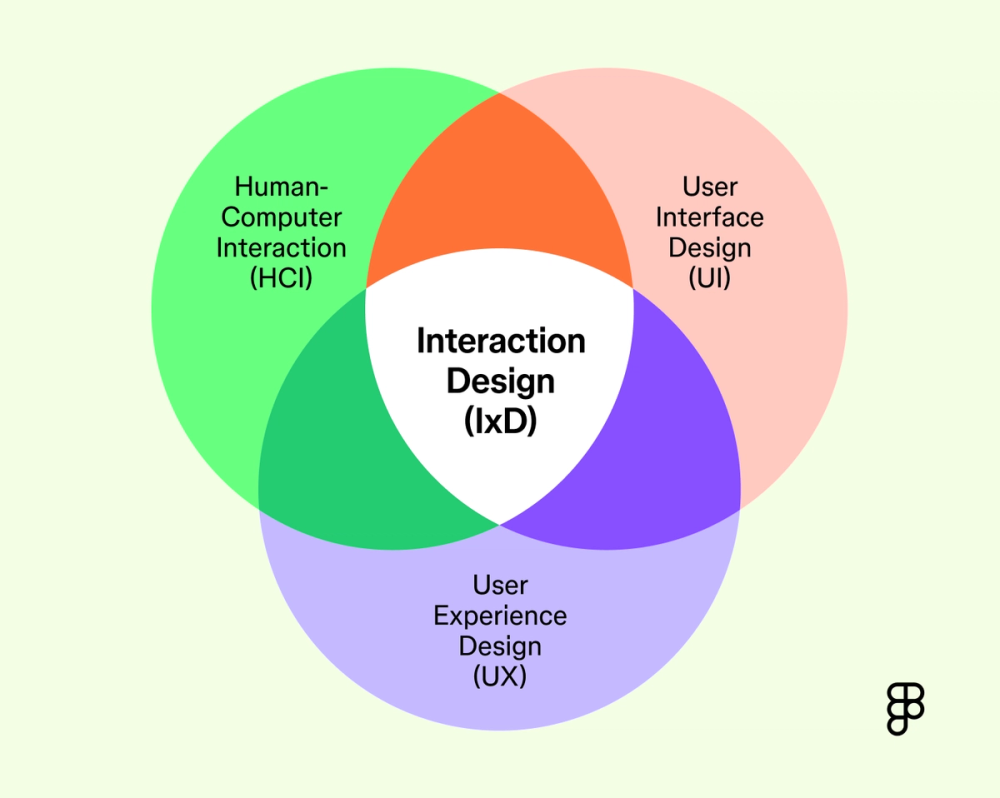
- Interaction design’s relevance to human-computer interaction, UI design, and UX design
- The five dimensions of interaction design
- Interaction design principles
- Skills interaction designers need
- Helpful interaction design resources
Interaction design definition
Interaction design (IxD) is the practice of designing interactive products, services, and systems. Interaction design aims to bridge the gap between people and the technology they use by creating interfaces that are intuitive and engaging.
At its heart, interaction design means understanding user behaviors, needs, and motivations, and then turning that insight into practical design solutions. The goal? Make every interaction intuitive, efficient, and satisfying so users can complete tasks with ease.
Interaction design in human-computer interaction (HCI)
Even the most advanced technology product can fail if users struggle to interact with it. That's why interaction design plays a vital role within the broader field of human-computer interaction.
HCI focuses on how people and computers exchange information. While it covers a wide range of topics, including ergonomics, cognitive psychology, and computer science, interaction design specifically addresses the “how”—how users navigate and experience a product.
Interaction design shapes usability, accessibility, and overall satisfaction. Poor interaction design leads to frustration, errors, and abandoned use, while good interaction design can transform tools into empowering experiences that build customer loyalty and delight.
By focusing on user needs and design principles, interaction designers help fulfill HCI’s ultimate goaI: creating technology that is useful, usable, and desirable.
Interaction design vs. UI design
While UI and interaction design overlap, UI design focuses more on the arrangement of visual elements in an interface, such as the icons, buttons, fonts, spacing, color scheme, layout, and overall aesthetic.
In contrast, interaction design focuses on the behavior of those elements, how they respond to user input, and how to guide users through completing tasks. For example, UI design determines the appearance and placement of a button on a website, while interaction design defines what happens when someone clicks the button.
A UI designer strives to create an attractive, consistent, and on-brand visual experience for the user, while interaction designers focus on creating intuitive flows, clear navigation, and effective feedback mechanisms. Both roles need to work in harmony during product development.
Collaborate in real time
Bring designers, developers, and stakeholders together to create seamless interactions.
Interaction design vs. UX design
What is the difference between UX design and interaction design? User experience (UX) design is a broader discipline that covers all aspects of a user’s interaction with a company and its services and products. This includes everything from initial discovery and branding to usability, performance, and overall satisfaction.
Interaction design lives inside UX design. While UX looks at the entire user journey, interaction design zooms in on key touchpoints of a product or service. A UX designer might conduct user research to understand needs and pain points, map out user journeys, and define the overall strategy. The interaction designer takes those insights and focuses on designing the specific interactive behaviors that contribute to a positive user experience.
For example, a UX designer might uncover why users abandon an online checkout process. The interaction designer then designs the flow—each step, form fields, and feedback touchpoint—to make it as intuitive as possible and increase conversions.
In short, UX design maps the big picture while interaction design refines the details, shaping the moments that make up the experience.

The five dimensions of interaction design
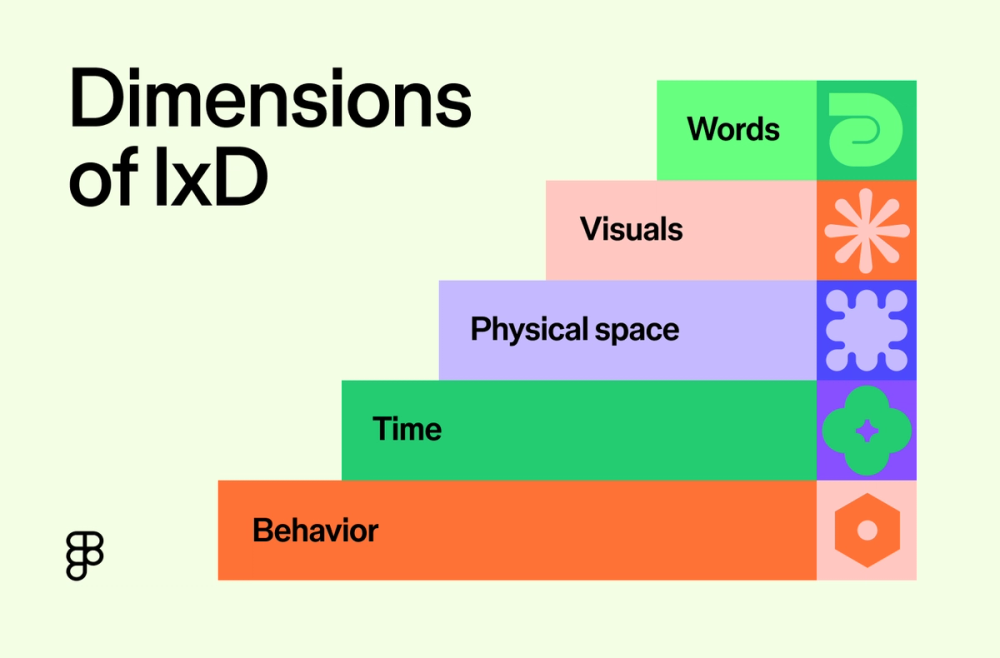
British professor Gillian Crampton Smith outlined four dimensions that shape interaction design. Interaction designer Kevin Silver later added a fifth. Together, they help interaction designers break down the many elements that influence user experience.
1D: Words
Words are the text users encounter in an interface, including instructions, error messages, navigation menu items, and button labels. Clear, concise, and action-oriented language helps guide users and set expectations. For example, a button labeled “Submit” clearly signals its action, while an error message that explains the issue and offers next steps helps users recover quickly.
2D: Visual representations
Visual representations cover all graphic elements of an interface, like icons, images, typography, backgrounds, overlays, and overall layout. Good visual design organizes information, signals hierarchy, and supports usability. Recognizable icons, like a trash can for “delete” or a down arrow for “download”, help users quickly understand functionality without needing extra explanation.
3D: Physical objects/space
This dimension considers the physical devices and environments where the action happens, including smartphones, tablets, desktop computers, or kiosks. It also includes how users physically interact: Are they tapping, swiping, clicking, or typing?
Good interaction design accounts for ergonomics and context, ensuring that interactions feel natural and seamless across different platforms.
4D: Time
Time refers to dynamic aspects of an interface, like animations, transitions, videos, or audio that change over time. These elements can provide feedback and illustrate relationships between different parts of the interface. Here are a few examples:
- A subtle animation when a button is pressed provides clear visual confirmation of the action.
- Thoughtful transitions between screens create a smoother and more intuitive user flow.
- Progress bars, loading screens, or temporary icons or changes to a cursor (like the rainbow pinwheel on Macs or the hourglass on older versions of Windows) inform users that a process is ongoing and set expectations for wait times.
5D: Behavior
The fifth and final dimension considers how users interact with an interface (such as tapping, swiping, or typing) and how the system responds. Effective interaction design ensures actions have clear, predictable results and that users can easily recover from errors.
Understanding this dimension helps designers anticipate user needs and create responsive, adaptive interfaces. Logical and predictable behavior across an interface reduces cognitive load and improves the overall experience.

Interaction design principles
Interaction design aims to make interfaces functional, intuitive, and responsive to human needs.. Several key principles guide this work, ensuring designs are usable and enjoyable:
User-centered design
User-centered design prioritizes users’ needs, wants, and limitations throughout the design process. This approach may involve:
- Creating user personas to inform design decisions
- Ensuring the product aligns with real-world use cases
- Conducting user research (interviews, surveys, and usability testing) to understand the target audience
User-centered design prioritizes efficiency so people can achieve their goals quickly and with minimal effort. This can involve streamlining workflows, providing shortcuts, and optimizing information architecture.
Accessibility is also key. Great interaction design works for everyone, including people with visual, auditory, motor, or cognitive impairments.
Clarity and feedback
Users should instantly understand what interface elements do and how to interact with them. Clear affordances (like buttons that look pressable) and constraints (like grayed-out options) help guide action.
Feedback, whether visual, auditory, or tactile, lets users know their actions were successful, reinforces trust, and keeps interactions flowing smoothly.
Consistency and predictability
No one likes uncertainty. When people use a product or a system, they want to know what to expect.
Consistency in interaction design means keeping similar patterns, behaviors, and visual styles throughout the product so users can confidently apply what they’ve learned in one part to another. . Predictability means actions lead to expected outcomes. Using design systems and sticking to established conventions (for example, placing navigation menus at the top of the page) creates smoother, faster, and more intuitive interactions.
Cognition
Good interaction design reduces the cognitive effort users need to process information or make decisions. That means presenting content clearly, using familiar language, and building on intuitive mental models. Design psychology principles help guide smart decisions:
- Fitts’ Law states that the time to hit a target depends on its size and distance. Make frequently used actions bigger and easier to reach.
- Hick’s Law states that the time it takes to make a decision increases with the number and complexity of choices. To improve efficiency, streamline options wherever possible.
- Gestalt principles describe how humans naturally group related visuals into meaningful patterns. Use this to create clear visual hierarchies and layouts.

What skills do interaction designers need?
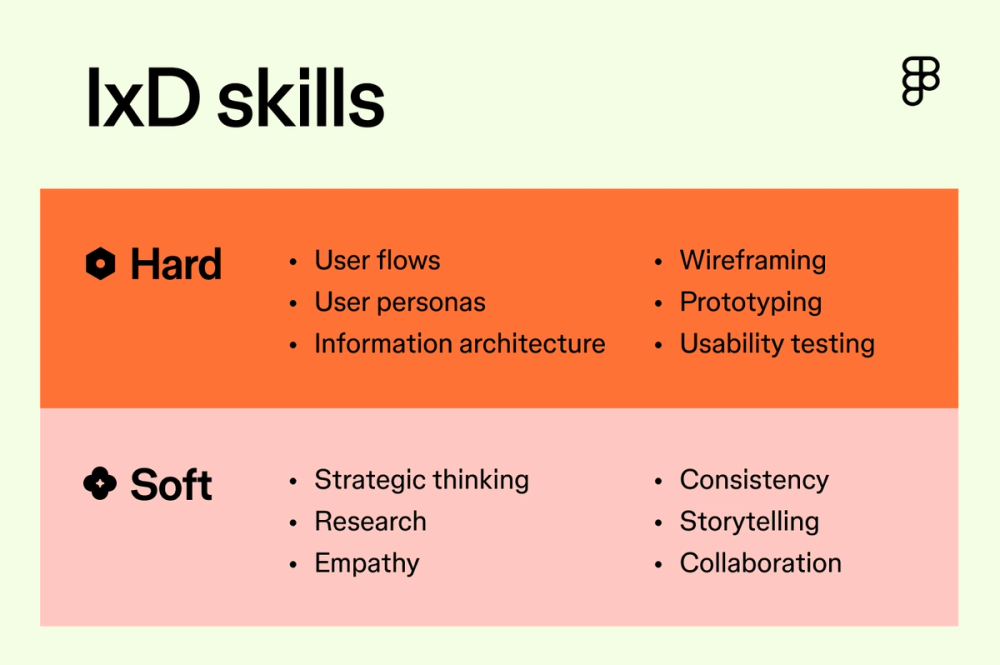
Great interaction design blends creativity, strategy, and empathy. Designers must balance user needs with business goals to craft intuitive, effective experiences.
If you’re interested in pursuing an interaction design degree, these are common responsibilities you’ll encounter:
- Creating user flows and user personas: To visualize how users will engage with a product or service, interaction designers start with user flow diagrams and user personas. These help designers understand motivations, behaviors, and pain points. For example, for a mobile fitness app, a user flow may detail the specific steps a user takes to log a workout, while personas might distinguish between a casual exerciser and a marathon runner, who will require different features and interactions.
- Setting design strategy: Before starting interaction design for a project, stakeholders need to understand business goals, user needs, and technical constraints.
- Wireframing: Wireframes are simplified representations of an interface, outlining the basic structure, content, and layout of key screens. Think of them as skeletons or blueprints for the design, allowing stakeholders to align and designers to test and iterate before working on the final visuals.
- Designing interactive elements: There are specific UI components users interact with, such as buttons, forms, and menus. Interaction designers consider the behavior of these elements and how they will respond to input with immediate, useful feedback. For example, hover states that reveal additional options or animations that show a task is in progress help users feel in control and understand the status of the system.
- Prototyping: Prototypes are interactive mockups or simulations of the final product, ranging from low-fidelity paper prototypes to high-fidelity digital prototypes. Prototyping allows designers to test out concepts and gather feedback early in the design process.
- Usability testing: Usability testing involves observing users interacting with the prototype so researchers and designers can identify any struggles or areas of improvement.
- Ensuring consistency: Maintaining a consistent user experience across all parts of a product is important. Data analysis plays a big role here, helping designers understand how users interact with the current design and identify any confusing areas or bottlenecks.
- Ongoing education and cross-collaboration: Interaction designers must stay up-to-date on industry trends and knowledge while frequently collaborating with other teams, including visual designers, developers, product managers, and researchers.
Interaction design resources
Whether you’re new to interaction design or looking to broaden your expertise, here are some top resources to explore:
- Podcasts like the UXPodcast and Design Matters let you listen in on deep conversations with designers, artists, and other industry leaders about usability, user experience, and design’s impact and philosophy.
- Blogs like UX Collective and Nielsen Norman Group feature case studies and cover UX and interaction design trends, techniques, and tools.
- Books
- About Face: The Essentials of Interaction Design by Alan Cooper introduces interaction design principles and detailed methodologies for user interface design.
- Don’t Make Me Think by Steve Krug presents complex aspects of Web design, usability, and user-centered design in a simple way, introducing actionable insights for digital experience creators.
- The Design of Everyday Things by Don Norman explores a variety of human-centered design principles, such as how to balance functionality with accessibility.
- Lean UX by Jeff Gothelf and Josh Seiden blends UX with Agile methodologies for an iterative design process that suits contemporary, fast-paced work environments.
- 100 Things Every Designer Needs to Know About People by Susan M. Weinschenk distills key psychological concepts about human behavior, cognition, and perception into 100 digestible lessons designers can immediately apply to their work.
Build better interactions with Figma
Great interaction design begins with the right tools. Whether you’re creating user flows, wireframes, or prototypes, Figma supports the full interaction design process from start to finish.
- Use Figma’s shared online whiteboard to brainstorm, map user flows, and co-create ideas with your team.
- Start designing with Figma and build seamless, engaging experiences that users love.
- Try Figma’s prototyping tools to turn designs into interactive user experiences and fine-tune the user flows.
- Explore ready-made design systems, plugins, and templates from the Figma Community to speed up your workflow and spark new ideas.
Create a user-first experience
Ready to elevate your digital product with thoughtful interaction design?