How to make a mood board in 5 simple steps
Share How to make a mood board in 5 simple steps
Explore more from
Team productivity

Starting a new project usually means navigating a messy swirl of references and loose ideas that haven’t quite found their place yet. Learning how to make a mood board is one of the best ways to turn that creative chaos into a clear visual direction.
Whether you’re a designer launching a new brand, a marketing team syncing on creative direction, or a homeowner planning a renovation, it helps you organize your inspiration in one place so you can stop guessing and start building.
Read on to learn:
- What a mood board is and how it can improve your workflow
- How to create a mood board in five steps
- Real-world examples of mood boards
- Tips and best practices for your mood board
What is a mood board?
A mood board is a physical or digital collage used to define your design direction. It brings together images, typography, colors, swatches, and other design references in a single place.
Designers and branding experts use mood boards to set a visual style, align with clients, and spark dialogue. They help win pitches, inspire product concepts, or establish brand identity. Whether you’re working solo or collaborating with a team, mood boards help clarify what inspires you and keep your creative direction on track.
Here’s how to complete your mood board in five steps:
Step 1: Define your project goal
Use keywords and adjectives to guide your visual direction. What story do you want to tell? Choose a few descriptive anchor words to set the tone.
For example, if you’re building an educational app for kids, you might use words like “cozy,” “inviting,” and “bright.” If it’s a high-end restaurant, you might choose “modern,” “romantic,” or “elevated.”
Step 2: Find and collect inspiration
Now for the fun part: gathering inspiration. Drag your images directly into FigJam or paste them from your clipboard. Search the Web, clip images from magazines, or take your own photos of elements.
Every mood board will be unique, but try to include:
- Textures
- Color palettes
- Photography styles
- User interface (UI) design
- Packaging and brand logos
- Typography and font pairings
Avoid heavily staged or Photoshopped images, and consider adding original photography for a one-of-a-kind flair.
Pay attention to what you’re naturally attracted to, then try to identify patterns. This is your design direction coming into focus.

Step 3: Assemble your mood board
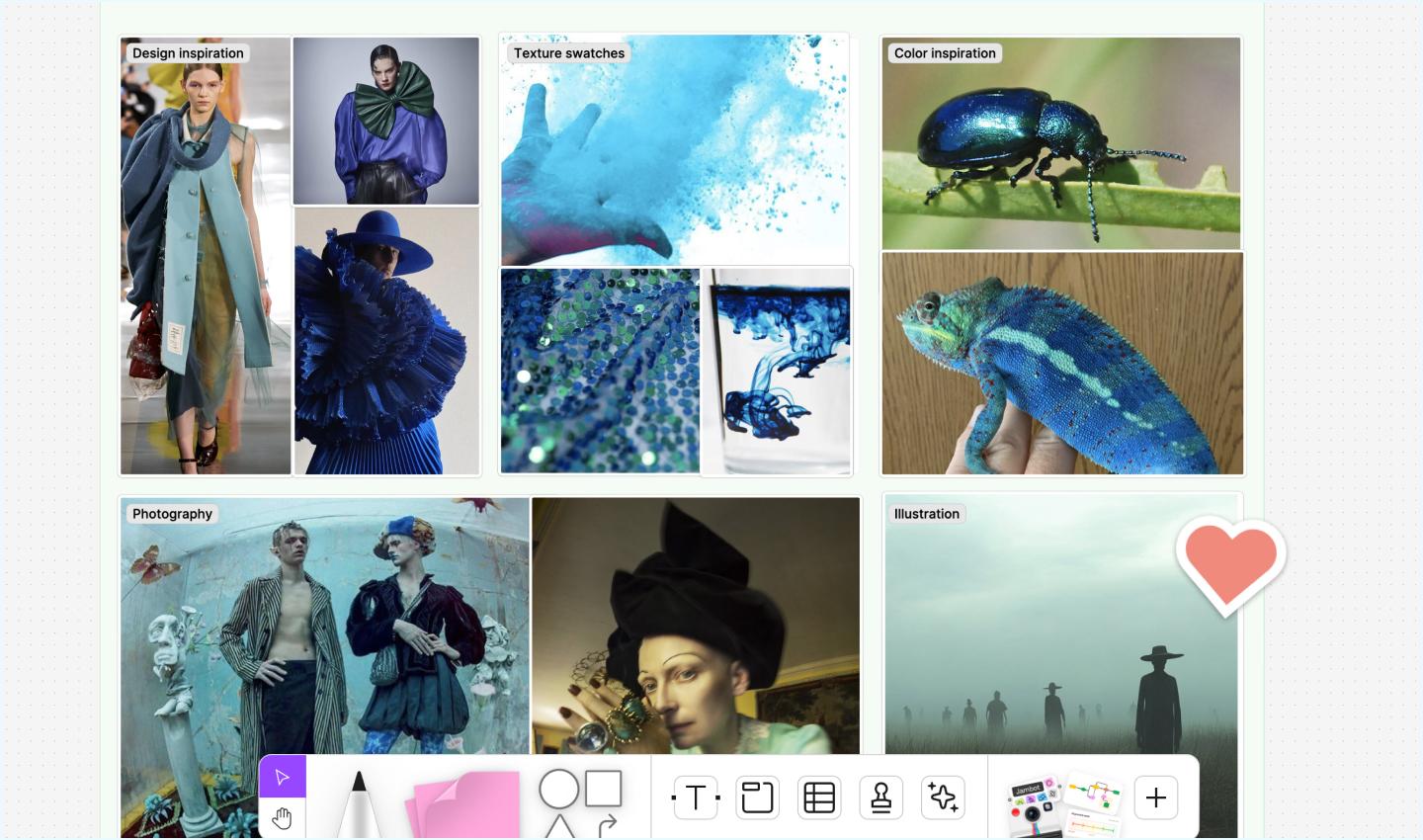
Use FigJam’s free mood board template to organize your assets and design inspirations on one page. Use the sticky notes feature to add context, brainstorm ideas, or make other notes.
To plot images on pre-designed grids, try this mood board maker—the designers at Mixpanel created it to auto-populate mood boards using Google Sheets Sync.
There are no strict rules with mood boards, but one starting point is to put a photo of your main theme at the center, then build from there. Alternate photos with typography, balance color, and leave enough space so the board is easy to read.
Arrange elements so that inspiration flows from one to the next and the whole canvas is visually pleasing and easy to understand.
Pro tip: Place your hero image or main visual in the center, then group supporting elements around it to create a cohesive visual hierarchy.
Ready to get your ideas on the canvas?
Start dragging in your inspiration with the mood board tool built for team collaboration.
Step 4: Add commentary
Context adds meaning. Explaining your choices gives your mood board more weight and meaning when you share it with clients or teammates.
For example, a cocktail brand might explain that imagery conveys a summer feel, typography signals premium quality, and the color palette suggests citrus and sunshine. This framing strengthens your mood board as both a reference and a presentation tool.
Step 5: Share and gather feedback
Mood boards evolve as projects do. Invite teammates or clients to revisit and refine as your concept comes to life.
FigJam’s online collaborative whiteboard makes it easy to share your finished mood board with others and build on team feedback in real time. Just send them a link, and they can use sticky notes or comment pins to annotate specific areas.
Update your mood board until it feels complete, then use it as a reference throughout the execution phase.
Mood board examples
Example 1: Fintech

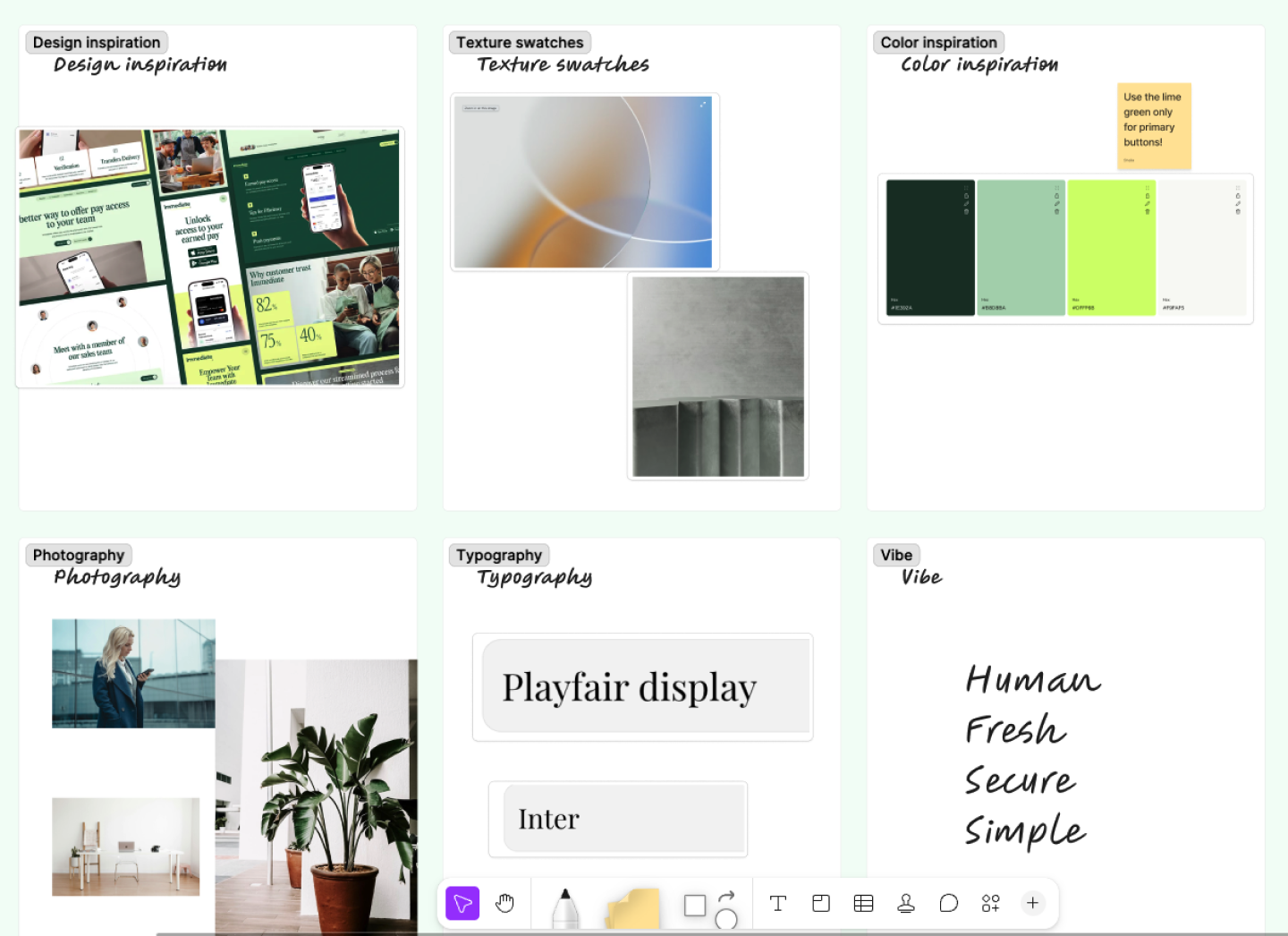
This example tackles a classic fintech challenge: looking trustworthy without looking like a 1980s bank branch. The mood board becomes a playground to test exactly how human the brand can be. Pairing deep forest greens and soft mints with warm photography helps the team visually feel out the direction.
To keep the momentum going in FigJam, the team could use sticky notes to flag specific UI patterns—like softer, rounded button styles and generous white space—long before anyone opens a high-fidelity file.
Example 2: SaaS

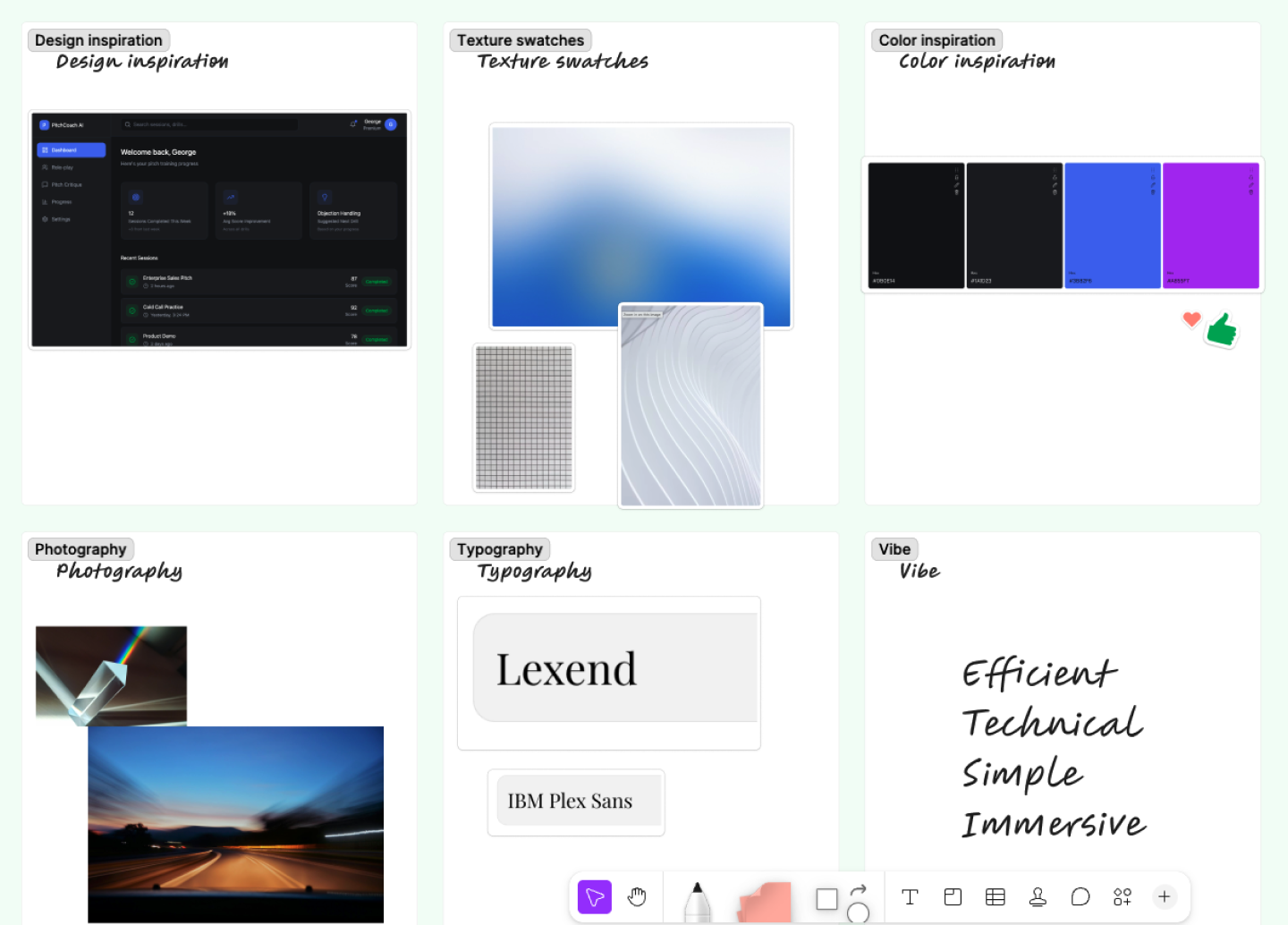
Data analytics tools can get complicated fast, so the goal for this team was to make everything feel easy to digest. This mood board design leans into a dark mode aesthetic using deep charcoal and electric blue. To give it that high-speed tech feel, they added textures like grid patterns and light trails—visual cues that suggest precision and movement.
To get the colors right, they used Figma’s color palette generator. It’s a great way to make sure your primary blue and accent purple actually look good together before you start mapping them to your Figma Design file.
Example 3: E-commerce

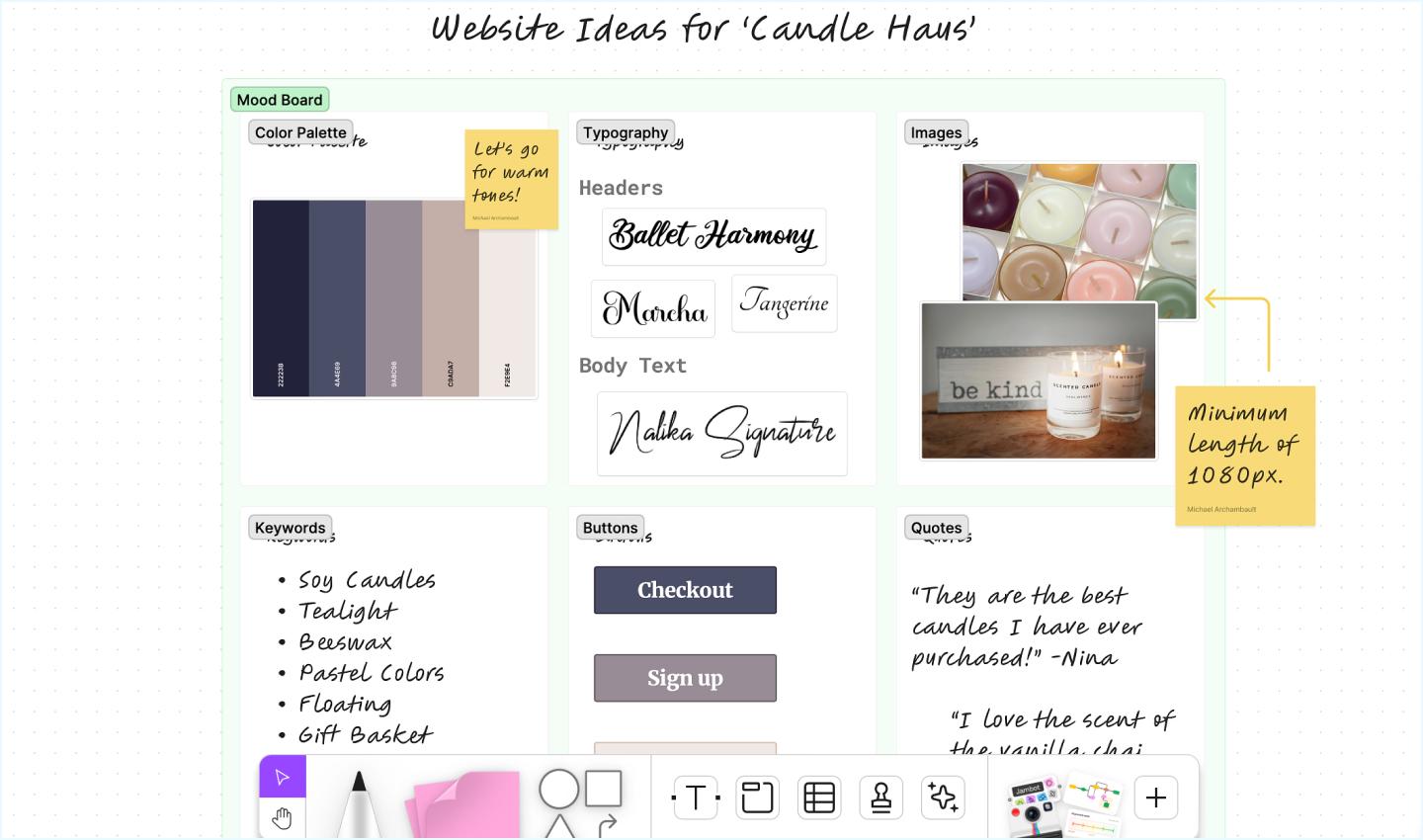
In this e-commerce example, the mood board for a candle brand’s site redesign focuses on the senses. The team pulled in earthy tones, soft lighting, and lifestyle photography to create that boutique, handcrafted quality.
They also used sticky notes to capture feedback or quick reminders on the fly. This turns the mood board into a collaborative space for your team or client. It’s way easier to align on a visual direction here than it is to backtrack once your team is building the website.
Here, a FigJam mood board for a candle brand’s site redesign combines a color palette, font pairings, imagery, and keywords, using sticky notes that capture dimensions and team feedback. The board acts as a foundation for both creative exploration and client discussion.
Five pro tips to create great mood boards
- Define what success looks like. Before you start, know your end goal. Is this to win a pitch, or to guide a UI kit? Use that purpose to guide you through the design process.
- Be fearless. Don’t worry about organization in the first 15 minutes. Throw everything onto the canvas. The best directions often come from unexpected combinations of images sitting next to each other.
- Show the flow. A great mood board has a rhythm. Arrange your elements to connect the feeling of the brand to the function of the product.
- Collaborate early and often. Use FigJam’s collaborative tools to get stakeholders on board early—different perspectives usually help you find a stronger direction much faster.
- Use the full toolkit. Add GIFs for motion, links to playlists for audio inspiration, or even video clips. If it adds to the look and feel, it belongs on the board.
Benefits of creating a mood board

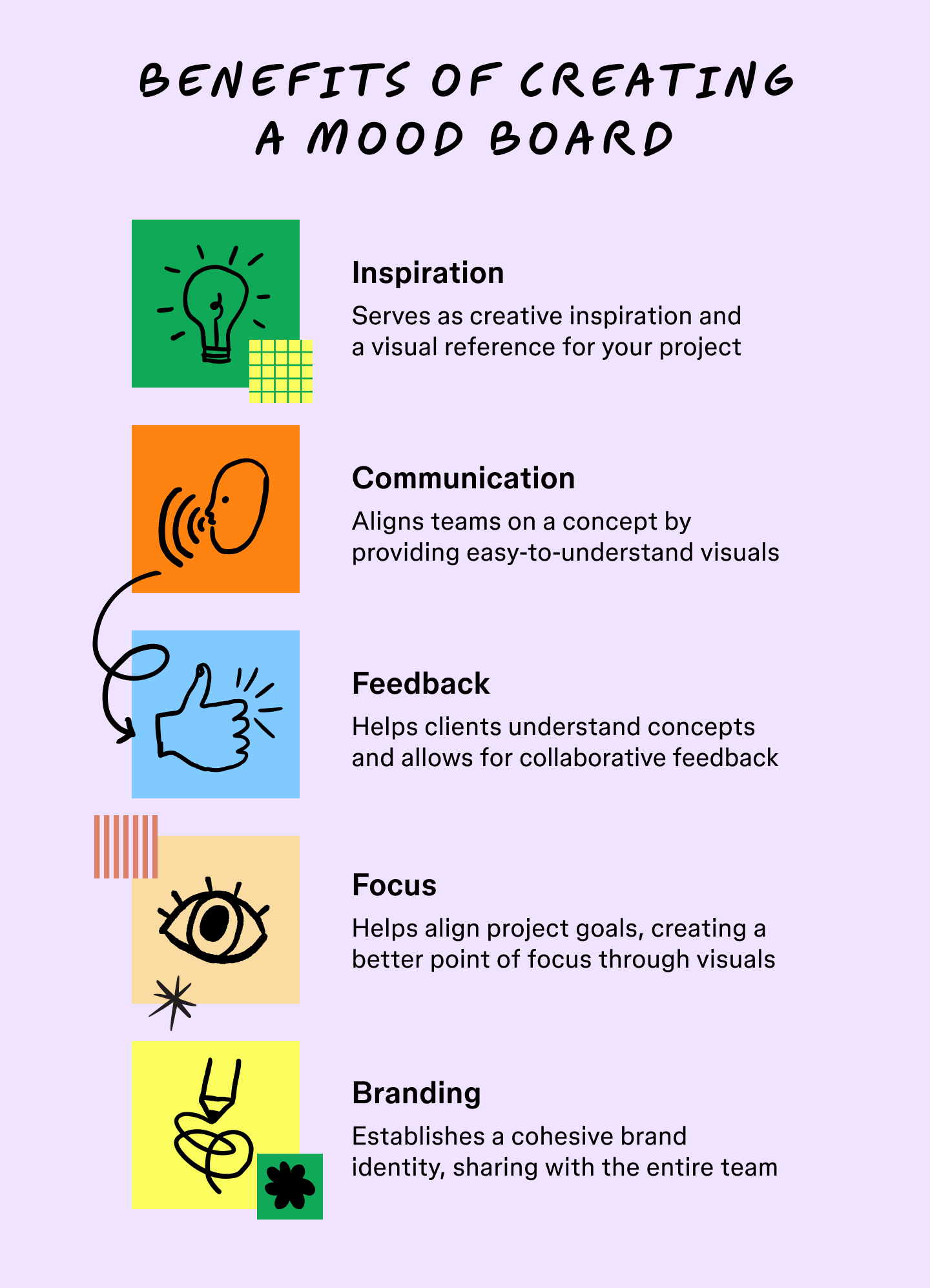
Here’s why mood boards are important and how they can benefit your creative workflow:
- Visual inspiration. Mood boards give you a visual reference point to keep your project on track.
- Better communication. They help teams align on goals by making complex concepts visual.
- Feedback. They help clients understand concepts and make it easy to give feedback, all in one space.
- Clear focus. Like vision boards, mood boards highlight a project’s goal, providing a visual point of focus.
- Cohesive branding. They establish a cohesive brand identity, so you can share it easily with your entire team, from design to marketing.
Mood board FAQ
Here are answers to common questions people ask when learning how to make a mood board.
What should a mood board include?
A strong mood board includes:
- A defined color palette
- Keywords or descriptors
- Inspiring images or illustrations
- Optional: textures, fonts/typography, icons, layouts, etc.
What’s the best tool to create a mood board?
FigJam is a flexible, collaborative option with a free, ready-made mood board template to get started quickly. Unlike static boards on Pinterest or Instagram, it’s interactive and built for feedback.
How do I organize a mood board?
To organize a mood board, start with your main visual or theme in the center, then group supporting elements around it. Use consistent spacing, color balance, and visual hierarchy. Sticky notes and section labels can also help with organization as the project evolves.
Remember, a good mood board is:
- Visually cohesive
- Aligned with your creative goal
- Easy to understand at a glance
- Open to feedback and iteration
- Tailored to your audience or project type
How many images should be on a single mood board?
Aim for 10 to 15 high-impact images. If you add too many, the specific look and feel gets lost in the noise. It’s better to be selective.
How do I choose the right colors for my mood board?
Pick one anchor color from an image you love, then use a tool like Figma’s color palette generator to find shades that complement it. Think about the feeling of the color—blues often feel stable, while yellows feel energetic.
Jumpstart your mood board with FigJam
You don’t have to start with a blank canvas or work in a vacuum when learning how to make a mood board. FigJam templates help you jump right in, organize your inspiration, and get your team involved from the very first step.
Here’s how to get started:
- Start with this ready-made mood board template to visualize your next great idea.
- Browse other mood boards and mood board templates from creators in the Figma Community.
- Mind map templates can help you break through creative blocks if you find yourself stuck.
- When you’re ready to turn your idea into a website or app, the prototyping template can bring your mood board to life.
Ready to bring your ideas to life?
From brainstorming to final prototype, FigJam can help every step of the way.
Keep reading

How to mind map
How can you remember the important stuff and forget the rest? Learn how to mind map, and you’ll learn how to think more clearly.
Learn more

Alignment charts explained
Ready to sort in a more engaging way? Our alignment charts explained guide will walk you through how to create an alignment chart of your own.
Learn more