What is a swimlane diagram? How to make one for any project


Share What is a swimlane diagram? How to make one for any project
Explore more from
Team productivity


Swimming laps is great exercise, unless there are no lanes. They keep everyone moving in the right direction without getting in each other’s way.
The same logic applies to major design projects like a website redesign, social campaign, or product launch. Swimlane diagrams define each team member’s roles and responsibilities, ensuring no task is overlooked. These diagrams streamline your processes and ensure you hit your goals.
Keep reading to learn:
- What a swimlane diagram is
- The benefits of using swimlane diagrams
- Examples of swimlane diagrams
- How to create a swimlane diagram
The swimlane diagram, explained
A swimlane diagram is a type of flowchart that shows who does what at each step in a workflow. Like lanes in a swimming pool, swimlanes (aka functional bands) separate activities from start to finish. In this case, it shows the division of roles, responsibilities, and sub-processes among different departments, people, and work groups.
Also called a cross-functional diagram or swimlane process map, this flowchart outlines steps, decisions, and responsible parties involved at each stage of a business process. They also highlight the connections between roles and how they interact.
Create your swimlane diagram
FigJam’s swimlane diagram template makes it easy to create swimlane flowcharts for any project.
Swimlane diagram symbols
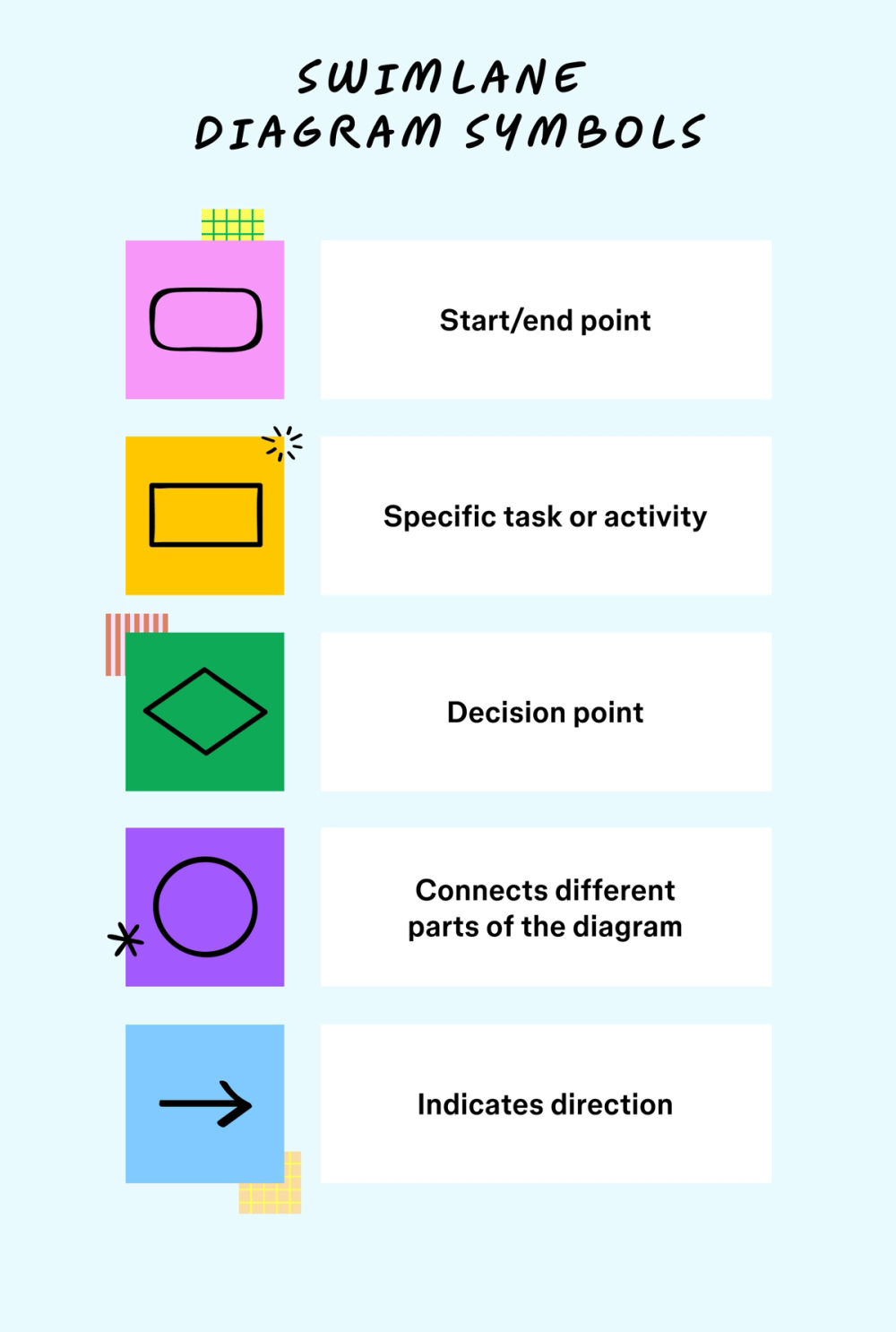
Swimlane diagrams represent project components with flowchart symbols. Some standard symbols include:
- Rounded rectangles indicate the starting point or end point of the process flow.
- Regular rectangles identify specific tasks or activities.
- Diamonds are key decision points that can branch into multiple paths.
- Circles show connections to another part of the diagram.
- Arrows show the sequence of tasks or decisions.

How to create a swimlane diagram in four steps
Make your own swimlane diagram in four steps:
Step 1: Define your goal. Use the FigJam lotus diagram template. to identify and translate your goals into actionable steps. Start with questions like:
- Why are we mapping out our process?
- What does success look like?
- How much detail should we include?
Then, work with your team to decide how you will achieve each step.
Step 2: Capture key steps and players. What are your project’s essential tasks and activities? Which team members can help make it a success? Break it down with a shared online whiteboard like FigJam.
Step 3: Build your swimlane diagram. Start with a diagramming tool like the FigJam swimlane diagram template. Label the lanes with the teams or team members who will be involved. Then, depict the connections, relationships, and milestones with flowchart symbols.
Step 4: Analyze and refine with your team. Your first pass will likely reveal gaps you’ll need to address before you get started. Review it with stakeholders to spot any gaps or inefficiencies before you begin.
Three pro tips for creating swimlane diagrams
New to swimlane diagrams? Create an effective flowchart with these simple tips:
- Balance clarity with simplicity. Include only what you need to make your diagram actionable. Keep it simple so your team doesn’t get bogged down in too many details.
- Create straightforward descriptions. Label your diagram using clear, simple words and phrases that are easy to understand. Avoid abbreviations, acronyms, and technical jargon.
- Maintain a clean layout. Map activities in chronological order, ensure the arrows don’t overlap, and consistently use colors and shapes.
Three benefits of a swimlane diagram
Swimlane diagrams help product and design teams understand, convey, and simplify complex processes into simpler steps. Effective use of these process flow diagrams makes projects run more smoothly due to:
- Enhanced clarity. A swimlane diagram provides a clear, step-by-step visual representation of a process from start to finish, including the teams and players involved.
- Better communication. Stakeholders can easily see assigned tasks at various stages.
- Improved efficiency. Teams can identify and weed out redundancies and bottlenecks ahead of time rather than reacting later.
Looking for just the right font for your next project?
Check out Figma’s font library to share your ideas in style.
Swimlane diagram examples
Swimlane flowcharts serve a variety of purposes that help plan any complex design project. Here are some swimlane diagram examples to see the work in action:
Example 1: Client onboarding
Assume you’re a design consultant and must create a standard onboarding process for new clients. You could lay out the steps and responsible parties in the process using these lanes:
Client:
- Provide documentation to their sales contact.
- Attend orientation/training, if needed.
- Complete client forms and agreements.
Sales:
- Initiate client contact and needs assessment.
- Share information about services, pricing, and options.
- Guide clients through the onboarding process.
- Collect all required documentation from the client.
Legal and compliance:
- Review client agreements and contracts.
- Ensure regulatory and legal compliance.
- Approve client agreements and contracts.
- Verify documentation accuracy and completeness.
IT and technical support:
- Set up client accounts and access to software or systems.
- Configure hardware and software, if applicable.
- Provide technical support and training.
- Troubleshoot and resolve technical issues should they arise.
Example 2: Project reporting
Let’s say you’re a project manager and need to report ongoing progress on a project you’re driving. You could use a project management swimlane to represent roles and steps visually, then get feedback and address issues that might need attention:
Project team:
- Collect and compile project data and updates.
- Report progress on tasks and milestones to the client.
- Report issues or challenges encountered during the project.
- Share data and information related to project objectives.
Project manager:
- Review and analyze the data provided by the project team.
- Assess project progress and performance against established goals.
- Identify potential risks and opportunities.
- Develop action plans for addressing project issues.
Client:
- Review the project status and performance.
- Provide feedback and input on project reports.
- Communicate specific requirements or request changes.
Example 3: Content creation
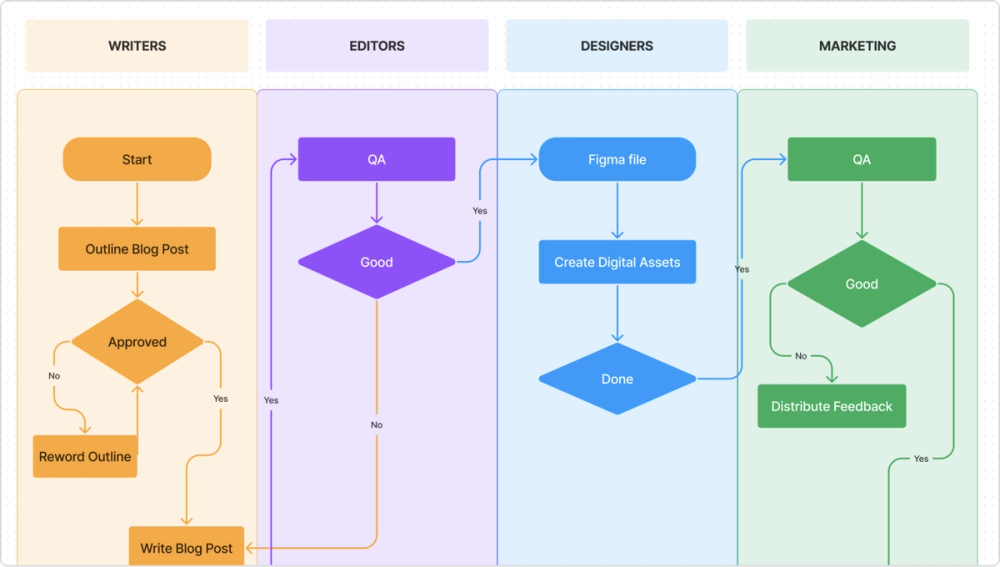
Content managers can use swimlane activity diagrams to plan and track tasks among writers, editors, designers, and marketers responsible for developing content. Here’s what you could include in a swimlane diagram to coordinate the creation of a blog post:
Writer:
- Get approval for a blog post topic and outline.
- Research and write the blog post.
- Submit the completed draft to the editor.
Editor:
- Review and edit the submitted blog post for clarity, grammar, and style.
- Provide feedback and request revisions to the writer if needed.
- Approve the final blog post and mark the task complete.
Designer:
- Create digital assets for the blog post.
- Get approval for the digital asset designs.
- Submit the final designs and mark the task complete.
Marketer:
- Review the edited and designed blog post and provide feedback.
- Distribute the content for publication to the intended channels.

Enhance collaboration and creativity with FigJam
Start brainstorming what to include in your swimlane process map with helpful swimlane diagrams created by members of the Figma Community, then build out your workflow with FigJam. Built-in tools and features make it simple to:
- Present your project plan with AI tools that create engaging meetings, supporting everything from agenda planning to post-meeting notes.
- Share your swimlane diagram with multiple stakeholders and see their real-time responses on a shared online whiteboard.
- Take the headache out of project management with a simple design handoff that improves communication between design and development.
Visualize your workflow with ease.
Ready to create your swimlane diagram?
Keep reading

What is a fishbone diagram?
Use a fishbone diagram to help you solve problems by understanding what’s causing them.

How to create a flow chart
Having a flow chart can help visually represent actions or people in a complex situation.

What is a UML diagram?
UML diagrams can help you plan complex systems and processes.