How to create an effective action plan


Share How to create an effective action plan
Explore more from
Team productivity

Imagine this: your product launch is fast approaching. Your code is fully functioning and you perfected the design, but feelings of worry linger as launch day approaches. This anxiety could be the result of missing an important document: an action plan. A well-defined action plan includes the concrete steps needed to connect ideas to outcomes—making development smooth, user experience seamless, and product launch successful.
Whether you want to reach new personal goals or launch a new product, an action plan will give you a roadmap to achieving your desired outcome.
This article covers:
- What an action plan is and why it’s useful
- The steps for writing an effective action plan
- Tips for successfully implementing your action plan
- How to use FigJam to create your action plan
What is an action plan?
An action plan outlines the steps and tasks you must execute to achieve the desired outcome. A clear action plan includes:
- A well-defined goal using the SMART model
- The tasks you need to complete to accomplish your goal
- Team members and other resources required for each task
- Task deadlines and milestones

What is the purpose of an action plan?
Action plans help prioritize tasks and make it easier to monitor project performance. They ensure everyone involved understands their roles so they have confidence in moving the project to the finish line.
Teams often use action plans in the strategic planning process. Strategic plans offer a broad overview of your long-term mission and vision, while an action plan details the short-term steps needed to get there. Essentially, your action plans put your strategic plan into motion.
When to use an action plan
You can use action plans for various reasons, including for personal goals or new marketing initiatives. They’re helpful for teams and individuals looking to reach specific milestones.
Here are a few examples of the different types of action plans:
- Project action plan: A project-specific action plan outlines the actions necessary to accomplish a project’s objective.
- Business action plan: These action plans focus on the tasks necessary to grow or start a business, like expanding your customer base or increasing revenue.
- Marketing action plan: These plans outline the steps needed to accomplish marketing initiatives, like increasing brand awareness or launching new products.
- Personal action plan: This type includes the actions needed to accomplish personal development goals, like finance, health and wellness, or career advancement.
How to write an action plan in 5 steps

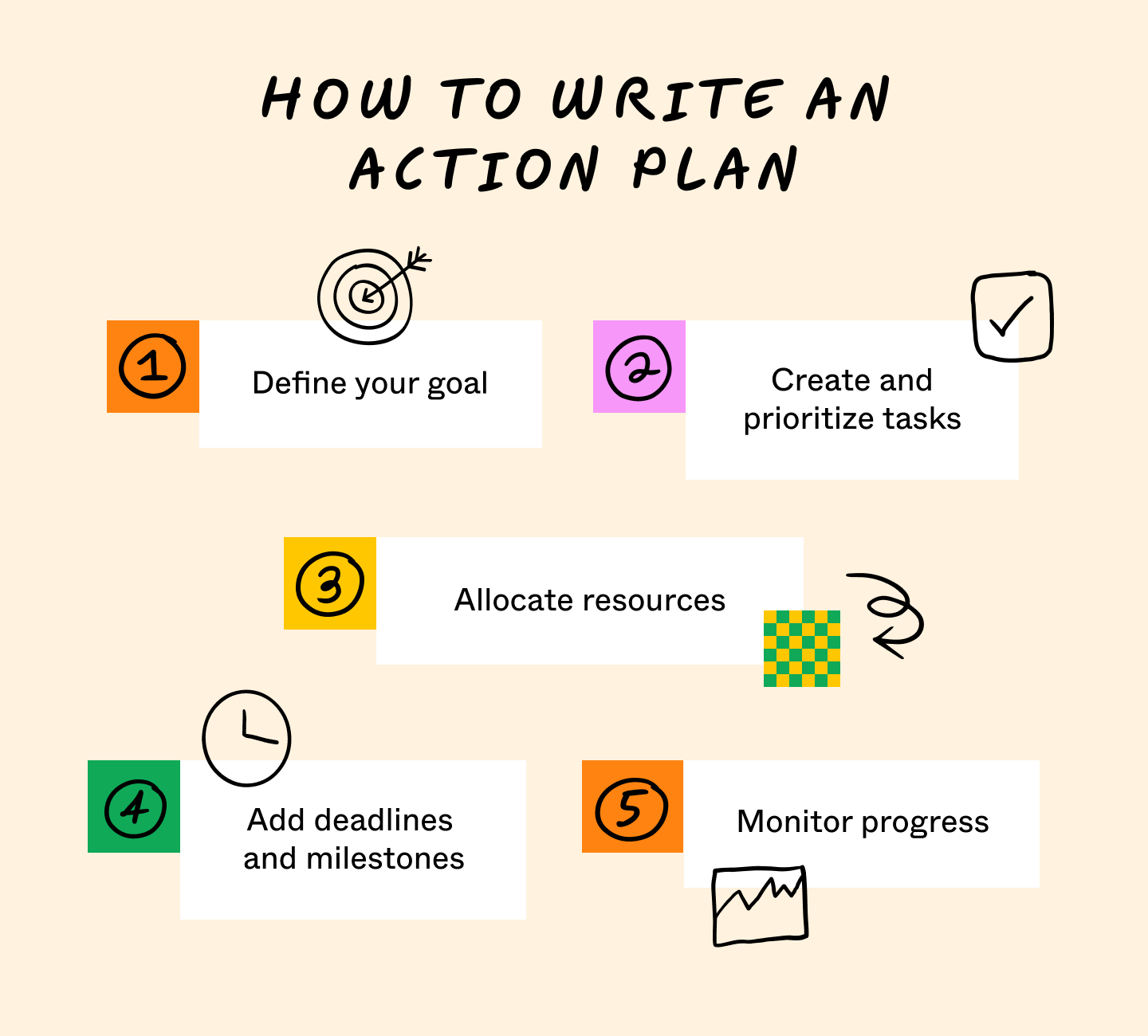
Here are five steps to write an effective action plan and reach your goals.
Step 1: Define your goal
Start by defining your goal. Use the SMART framework to help you set specific, measurable, achievable, relevant, and time-bound goals.
The SMART model makes creating, organizing, and achieving outcomes easier because they’re realistic and attainable. For example, instead of saying you want to read more UX books, your goal could be to read 20 pages of the book “Refactoring UI” a day (specific) for one months (time-bound), tracking progress in a journal by recording the number of pages read (measurable).
Pro tip: Use a SMART goal template when brainstorming your goals. A template is a visual way to clearly outline the SMART goal components, making it easy to adjust and refer back to them as needed.
Step 2: Create and prioritize tasks
Next, you’ll want to create a list of tasks to determine what you need to complete to reach your desired result. Let’s say your goal is to improve website accessibility to enhance UX for individuals with disabilities. Some actions could include conducting an accessibility audit, gathering user research to understand the audience’s needs and challenges, and collaborating with your development team to implement accessibility features.
Once you’ve outlined your tasks, organize them based on priority. Prioritization within an action plan is crucial for effectively managing your time and resources. It also helps your team understand what work they must complete before others can start.
A simple way to prioritize tasks is to use the Eisenhower matrix. This matrix helps you categorize tasks based on urgency and importance. This framework breaks tasks into four quadrants:
- Urgent and important: These are high-priority tasks you need to complete first.
- Important but not urgent: While not urgent, these tasks are still essential to the project’s success.
- Urgent but unimportant: Since these tasks aren’t important, delegate them to free up resources to complete high-priority ones.
- Not important or urgent: Complete these tasks later or remove them from your action plan since they don't impact your goal.
Pro tip: Use the Eisenhower matrix template to collaborate with your team and quickly outline what actions you need to complete now, which ones can wait, what tasks you can delegate, and which ones you can remove.
Step 3: Allocate resources
Identify the resources needed to reach your goal. Look at your team's bandwidth and skills to determine who to assign to each task. Then, determine any additional resources required to complete them, like equipment, tools, or budget.
Pro tip: When working with a large team, create a team charter to define team roles and responsibilities clearly. This also helps you assign things according to your team’s unique skill sets.
Step 4: Add deadlines and milestones
Deadlines are essential for tracking progress. Specific and time-bound deadlines also ensure your action plan stays on schedule. Refer back to your timeline, then determine how long each deliverable should take to reach that end date.
You also want to set project milestones—significant checkpoints or achievements that mark progress toward your goal. Milestones usually signify a project phase's start or end date, but can also represent key deliverables, meetings, or approvals.
Pro tip: Create a Gantt chart to visualize your timeline, highlighting start and end dates for each task, the order in which you should complete them, and key milestones.
Step 5: Monitor progress
Once you create your action plan, don’t just set it and forget it. Hold regular check-ins to keep track of your team’s progress and the overall timeline. You may need to change your action plan sometimes, so don’t be afraid to pivot if needed. Remain flexible and prepared to adjust timelines or reallocate resources to keep your action plan on track.
Pro tip: A project status report is a great way to monitor progress and keep your project on schedule. Update this document regularly and share it during weekly team meetings so everyone stays aligned on the project’s status.
Tips to successfully implement your action plan
Here are some tips on how to create an action plan and achieve your desired outcome.
- Use an action plan template. Quickly put your plan into motion with an action plan template. Customize the template to include your goal, milestones, key tasks, and resources needed to reach success within your desired timeline.
- Set up task alerts. Automate tasks and alerts with a project management tool so team members never miss a deadline.
- Mark off tasks and milestones. Mark off completed tasks and milestones as you go with a milestone chart template. This helps visualize important benchmarks and offers a collective sense of accomplishment as you complete deliverables.
- Talk through pending tasks. Review pending action items to uncover any bottlenecks when your team meets to discuss performance. Determine any changes you need to make to keep your project on schedule.
Action plan example

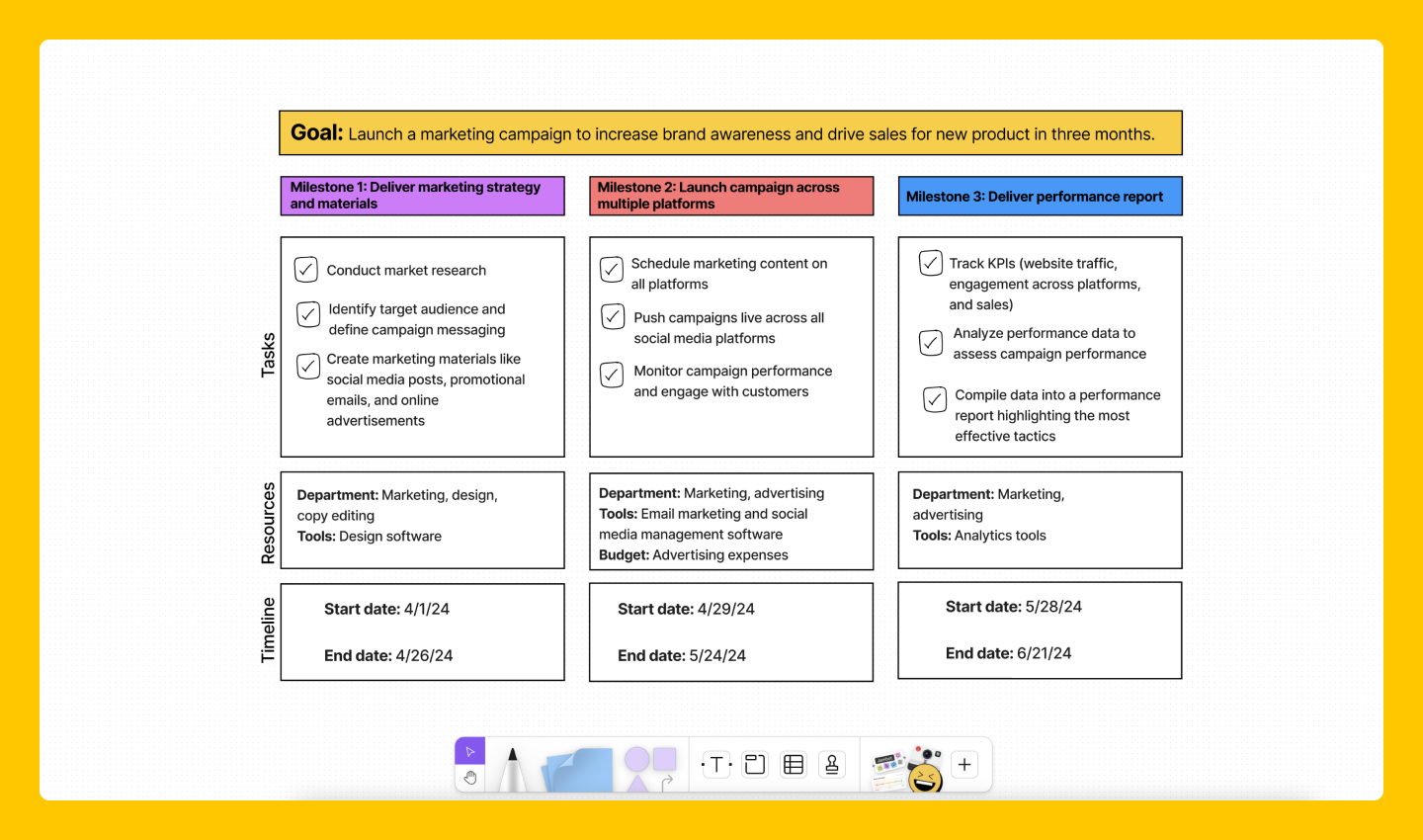
Here is an example of an action plan for a marketing campaign using the FigJam action plan template.
Goal: Launch a marketing campaign to increase brand awareness and drive sales for a new product in three months.
Milestone 1: Deliver marketing strategy and materials
Tasks:
- Conduct market research
- Identify target audience and define campaign messaging
- Create marketing materials (social media posts, promotional emails, and online advertisements)
Milestone 2: Launch campaign across multiple platforms
Tasks:
- Schedule marketing content on all platforms
- Push campaigns live across social media platforms
- Monitor campaign performance and engage with customers
Milestone 3: Deliver performance report
Tasks:
- Track KPIs (website traffic, engagement across platforms, and sales)
- Analyze performance data to assess campaign performance
- Compile data into a performance report highlighting the most effective tactics
Create your action plan with FigJam
An action plan effectively prioritizes tasks, gives your team clear direction on a project, and tracks progress toward your goal. If you need guidance on how to create an action plan, FigJam is here to help. Here's how:
- Use the strategic plan template to develop your long-term mission and vision. Then, put your goals into motion by utilizing FigJam’s premade action plan template or browsing other template options from the FigJam community.
- Once you define your desired outcome, use the goal tracker template to monitor individual and group progress.
- Check in regularly and use the project status report template to ensure your project is on track.
Ready to accomplish your goals with a concrete action plan? Try FigJam today to easily collaborate with your team and visualize timelines to push projects to the finish line.