Work breakdown structure (WBS): What it is + how to create one


Share Work breakdown structure (WBS): What it is + how to create one
Explore more from
Strategic planning

Complex projects fail when tasks get lost in the shuffle. Teams need more than to-do lists and good intentions—they need structure that clarifies who does what and when.
That's where a work breakdown structure (WBS) transforms project chaos into a clear plan of action. By breaking projects into manageable tasks, WBS helps teams understand their roles and keep initiatives on track, whether launching products or planning campaigns.
Read on to learn:
- What a WBS is
- Types of work breakdown structures
- Key elements of a WBS
- How to create a WBS
- Examples of work breakdown structures
- Tips for creating a WBS
What is a work breakdown structure?
A WBS is a visual project management tool that breaks a project into smaller, more manageable parts, organized in a hierarchy. It starts with the overall goal at the top and divides the project into detailed tasks and deliverables.
Each level connects to those above it, showing how individual tasks support larger deliverables. This hierarchical view helps teams plan, manage, and track complex work more effectively.
Three levels of a work breakdown structure

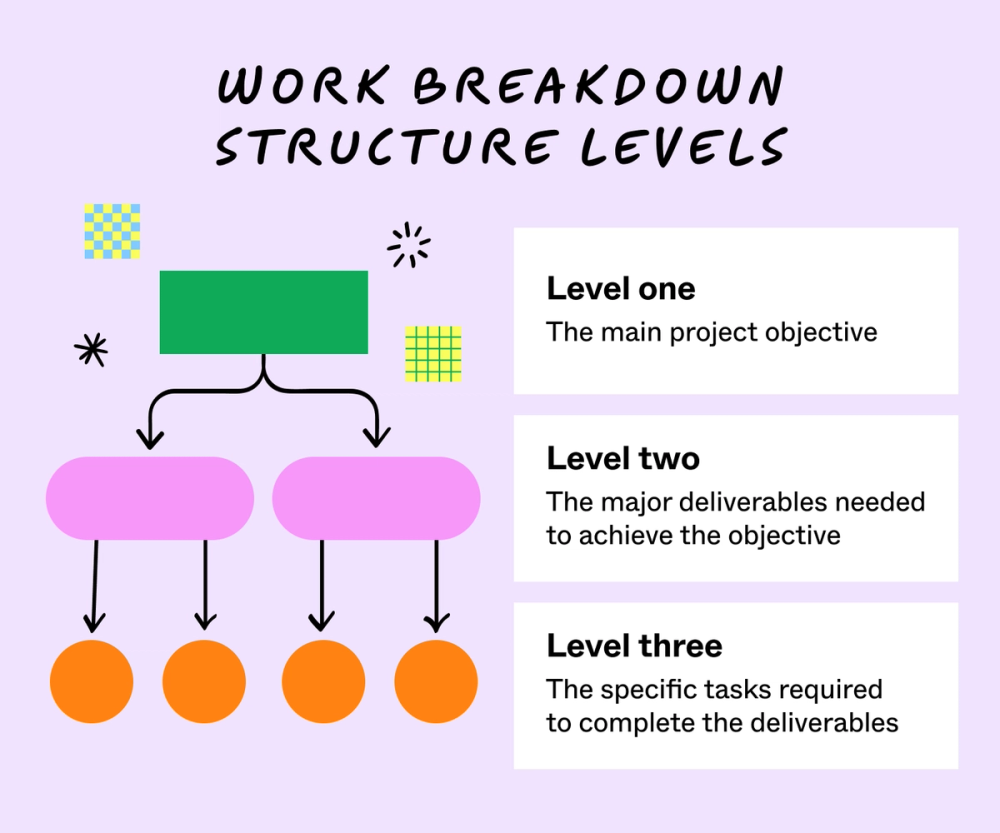
In a WBS, projects are structured into three levels:
- Level one represents the entire project or final deliverable with a high-level overview of the project’s objective.
- Level two, the middle level, breaks the project into major deliverables or phases that must be completed to achieve the main objective.
- Level three, and subsequent lower levels, divide each deliverable into more specific tasks and work packages assigned to each individual or team.
For example, if your team is designing an app, level one would represent your main objective: the final app ready for launch.
Level two would outline the major deliverables needed to achieve this goal, like UI and UX design, development, testing, and quality assurance (QA).
Level three would break down specific tasks associated with each deliverable. For instance, under UI/UX design, you might include tasks like creating wireframes and prototypes. Under testing and QA, you might focus on user testing and implementing feedback.
Types of work breakdown structures
Work breakdown structures can be organized differently depending on your project needs. Choose your WBS structure based on how your team works best:
- Deliverable-based WBS organizes work around specific outputs. In app design, this means structuring around elements like UI design, backend development, and quality assurance.
- Phase-based WBS follows project stages sequentially. Teams move through distinct periods like planning, design, development, and launch phases.
- Team-based WBS aligns with department responsibilities. This approach organizes work by groups: UI/UX design team, development team, and marketing team.
Key elements of a work breakdown structure
A strong WBS combines several essential components that work together to keep projects organized. Think of these elements as building blocks that create your complete project picture:
- WBS dictionary: provides descriptions of each element in the work breakdown structure, like the scope, deliverables, task names, milestones, assigned resources, and other essential details
- Work packages: the lowest level of a WBS that represents a group of related tasks, including clear activities, resources, timelines, and outputs
- Project deliverables: the tangible or intangible outputs that result from completing the work outlined in the WBS and fulfilling the project’s main objective
- Tasks and subtasks: the individual activities required to complete project deliverables, including subtasks, which are the smaller, detailed components that break a task down into manageable steps
- Control accounts: related work packages that help track costs, schedules, and performance for a specific section of the project, providing a way to monitor and control the work
- Dependencies: the relationship between tasks, showing how one task relies on the completion of another, making it easier to determine any conflicts to ensure projects stay on schedule
- Milestones: key points in the project timeline that represent the completion of a major deliverable or project phase, serving as a check-in point to monitor progress and whether a project is on track for completion
How to create a work breakdown structure in five steps
Follow these five steps to create a clear, actionable WBS that serves as a roadmap for project success.
Step 1: Identify project goals and objectives
Understanding your aim guides your WBS process). Start with a clear project charter that outlines key stakeholders, timelines, and resources. Establish KPIs to monitor performance as you build a comprehensive breakdown of required work.
Step 2: Outline your deliverables
Break down your project into key deliverables, ensuring each one aligns with the project’s scope and objective (level two). Each deliverable should represent a tangible outcome necessary for project completion. Select a type of WBS and organize the deliverables into a few main categories, such as project stages for phase-based work breakdown structures, departments, or outputs. For example, deliverables for a website redesign project could include design, development, testing, and QA.
Step 3: Create and assign tasks
Break down deliverables into smaller, actionable tasks (level three). Define specific tasks within each package, and estimate resource needs. Use a RACI matrix to define responsibilities across teams, ensuring everyone understands their role in the project.
Step 4: Establish milestones
Milestones in your WBS provide checkpoints that help track progress and maintain momentum toward project completion. Identify critical phases in your project timelines and set clear completion criteria for each milestone.
Milestones are essential for visualizing a project’s progress and helping your team understand how each task contributes to the overall project goal. Clearly defined milestones can also prevent potential delays and provide opportunities to celebrate achievements, motivating your team to finish the project.
Step 5: Review and monitor the WBS
Implement a system for tracking progress and making any necessary adjustments throughout the project lifecycle. You can do this by setting up recurring review meetings with team members and stakeholders. Keep your WBS up-to-date to ensure it accurately reflects the current state of your project and aligns with future needs.
Monitoring will help you make data-driven adjustments, like reallocating resources, modifying timelines, or restructuring work packages based on performance metrics or team feedback.
Creating a work breakdown structure is simple with FigJam’s premade WBS template. Open it in FigJam, then fill in the necessary items to estimate project scopes and plan schedules accordingly.
A well-structured WBS provides the foundation for identifying your critical path method and predicting an accurate launch date.
Work breakdown structure examples
Here are some examples of work breakdown structures to help you better understand how to visualize your project plan.
Example 1: Company rebrand

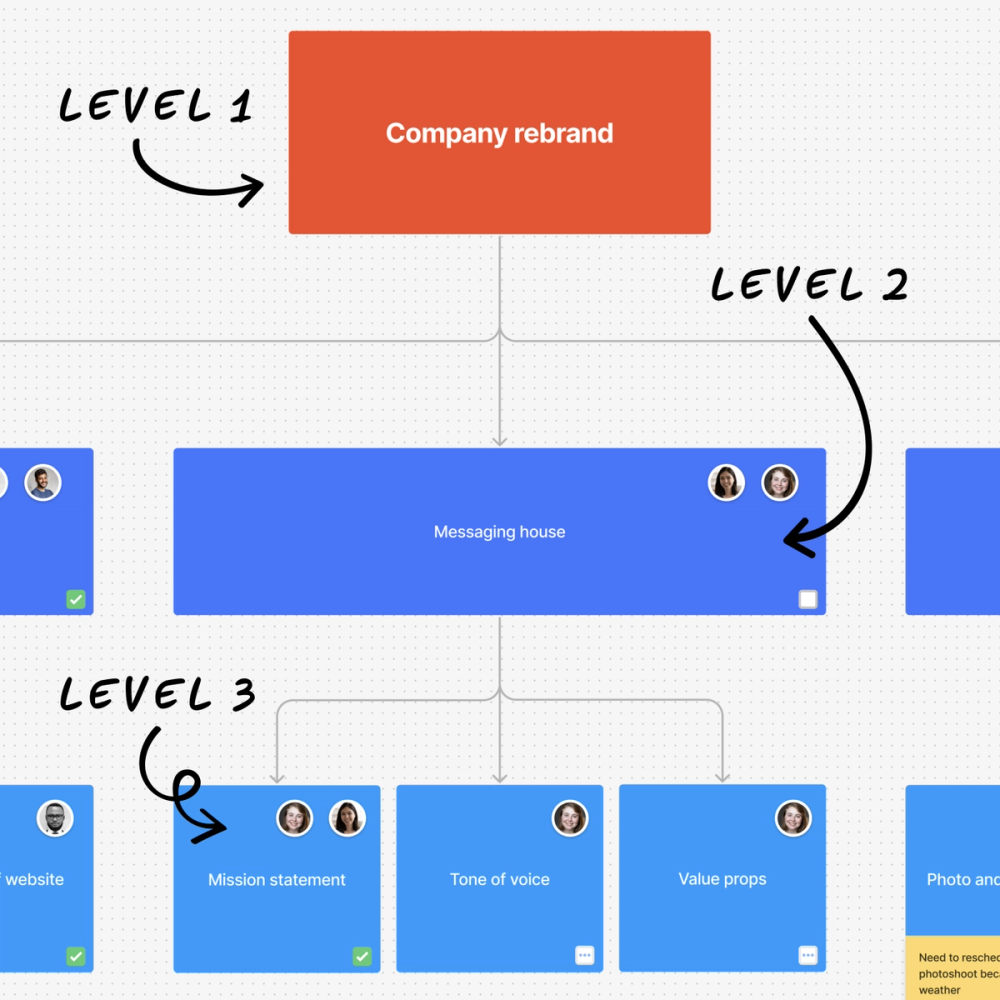
This simple WBS highlights a company rebrand, with different deliverables and tasks needed to complete the high-level goal.
Level one:
- Company rebrand
Level two:
- Brand guidelines
- Messaging house
- Asset creation
Level three:
- Brand guidelines:
- Develop brand colors
- Craft mood board
- Audit website UX
- Messaging house:
- Mission statement
- Tone of voice
- Value props
- Asset creation:
- Photo and video shoot
- Editing
- Graphic design
Example 2: Website redesign

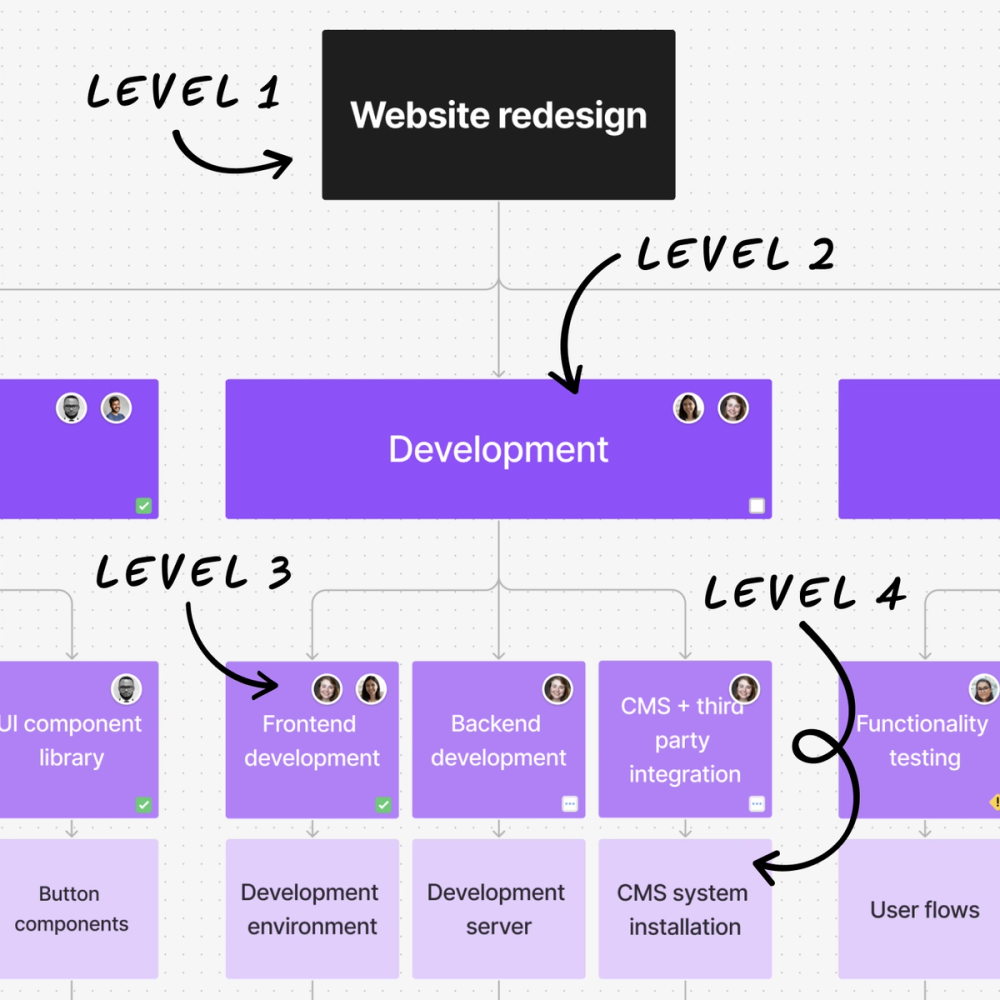
This example WBS outlines the deliverables and tasks needed to redesign a website. It includes a fourth level that breaks down work packages into even smaller, more manageable tasks. For example, the functionality testing work package includes smaller tasks like testing user flows and verifying third-party integrations.
Level one:
- Website redesign
Level two:
- Design
- Development
- Testing and QA
Level three:
- Design:
- Brand guidelines
- Wireframes and prototypes
- UI component library
- Development:
- Frontend development
- Backend development
- CMS and third-party integration
- Testing and QA:
- Functionality testing
- Mobile responsiveness
- Performance testing
Level four:
- Brand guidelines:
- Color palette
- Logo usage guidelines
- Design system documentation
- Build wireframes and prototypes:
- Homepage wireframe
- Mobile navigation
- Interactive prototypes
- Create UI component library:
- Button components
- Navigation structure
- Notification system
- Frontend development:
- Development environment
- CSS framework
- Page templates
- Backend development:
- Development server
- Security measure configuration
- Search functionality
- CMS and third-party integration:
- CMS system installation
- Payment gateway
- Chat functionality
- Functionality testing:
- User flows
- Third-party integration
- Payment processing
- Mobile responsiveness:
- iOS and Android testing
- Browser testing
- Responsive breakpoints
- Performance testing:
- Page speed tests
- Response times
- Server performance
Four pro tips for work breakdown structures
Follow these five practical tips to organize your WBS effectively.
- Follow the 100% rule. Your WBS should adhere to the 100% rule, which includes 100% of the work required to complete the project. Every deliverable, task, and subtask should be included to ensure you don’t overlook critical steps.
- Use the 8/80 rule. For work packages, aim to follow the 8/80 rule, which means they should take no less than eight hours and no more than 80 hours to complete. This helps manage tasks more effectively, allowing for better resource allocation and project planning.
- Use nouns for deliverables. Clearly define deliverables using nouns that describe what will be produced, like “Design Mockup.” Avoid using action verbs, as they emphasize activities rather than outcomes.
- Start with templates. Save time by starting with a WBS template to tailor to your project needs. FigJam’s WBS template provides a strong foundation to kickstart your next project.
Create a work breakdown structure with FigJam
A WBS is more than just a project planning tool—it’s your project’s roadmap to success. By breaking down your project into manageable tasks, you can boost team alignment, accurately track progress, and confidently achieve your project goal.
If you’re ready to start building your WBS, FigJam can help. Here’s how:
- Use FigJam’s collaboration features and invite teammates to collaborate directly on your WBS to ensure everyone is aligned. Then, conduct check-ins and keep your project on track with FigJam’s team meetings feature.
- Build a WBS from scratch with FigJam’s diagramming tool. Use lines, arrows, and shapes to map out task deliverables and milestones visually to create a clear project plan.
- Explore the Figma Community for WBS ideas to inspire yours, or browse through other project management templates in Figma’s template library.
Ready to start project planning?
Keep reading

How to create an effective action plan
Learn how to create an action plan with FigJam in this guide.

How to write SMART goals
Learn how to make goals that are specific, measurable, attainable, relevant, and time-bound.


What is a Gantt chart?
Learn how to create a clear timeline and structure for your project teams.