Turn your prompts into visual assets and slide decks with the Figma app in ChatGPT




We’re expanding the capabilities of the Figma app in ChatGPT, so you can turn your ideas into creative assets and presentations that you can polish in Figma Buzz and Figma Slides.
Share Turn your prompts into visual assets and slide decks with the Figma app in ChatGPT
This fall, we partnered with OpenAI to launch the Figma app in ChatGPT With the new Figma app in ChatGPT, you can turn conversations into FigJam diagrams like flow charts, Gantt charts, and more. With marketing templates that are now connected to your design system, plugins that pull in your favorite apps, and video trimming in Figma Buzz, we’re giving designers and marketers new tools to create branded assets that speak volumes. Today, we’re announcing new features in Figma Slides that unlock high-fidelity design and cross-functional collaboration.
Turn your ChatGPT brainstorms into FigJam diagrams

Three new features to help build brand momentum with Figma Buzz

How teams tap into the power of design with Figma Slides
Get the word out with Figma Buzz
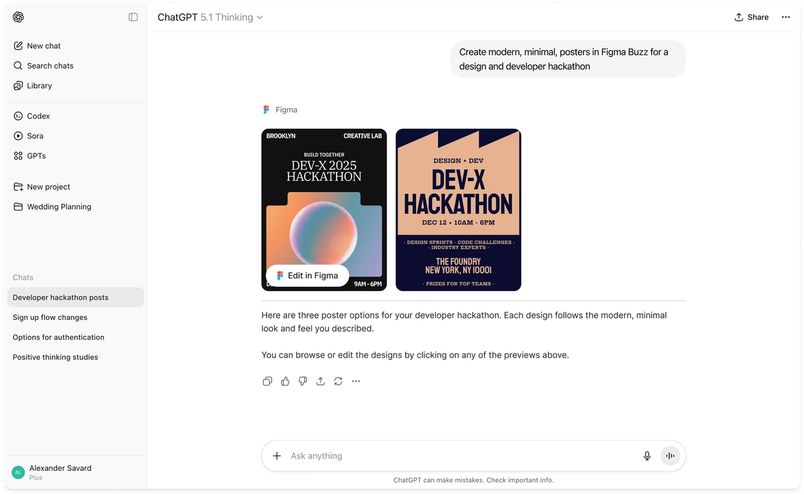
Figma Buzz makes it easier for anyone—regardless of design expertise—to create beautiful, polished visual assets, from posters and invitations, to digital ads and video collages. Now you can prompt ChatGPT to create a jumping-off point that you can bring into Figma Buzz to riff on. For example, below, we asked ChatGPT to create “modern, minimal posters” to promote a design and developer hackathon. The Figma app in ChatGPT responded with two variations on the visual identity, layout, and copy.

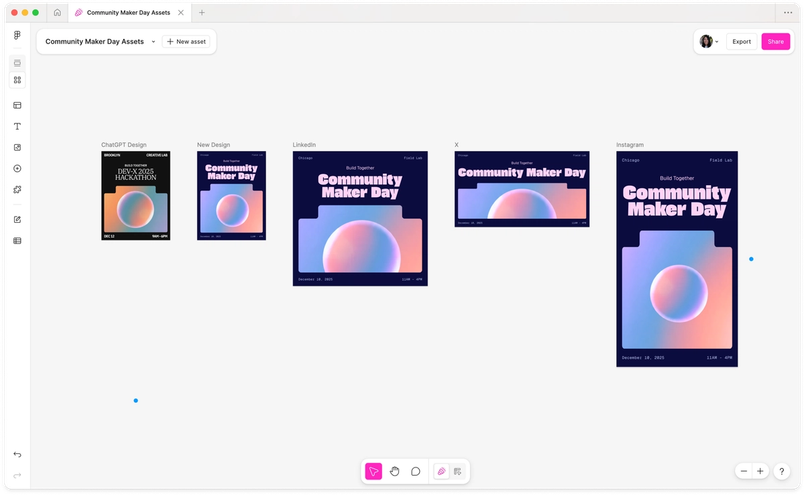
From there, we opened the assets in Figma Buzz and iterated on the first design, updating the copy and typography. Because Figma Buzz has all the power of Figma Design, we could use blend mode to tweak the image for a new color palette. Then, we resized the assets for a range of social media platforms by choosing from preset sizes in Figma Buzz.

Pull your story together in Figma Slides
We know that an impactful presentation can make all the difference in a client pitch, internal review, or sales call—but kicking off a new deck is often the hardest part of the process. Starting today, you can prompt ChatGPT to create a Figma Slides deck: Provide an outline up front, or let ChatGPT suggest an ideal flow. For instance, we asked the Figma app in ChatGPT to “create a polished ‘year in review’ deck template” that included a number of key narrative beats like “goals and priorities,” “highlights from last year,” and “completed projects.” ChatGPT gave us two templated options to use as starting points.

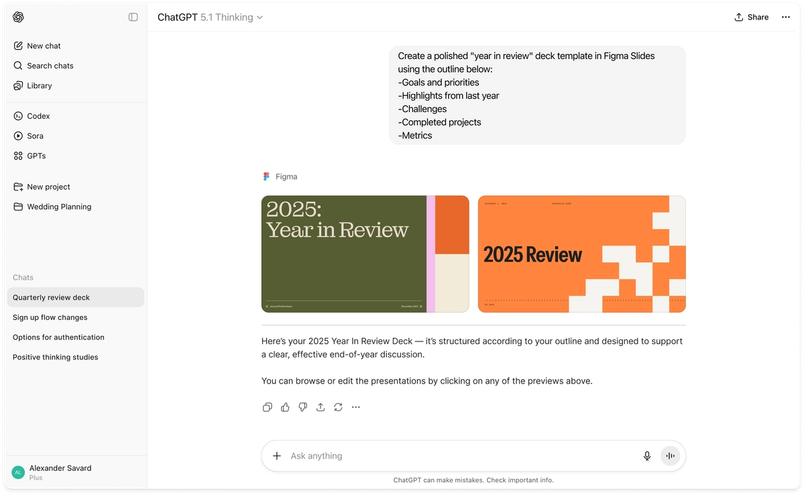
Once we were in Figma Slides, we were able to choose which option best fit our presentation style and continue building and refining as a team. We were able to replace generated images with our own assets and update the template style, finessing the color palette and typography to stay true to our brand guidelines. Working in Figma Slides also allowed us to spark two-way conversations with live polls, stamps, and alignment scales. From first draft to finishing touches, the whole team could help shape the story.
All ChatGPT users outside the EU can now use the Figma app. Figma Buzz and Figma Slides are currently in beta in the Figma app. For more information about how the app works and where it’s available, visit our help center. We’re thrilled to bring the power of Figma Buzz, Figma Slides, and FigJam to more people, and can’t wait to see what you make.