Three new features to help build brand momentum with Figma Buzz



With marketing templates that are now connected to your design system, plugins that pull in your favorite apps, and video trimming in Figma Buzz, we’re giving designers and marketers new tools to create branded assets that speak volumes.
Share Three new features to help build brand momentum with Figma Buzz
Product development doesn’t just end after you ship code. The next step is making sure your product finds its audience. That’s why we launched Figma Buzz—to help brand and marketing teams create beautiful, on-brand assets at scale. Whether it’s social media posts, digital ads, or event promotion, Figma Buzz allows brand designers to build high-quality templates To create self-serve templates that bend—but don’t break—brand designers need to consider work through a marketing lens. Here’s how to set up editing guardrails and design layouts that flex and scale.

8 tips for designers building branded templates in Figma Buzz
But that’s just the beginning. We’ve heard valuable feedback about how Figma Buzz can be even more powerful. Today, we’re answering those requests with three new features that deepen customization and control, so teams can build high-impact assets that stay true to the brand.
- Configurable templates built on design systems: Set up and publish templates using component properties, so it’s simple for marketers to browse and switch between flexible templates without having to sift through hundreds of template variations.
- Plugins: Easily access and run plugins that help with digital asset management, translation, animation, and more. Teams can also create and publish internal plugins.
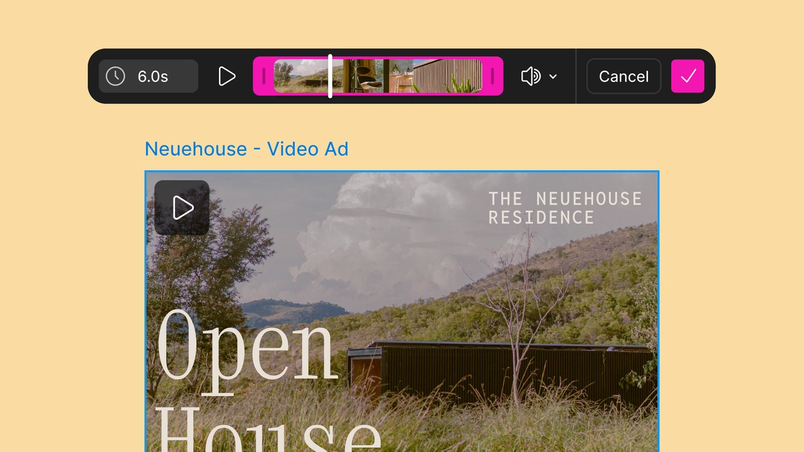
- Video trimming: Get even greater control of how videos show up in your asset by trimming them directly in Figma Buzz.
Build marketing templates from component properties
If you’re not sure how to set up and use component properties in a design system, check out our Help Center article.
Templates keep teams from needing to build assets from scratch, but they also need to make room for variation. Depending on the context, marketers may need to select the right layout for Instagram or LinkedIn, switch up color combinations, add logos or CTAs, or swap illustrations. To manage these variables, marketing templates in Buzz are now connected to your design systems. Brand designers can copy templates they’ve created in Figma Design using component sets and properties, and paste them into Figma Buzz, where those properties will automatically work.

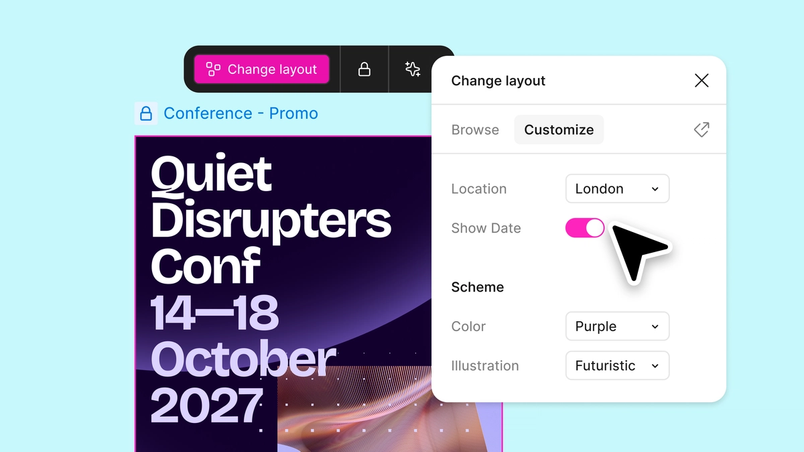
For collaborators, it’s much easier to browse and find the right template set in the template picker, and customize from there. Using the “Change layout” panel, they can choose layout variants using dropdowns, toggle elements on and off, or swap approved instances.
For more details about how to publish and use template variations, visit our Help Center.
Connect to your favorite apps with plugins
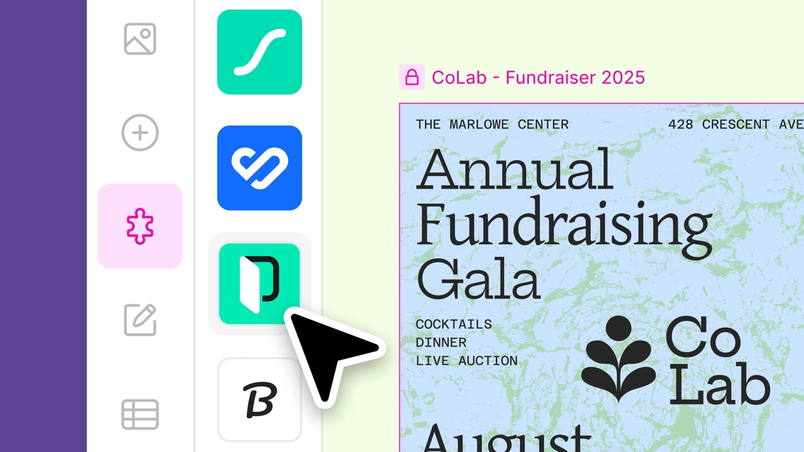
Plugins have long been a powerful way to bring other tools you use into Figma, and now, they’re available in Figma Buzz. To get you started, we’re launching with a set of highly requested plugins focused on digital asset management (DAM), translation management systems (TMS), and animation—all easily accessible from the plugins tab. Here are some of the highlights.

Digital asset management
We know marketing teams rely on DAMs to organize, analyze, and track massive libraries of digital assets. To cut down on context switching, connect to these tools so you can pull in brand-approved images without leaving Figma, and upload your latest designs to keep everything in sync:
Translation management systems
A TMS plays a crucial role in helping marketing teams scale their content globally, whether it’s through localizing campaign copy, facilitating cross-functional collaboration, or situating copy within design context. Now, teams can pull translations from their TMS directly into templates in Figma Buzz:
Animation
Teams can now bring their assets to life with motion design plugins in Figma Buzz. Whether it’s to call attention to a headline, insert an eye-catching visual, or mimic an on-screen interaction, these plugins make it simple to animate without leaving the canvas:
Beyond this list, teams can also create and publish their plugins for internal use, or the Figma Community.
Trim and edit videos
Static assets can pack a punch, but videos are an especially powerful medium for storytelling. When we launched the ability to import and export videos in Figma Buzz, we sweated the details To get videos working just right in Figma Buzz, Product Designer Natasha Tenggoro used Figma Make to prototype complex ideas when words alone fell short. We show three of them here, prompts and all.

Version control: How Figma Make helped us figure out video playback

We’re excited to keep improving Figma Buzz, so brand designers and marketers have a shared space to build impactful, on-brand assets that get their story heard. Try out template variations, plugins, and video editing in Figma Buzz today.