Cooking with constraints: A designer’s framework for better AI prompts


Design and cooking share a truth: Preparation determines the outcome. Structured prompts turn AI from guesswork into a reliable design partner.
Share Cooking with constraints: A designer’s framework for better AI prompts
Hero illustration by Jimmy Simpson
Every night after work, I start my second shift as the home cook for my family. Prep might begin during an afternoon break—chopping veggies, marinating proteins, setting timers for the oven or Instapot. Cooking is a lot like design. Knowing what to cook, when to season, how to prep, and when to use restraint; every action matters to get the desired outcome.
I never say “thank you” to my knives. Or to the stove, the oven, or the microwave. There’s a reason their buttons don’t say “please start.” Tools don’t require empathy. They require clarity.
Large language models are no different. They are machines built to interpret, not to feel. They export empathy beautifully, but they do not require it as input. In fact, the more polite you are to a model, the more ambiguity you introduce.
Models want clean instructions and clear constraints. And while prompt fluency is becoming table stakes across many roles, for product designers, it's a uniquely critical skill. That’s because models are, by nature, probabilistic and variable. Design is the opposite: precise, repeatable, and intentional. Bridging that gap requires systems thinking, not just language skills.
Stochastic refers to randomness in a system; in LLMs, it explains why outputs are probabilistic rather than fully deterministic.
Where code has structure and AI has stochasticity or randomness, design sits in the middle. It has to be legible. That’s what makes prompting in a design tool different: You can’t just vibe your way to a working prototype. You need inputs that collapse uncertainty into structure.
Mise en place
In cooking as in prompting, prep is everything. As they say in haute cuisine, mise en place, meaning "everything in its place" is how you bring order to chaos before heat ever hits the pan. Spend the time prepping correctly, and you’ll spend less time fixing later.
As designers, many of us are particular about our environment—the music we play, the lighting we set, and where everything is arranged on both our desk and our desktop. Sometimes it means giving yourself a new file, a clean page, an empty canvas. With prompting, we need to make sure that we have certain things arranged, too. Every prompt needs clarity, context, and constraints. I've been building my own prompt framework, and this TC-EBC structure—Task, Context, Elements, Behavior, Constraints—has served me well. This kind of structure doesn’t just help you get better results—it’s aligned with what prompt engineers and system designers are converging on across disciplines. A well-circulated checklist from a Reddit user with 1,000+ hours of LLM prompting arrives at the same priorities: clear task, constraints, modular sequencing. Microsoft’s Semantic Kernel documentation reinforces this too, with prompt design patterns that emphasize intent definition, modular construction, and predictability over cleverness. It's more about alignment of intent than it is an exacting recipe.
For example, let’s say you’re designing a prompt for a new Figma Make Today, all Figma AI features and products are moving out of beta, including Figma Make—which is now available for everyone to try. Here’s how teams are using the prompt-to-app tool to dream bigger, move faster, and work better together.
Prompt, prototype, perfect: Figma Make is now available to all users
Please build a new app that allows home cooks to take a picture of their pantry or freezer to suggest recipes. Remember any allergies or preferences. Thanks!
That’s the equivalent of throwing all your ingredients into a pot and hoping for a meal. And honestly, I’m not thrilled with what we got back.

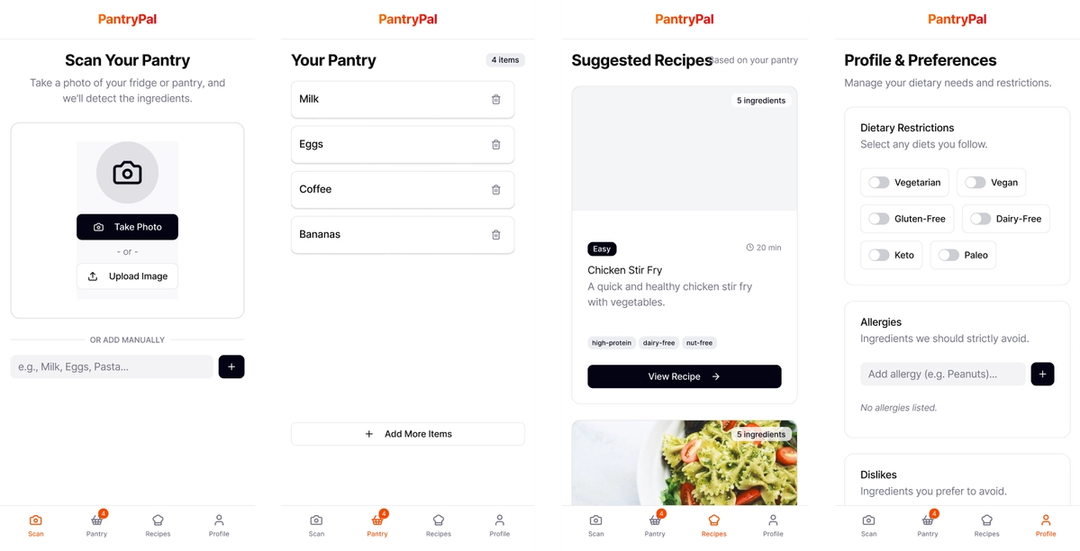
Without discussing the visual design, this result is generally lacking. It’s not a bad starting point—it has some basic features and functions, but on the whole it is uninteresting, and just a step above a wireframe.
Now let’s try the same prompt adapted to the TC-EBC format:
Task: Build an AI-powered meal suggestion app using pantry/fridge photo inputsContext: Home cooking assistant for households with dietary restrictionsElements: Camera input, pantry scanner, dietary settings form, meal suggestions list, recipe cardsBehavior: User uploads photos; app scans inventory, filters by diet prefs, suggests recipesConstraints: Mobile-first, iOS/Android, accessible UI, supports multiple household profiles
As you can see, the TC-EBC formatted prompt is clear, scannable, and explicit about desired behavior and UI. It is also much more likely to generate the result you’re looking for, while the initial prompt was rambling, vague, and buried the task in pleasantries. The structured version replaces guesswork with clear guidance. A well-built prompt disambiguates intention, just as a great design system can provide the appropriate structure and guidance to a design.

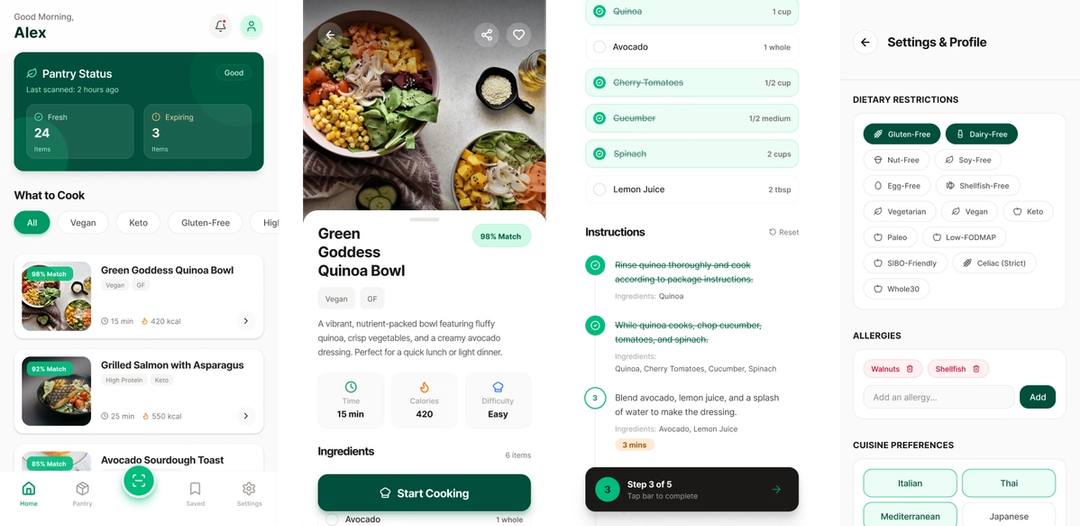
And the results? The screen on the left was the initial one-shot from the above TC-EBC structured prompt. The context, elements, and constraints provided what Figma Make (and the underlying LLM) needed in order to build the app we wanted, the app we intended to build. In addition to a richer, more visually appealing design, the refined prompt created better scaffolding to build on.
Ask what context your model needs to succeed, then remove everything else. Unnecessary fluff slows down the process, confuses the model, or at a bare minimum, forces the LLM to spend additional cycles deciphering meaning. Elegance in AI, like elegance in design, is a process of subtraction. The key is paring down to the essentials, which requires meticulous preparation and a robust, well-defined design system to ensure clarity and coherence.
Looking for help with your prompts? Try my Make Prompt Assistant GPT. I entered the initial “polite” prompt into the GPT and told it to give more structure and clarity to the prompt to create a more compelling app. The result was the TC-EBC prompt we used above.
Refine the recipe
A well-structured prompt reads like a recipe card: short, direct, and instructive. Every “maybe,” “just,” or “please” dilutes intention and adds noise. The goal isn’t to be verbose or polite—it’s to be clear.
We use TC-EBC to create that structure:
- Task defines what you’re building.
- Context frames why and for whom. It prevents drift.
- Constraints set the guardrails, keeping the system controlled and consistent.
Each part of the TC-EBC structure narrows ambiguity and strengthens intent. Together, they turn guesswork into guidance. For all of us who’ve spent hours staring at an LLM thinking-waiting-reasoning-adjusting-deciding status message, we understand intuitively that being precise is an energy-saving, clarity-building design choice. Consuming fewer tokens becomes an exercise in efficiency.
Let’s look at another example using a scenario that most product designers have found themselves dealing with lately:
Vague prompt:
Write a description for this feature. Keep it simple but also exciting. Maybe like how Apple does it?
TC-EBC prompt:
Task: Write a short product feature description.Context: For a new “One-Click Export” feature in a design tool.Elements: Headline (max 7 words), subheadline, single-sentence body copy.Behavior: Body should imply speed, simplicity, and trust.Constraints: No jargon. Match the brand tone of Duolingo or Notion. Total length: under 200 characters.
The TC-EBC prompt is much better at defining what you want, and how to get there. Providing the constraints and specific direction for elements and behaviors undoubtedly gets you closer to your mark, and I’d posit your results will be quicker, and more precise.
As Figma Dev Advocate Jake Albaugh says, “The more direct the language, the more efficient the exchange.” Specificity doesn’t mean rigidity. It’s precision paired with adaptability; tight enough to hold its shape, flexible enough to evolve. Like design and cooking, it’s about balance.
Layer in flavor
Prompting is iterative. You taste, test, and adjust as you go. The goal isn’t perfection, it’s calibration, and each round will reveal new notes, gaps, or overreaches in the model’s reasoning. Whether you’re building an app in Make, working on a book idea with ChatGPT, or writing code with Cursor and Figma’s MCP server Today we’re announcing the beta release of the Figma MCP server, which brings Figma directly into the developer workflow to help LLMs achieve design-informed code generation.Introducing our MCP server: Bringing Figma into your workflow
Pro tip: Use an LLM like ChatGPT, Claude, or Gemini as a prompt partner to keep your makes cleaner. Teach it the TC-EBC framework, and tell it to assist you in refining your revision prompts. Add images, screenshots, and your desired outcome, and the LLM will provide back well-structured revision prompts. For revision prompts, I always add directions in the Constraints part of the TC-EBC prompt to make it abundantly clear what the tool should not be adjusting.
To get the most out of revision prompting, it’s important to define what belongs in your model’s line of sight and what doesn’t. Anthropic calls this context engineering: curating what the model sees, remembers, and weighs. The goal is to keep intention pure. If mise en place is preparation, context is discipline.
In Figma Make, you can provide a wide range of context From redrawing product roadmaps to building starter templates, these Figma Make ideas from Maven Clinic, Pendo, ServiceNow, and LinkedIn show how designers can prompt a path forward.
4 ways for design teams to chart new territory with Figma Make
Additionally, you can add directions on APIs and/or dependencies like three.js or D3js.org that you want Make to use and reference. And while using a structured approach to your prompt like TC-EBC is still important in revision prompts, added context gives it body and the unique flavor you expect from polished, shippable designs.

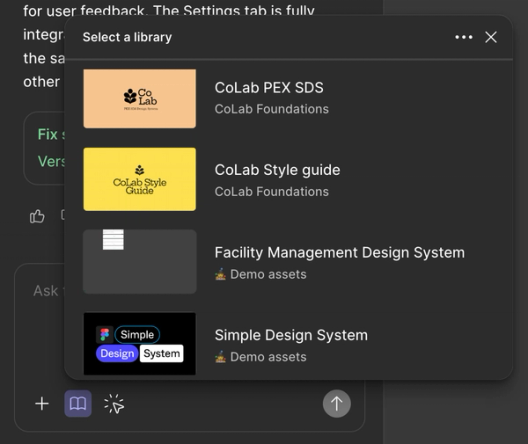
You can also layer in style context by adding a library, add behavioral and structural guardrails by adjusting Make guidelines, or add deep context to your prompts via MCP connectors Today we’re announcing the beta release of the Figma MCP server, which brings Figma directly into the developer workflow to help LLMs achieve design-informed code generation.Introducing our MCP server: Bringing Figma into your workflow

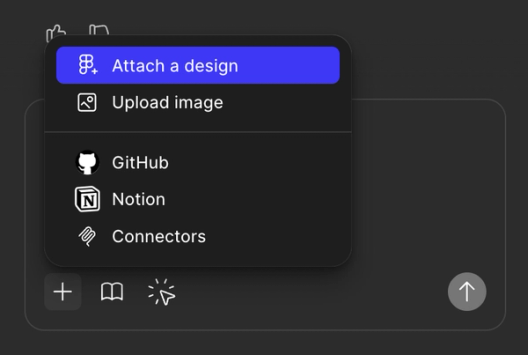
Think of this as creative debugging. Over time, revisions teach the model your design style and approach, and you begin to better understand the model's limitations—how much complexity it can absorb, where it needs structure, and when it benefits from simplicity. The process grows faster, tighter, and more expressive with each round.
Working with AI models is not an exact science, but adding design context makes the process more deterministic, and less like throwing ingredients at your stove and hoping for a meal. You end up with prompts that feel less like recipes on paper and more like practiced technique.
Choosing the right knife
Every model cuts differently. Their architecture, training data, and alignment shape each one into a specific kind of blade—some are designed for fine detail, others built for broader, faster cuts. Treat them like a well-stocked toolkit: When you understand the edge each model brings, you can choose the one that fits the workflow and sharpens the outcome.
In Figma Make, our default model is Claude Sonnet 4.5. It’s great at summarizing, following nuanced structure or light context, and delivering a friendly tone. CS 4.5 tends to infer intention gracefully when prompted clearly, and it favors architectural prompts with rich embedded logic, like the TC-EBC prompt framework. Think of Claude like a well-trained sous chef: If your instructions are sharp, it’ll execute beautifully. If they’re vague, it’ll try to please you—sometimes to a fault.
We recently introduced Gemini 3 We ran Gemini 3 Pro through a series of design exercises in Figma Make. Here’s what stood out.Gemini 3 Pro is now available in Figma Make
Lastly, GPT-4 and now GPT-5 are used in my Make Prompt Assistant GPT and are generally some of the more well-known models. GPT is the known quantity: smart, verbose, and incredibly capable, but occasionally a little too eager to help. It likes examples. It responds well to demonstration. And it remains the best generalist available.
Prompt fluency isn’t just about structure. It’s about model choice. And in Figma Make, we’re giving you the option to switch models explicitly. That means you can now match your prompt, and your expectations, to the model best suited for the job. This is how prompting becomes a design decision, not just an interaction.
So which should you use? Depends on the job:
Use Claude as a balanced collaborator that can follow layered structure.
- Great for: Clean summaries, structured follow-through, and friendly, lightly contextual work
- Cuts best when: Your instructions are crisp and your logic is embedded right in the prompt (TC-EBC fans, rise)
- Vibe: A well-trained sous chef—give it sharp direction, and it’ll plate something beautiful; go vague and it’ll try a little too hard to make you happy
Reach for Gemini when you want fast, consistent results on narrow tasks.
- Great for: Tight prompts, fast structured tasks, and anything with clear constraints
- Cuts best when: Precision is required but the input is short—rename this, swap that, refine the wording here
- Vibe: The sharp utility knife—crisp, fast, no patience for hand-waving; give it a narrow job and it’ll slice cleanly every time
Go with ChatGPT for reasoning, examples, or exploratory reframing.
- Great for: General-purpose reasoning, rich examples, long-form structure, and anything that benefits from “show, don’t tell”
- Cuts best when: You provide demonstrations or patterns it can follow—it sharpens itself by mirroring what you model
- Vibe: The classic chef’s knife everyone trusts—incredibly capable, eager to help, and still the most reliable generalist in the drawer
Plating the dish
By the end of any LLM-assisted design or development session, you’re not just generating output. You’re designing a repeatable system for the future. You started with clear intent. You structured the logic. You chose the right model for the job. And if you’ve done it well, you can trace the result back to the decisions that shaped it.
Want to learn the latest on design systems? Check out our resources on building and scaling design systems in the age of AI.
Prompting isn’t about magic words or clever phrasing. It’s about architecture, context, and tool fluency. It’s about designing a workflow where the model doesn’t have to guess. It executes. The same way design systems let teams move faster—and with more consistency—structured prompting lets us translate intention into working prototypes.
That’s the new creative loop: Start with clarity, build up with context, and refine with feedback. It’s craft and precision, not charm, that get you a seat at the table.

Explore Software Is Culture, a collection of stories tracing the impact of design on how we think, feel, and connect.
Greg leads Advocacy in North America at Figma and is a design leader with 25+ years of experience across UX, product, brand, and cross-discipline systems practice. He explores how thoughtful human-centered communication can shape the way we collaborate with intelligent tools and practical design workflows. When he's not working, he's out walking with his wife, hanging with his kids, or in the ocean (or a pool, reluctantly) swimming.