4 ways for design teams to chart new territory with Figma Make



From redrawing product roadmaps to building starter templates, these Figma Make ideas from Maven Clinic, Pendo, ServiceNow, and LinkedIn show how designers can prompt a path forward.
Share 4 ways for design teams to chart new territory with Figma Make
Hero illustration by Marco Quadri
With Figma Make Today, all Figma AI features and products are moving out of beta, including Figma Make—which is now available for everyone to try. Here’s how teams are using the prompt-to-app tool to dream bigger, move faster, and work better together.
Prompt, prototype, perfect: Figma Make is now available to all users
1. Get your ideas back on the roadmap
A healthcare platform for women and families, Maven Clinic helps their members navigate everything from fertility treatments and pregnancy, to parenthood and pediatrics, to menopause and midlife health. In early 2024, they launched the employer-sponsored Maven Managed Benefit program, which connects members to a closed network of vetted fertility clinics. To meet tight deadlines, the team had to delay certain features for the launch, including a map-based fertility clinic finder. When it came time to revisit the idea, Maven Product Design Manager Loric Avanessian knew she’d need more than a mockup to drum up support—so she turned to Figma Make.
“A designer’s superpower is being able to turn ideas and conversations into something tangible to get people excited about new features,” says Loric, who fed some of her initial designs into Figma Make to create a high-fidelity prototype that people could actually interact with. “It looked like it belonged in our product, and it felt real,” she continues. “It got shared widely in Slack, our CEO commented on it, and I was able to get it back on our roadmap when it could have easily been below our cut line of features to prioritize this year.”
Now teams can copy designs directly from Figma Make into Figma Design for further refinement.
Loric sent the prototype to another designer, who iterated on the design Now you can copy any design from a Figma Make preview to the design canvas, allowing you to edit, iterate, and take your ideas further.Bringing Figma Make to the canvas
Because we started at 45% instead of zero, we were able to design, develop, test, and launch the clinic finder MVP in less than four sprints.
With Figma Make, says Loric, the role of the designer is changing emphasis from execution to taste, strategy, and vision. She describes a recent project where Figma Make preceded the Product Requirements Document (PRD); in fact, the team wrote the requirements based on what was working and what was lacking in the initial prototype. “Figma Make helps you solve the blank-canvas problem by giving you something to riff on,” she says. “It also helps you try a bunch of ideas really fast, and then go back to your core designer skillset of refining and adding polish.”
2. Make time to explore the unknown
In some cases, a net-new product has clear precedents to draw from—and in others, the blueprint isn’t so clear. The AI platform company ServiceNow was in the second camp when they set out to design a dashboard giving customers an overview of the ROI of different AI agents. “Figma Make has been great in this vertical because there are a lot of unknowns that are incredibly hard to research,” says Guy Meyer, senior staff product designer at ServiceNow.
Additionally, separate teams at ServiceNow had differing ideas on how to approach the hierarchy of information on the dashboard. “Figma Make gave me a map to understand, on some level, what people would need to see on a dashboard,” says Guy. “Within five minutes, I could validate some of our ideas.” While it was clarifying to understand what was working, it was even more instructive to see where the initial prototype fell short. For example, the AI agents matrix that Figma Make presented wouldn’t scale, says Guy, because it would become too huge of a grid: “It was a good solution for today, when most companies are nascent with their AI journey, but we’re trying to lay the groundwork for the future when customers may be working with thousands of systems. So, we started looking at more custom solutions.”
The ease with which people can prompt their way to new ideas has “democratized design,” says Guy. “Anyone can prompt their own version, and we’re able to cherry-pick the pieces we like. It also removes the ego and time commitment that ties you to an idea.” Whereas the team would have taken weeks to design and get feedback on different directions, Figma Make tightens the loop to two or three days. “Figma Make is the tool that aligns cross-functional partners because it can quickly execute on artifacts for us to discuss,” says Guy. “That elevates the roles of designers from just execution to leveling up the quality of what AI builds.”
Figma Make is the tool that aligns cross-functional partners...and elevates the roles of designers from just execution to leveling up the quality of what AI builds.
3. Collaborate and rev on new interfaces
With tools for leveraging behavioral and agentic analytics, creating in-app guides, and capturing qualitative feedback, Pendo helps product teams make more informed decisions. When Senior Staff Product Designer Brian Greenbaum was tasked with creating a conversational UI for Pendo, now called Agent Mode, he reached for Figma Make. “It was the right tool because A, I wanted it to look like Pendo; B, I wanted to create multiple variations; and C, It was an experiential design. I wanted to experiment with timing and how messages would come in and out of view,” he says.
Starting with a frame from Figma Design, Brian created an interface in Figma Make to iterate on how reasoning messages and tool call responses would stream in. To play with different variations, he added a drop-down menu that allowed him to choose between more minimal and detailed views, and between single-line or stacked text. Anyone could drop into the file, click around, and understand how the UI would look and feel. Ultimately, the team decided to keep a more persistent trail of messages to orient the user within the tool. Without a design artifact, says Brian, “you’re debating over what’s in people’s minds. If I describe something to you, you have a visual of what that means, and I have a visual, and they may not be aligned.”
Having a tangible design also meant that other people could riff off Brian’s work. When a collaborator suggested replacing the circular loading icon with an animated Pendo logo, he quickly prompted a way to toggle that on. “Before, I would have mocked up static designs because the prototyping may not have been worth it with all these variations,” says Brian. “But with code, I can get it done faster.”
Before, I would have mocked up static designs because the prototyping may not have been worth it with all these variations.
4. Bake your design system into early explorations
At LinkedIn, the design systems team focuses on giving designers the styles, data, and tools they need to create experiences that feel visually aligned with the rest of the platform. Says Grant Blakeman, staff design engineer at LinkedIn, “Just like they come to us and ask, ‘What pattern do I need for this part of the app?’ They’re coming to us for tooling, too.”
Templates in Figma Make allow your team to get started with a file that’s already consistent with brand and product guidelines.
To that end, the team has created a starter template in Figma Make that automatically generates three variations of any design from the first run of a prompt, allowing designers to easily spin up layouts for web, mobile, and tablet, and switch between light and dark modes. “We were trying to get more deterministic outputs that would accurately abide by not just our components and styles, but our product patterns as well,” says Product Designer Cherin Yoo. She also supplied the template with guidelines for frequently used components and internal CSS color ramps. “LLMs make choices within the boundaries we give them,” explains Cherin, “and this template helps us narrow those boundaries.” Recently, the team used the template to demo a premium plan signup page for the leadership team.
To keep user information private during presentations, Product Designer Ray Sun has also customized the code, integrating a set of metadata that populates designs with mock content from fictional companies and people. This way, designers can stay in the flow of Figma Make while knowing that they’re pulling legally vetted data into the template.

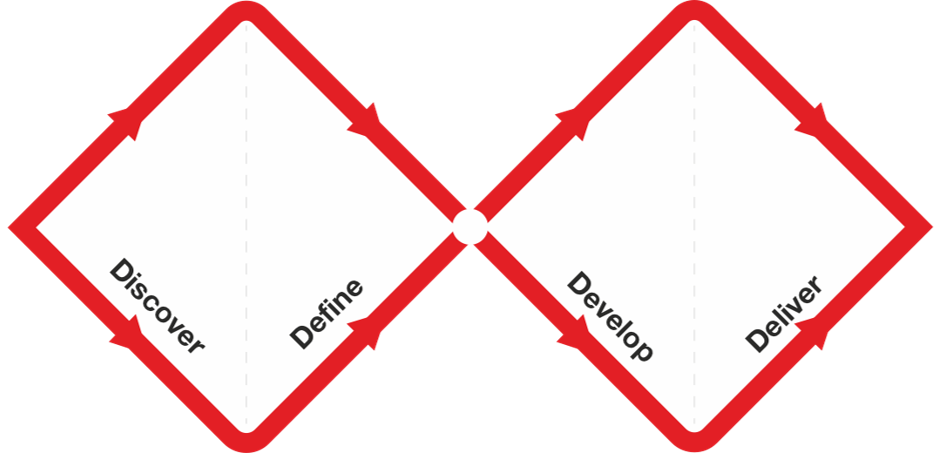
In 2003, the Design Council developed the Double Diamond model of the design process, which identifies four distinct phases: Discover, Define, Develop, and Deliver.
From a workflow standpoint, Figma Make allows designers to not just explore more broadly, but also communicate more effectively, says Giuliano Manno, director of design systems at LinkedIn. “In the classic Double Diamond design thinking pattern, Figma Make allows us to stretch the two vertices of the diamond because it allows us to do faster divergence and exploration work,” he says. “It’s also very good at transferring a mental model around UX patterns when you’re in conversation with engineers and product managers. In five minutes, I can use Figma Make to generate something that helps the idea click for everybody.”
In the classic Double Diamond design thinking pattern, Figma Make allows us to stretch the two vertices of the diamond because it allows us to do faster divergence and exploration work.
“It’s a communication tool with a combination of fidelity and ease-of-use that we never had with other types of prototyping,” agrees Grant, who sees tools like Figma Make lowering the barrier for designers to experiment with code. “I think designers are going to evolve to get more technical, and I’m watching designers who use Figma Make become less afraid to go into the code to play with things. They can now create demos that would’ve taken an engineer a lot of time—or wouldn’t have gotten resourced in the first place.”