Creativity meets precision with Google's Nano Banana Pro


From quick style variations to precise edits, Nano Banana Pro helps teams stay creative without losing context or brand integrity.
Share Creativity meets precision with Google's Nano Banana Pro
When I was 16, I had a side job digitally retouching old photos. It took hours of meticulously nudging dusty pixels across the screen with healing brushes until things looked “good enough.” If you’d told me then that in the future I could just describe what I wanted to fix and get excellent results in seconds, I would’ve laughed (and maybe even thrown the Paint Shop Pro 8 CD at you). But here we are. AI models are improving image capabilities every week, and they are getting surprisingly good. Today’s release of Google’s Gemini 3 Pro (with Nano Banana) is a terrific example of how creative image prompting can add serious value to your work—let’s walk through a few of my favorite aspects.
A new level of design coherence
I tested this new model with a wide variety of design prompts across Figma’s products. From generating a breadth of variations on social assets in Figma Buzz, to prototyping unique details with product illustrations in Figma Design, to riffing on brand imagery for storytelling in Figma Slides—it’s been a blast to see the model’s visual intelligence come to life across the Figma platform. The model is especially good at retaining visual DNA—palette, texture, type, composition, imagery—even as it generates new visual directions. It picks up subtle cues in visual prompts quite well and can make intelligent adjustments that preserve the overall intent of your design or image. It’s able to realistically composite visual input in a way that feels branded and intentional. Here's how it looks in action:
Change the look, keep the feel

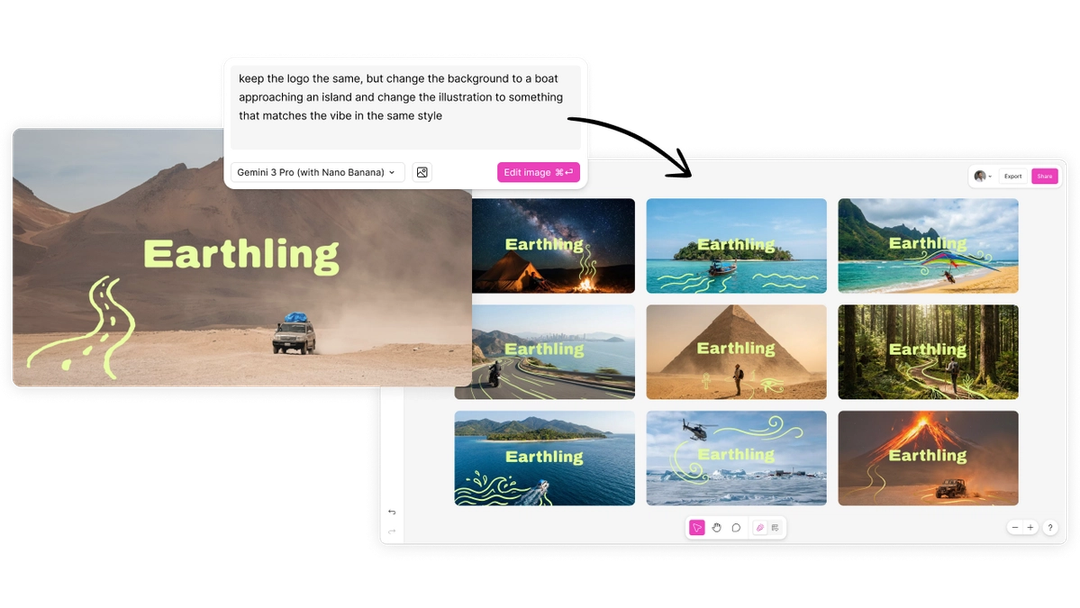
Notice here in Figma Buzz how you can take a simple concept with a logo, background, and illustration, and create riffs retaining the general feel of the brand with just a simple description. It’s cool to see how the model keeps the simplicity and charm of the lightweight drawings, the composition of a smaller subject beside a larger landscape, and the logo accurately intact without distortions.
Often you’ll have a photo or an illustration that you’ll want to adapt to a specific context. In this example, I took a series of illustrations Nano Banana Pro made for a fictional news app about “winter things to do in New York,” and adapted them with simple prompts so that when you switch to dark mode, the illustrations light up. It might’ve taken hours to recreate all of these images to the point where I probably just wouldn’t have done it; instead I was able to play out this delightful concept with just a few words.
Extend your work in new angles
Here, I took an illustration for a fictional astrology app, and set it into a scene of someone reading in a cozy environment for a deck I was making in Figma Slides. Not only did the model accurately place the image to the phone, it also took cues from a reference mood board to make the lighting of the scene match—it even creatively added a star light which felt like just the right vibe for the concept.

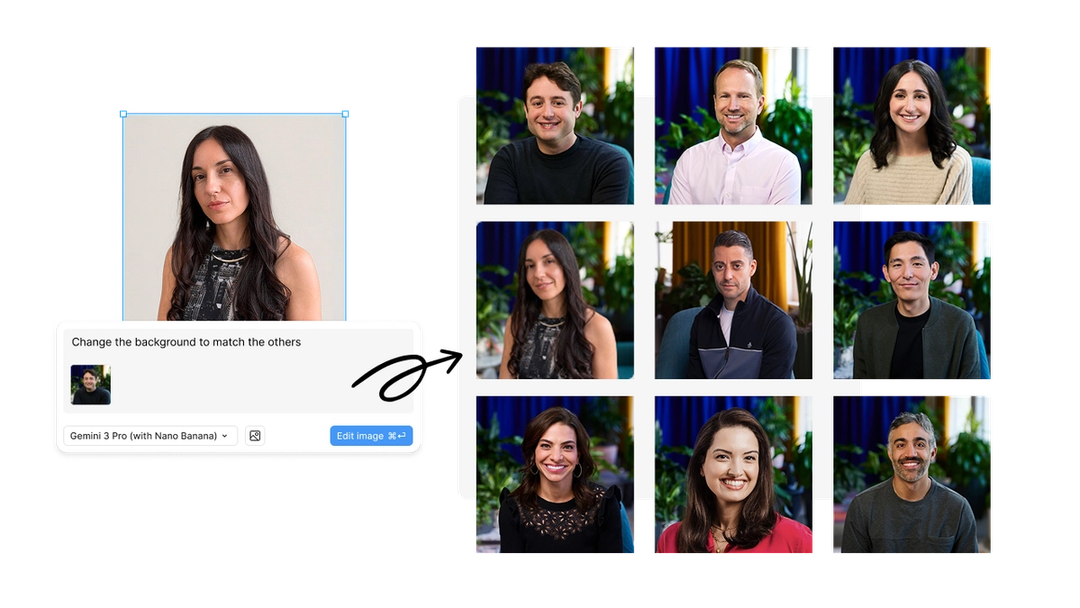
Loredana Crisan joined us recently as Figma’s Chief Design Officer, and I wanted to welcome her with an image that felt in line with the rest of our leadership team’s headshots. This is a common problem—companies hire new employees all the time, and it can be tricky to update their profile photos to feel consistent (let alone keep them up to date if you change your brand). Fortunately, Nano Banana Pro is great at this; you can just ask the model to reframe a shot, try a new camera angle, or update the background—and it stays true to the scene. Human faces are notoriously difficult (and contentious) to work with in AI, but so many assets we touch across product and brand use them. It’s nice that this model works quite well within those constraints, and lets you make changes to imagery without distorting people’s likeness.
Composite scenes to bring big ideas to life
It’s especially fun to mix and match models to give you even more creative freedom and flexibility. With Figma Weave, you can composite a number of images together, and take advantage of Nano Banana Pro’s incredible coherency to bring scenes to life. Here you can see us taking 2D elements from a brand mood board for a conference—graphics, copy, photography—and combining them into a single rendering. Then using Google’s Veo video model, you can imagine the space with real activity through it. You can even combine it with 3D models, upscalers, remove background models, prompt refinement via LLMs, and the list goes on. If you haven’t tried it yet, it’s an incredible playground for modular creative expression.
Imagery in context, available across Figma’s products today
When you can bring models like Nano Banana Pro into the context of your work, and across the products and tools your team is already using, it becomes an even more powerful medium for expression, for collaboration, and for pushing your ideas further. With Nano Banana Pro, you can actually refine not just regenerate. You can prompt updates to text and tweaks to spot colors without distorting your original image. Faces look natural, typography localizes, context stays intact. But don’t just take my word for it—try it and see for yourself.
Nano Banana Pro will be rolling out to all Figma users on paid plans gradually throughout the day and will be available in all Figma products where you can generate images. I can’t wait to see what you all make with it!