Drafts are changing—here’s what you need to know


For users on a Starter or Professional team, we’re relocating where your drafts live. Starting this week, you’ll be asked to move your drafts into a team space.
Share Drafts are changing—here’s what you need to know
On October 15th, we’re rolling out the new drafts experience to all of our remaining users, with a new way to view external projects and files. Read on to learn about the changes to drafts.
If you’re on a Starter or Pro team, here’s what to expect:
- Your drafts are now in a space called “Drafts to move.”
- You can move your drafts at once into the appropriate teams—or create a free Starter team for all your drafts.
- When you move your drafts to a team, they will still be private.
- You will still be able to create and edit drafts free of charge.
- You may not see this prompt immediately, as we’ll be rolling out this update over the next few days.
Check out the video, below, for a walk-through of this update.

Why we’re making this change
As we consider the design of our system, we found that our current drafts model—where drafts live outside of teams—causes unclear ownership, lack of team association, and inconsistent product experiences.
For instance, because the draft model on Starter and Professional plans does not match the model on Organization and Enterprise plans, it slows down how we can improve the product experience.
When drafts are not associated with a team, you do not have access to paid features, like advanced prototyping, password protection, or Dev Mode in your drafts.
Lastly, design work happening outside of a team can have security and IP implications. The current drafts model does not create a separation between drafts on personal and professional teams, resulting in unclear file permissions and the potential for an unintended loss of files.
What’s changing
To solve these problems, we’re making drafts on Starter and Professional plans consistent with our other Figma plans:
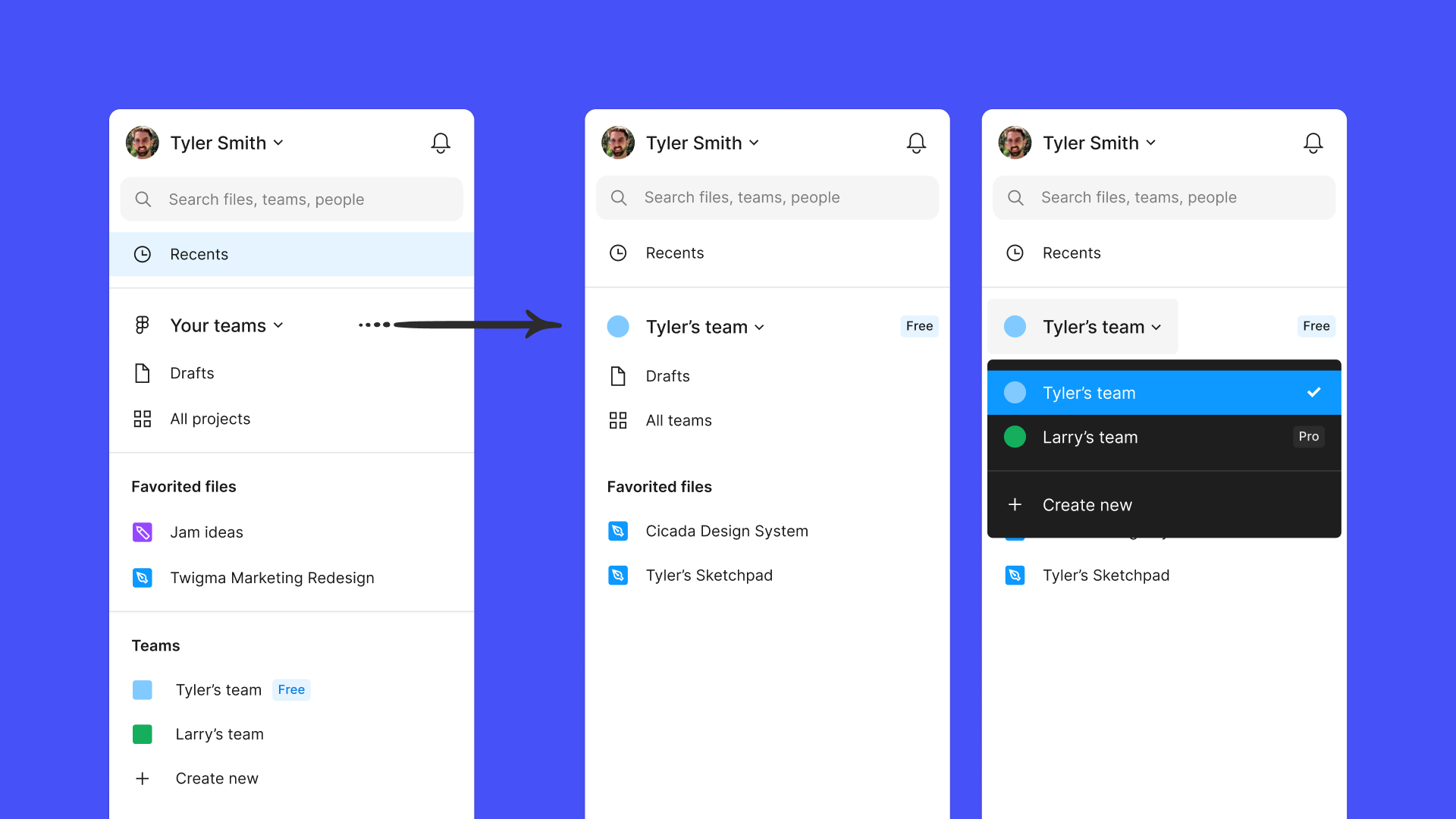
- All drafts will now need to be associated with a team. You can navigate to all your teams via the new drop-down.
- You will have your own private draft space within each team you’re a member of.
- Drafts on a Professional team will now have access to Professional plan features if you are an editor.
- When you move a draft to a team, editors of that draft will need to be full members of that team. We will reset editors who are not full members to viewers so you don’t experience any unexpected paid seats. Thus, you or your admin may need to re-grant edit access to these collaborators.
If you only have one Starter team, we will auto-migrate your drafts into the new drafts space within your Starter team.
What’s staying the same
While the location of drafts is changing, drafts will still behave the same way you are used to:
- Drafts will always be private to you and those you shared them with.
- You can continue to create and edit your own drafts free of charge.
- On a Starter team, you can invite unlimited viewers to collaborate on your drafts, and unlimited editors on up to 3 collaborative files.
How to move your drafts
When you navigate to “Drafts to move,” you’ll be prompted to move files into a drafts space within the team of your choosing.
If you have personal work that isn’t relevant to any of your teams, you can create a free Starter team and move your files into that team’s drafts space.
As to not disrupt your work in progress, you’ll still be able to to edit your drafts in the “Drafts to Move” space alongside existing collaborators. However, if you want to invite additional collaborators, you will need to move the file into a team.
You will have ample time to transition your drafts, as there is no hard deadline at this time. At some point in the future, any unmoved drafts will be migrated to a new, free Starter plan. We will give you a heads-up before this happens.
What we’re working on next
We are making this platform update to help pave the way for billing improvements in the future. For example, we’re actively working through:
- Bringing more clarity around upgrades so it’s even more clear when a user moves to a paid editor seat.
- Addressing the needs of freelancers such as enabling better project hand-off and solving for the needs of users who exist on multiple teams.
- Easier license management, like improvements to the admin dashboard and better guest management on Starter and Professional teams.
Additionally, we’re starting to work on re-designing Figma’s core billing experiences. This will take time so look for more on this from us soon.
While this update is largely an information architecture change, we know it will cause some extra work for many users, especially those with a lot of drafts. However, we do hope that this will bring some organization to your drafts and create the right level of separation between the personal and professional work you do in Figma.
If you have any questions, check out this help center article for more details.