Think outside of the box—with Claude and FigJam




With the Figma MCP app in Claude, powered by Anthropic, designers, developers, and product managers can now create AI-generated FigJam diagrams.
Share Think outside of the box—with Claude and FigJam
AI conversations are great for solo exploration—but real progress happens when teams can visualize, shape, and build on ideas together in a shared space. Now you can turn conversations with Claude into editable FigJam diagrams from written prompts, PDFs, images, or screenshots. This not only helps you organize your thoughts into strategic flows, it lets you riff on them with your teammates in the open canvas—expanding the capability beyond the prompt box.


Make thinking visible
For many, AI has become a trusted thought partner. A place to spin up ideas or validate hunches as they develop. Now it’s even easier to visualize as fast as you think—less copy-pasting, less context switching, and more focus on solving the right problems. Whether you’re a designer plotting a user journey, a product manager looking to prioritize, or an engineer structuring implementations, diagrams can help turn dense or abstract concepts into digestible flows.
Diagramming helps teams align by giving PDE groups a shared visual language to rally around—saving time and reducing back-and-forth. For product managers, this is especially useful when working with Gantt charts in FigJam to map timelines and dependencies. From a PRD, Claude can generate a first pass almost instantaneously, making it easier to spot issues early, unblock work, and sequence milestones with confidence.
For engineers, diagramming is common practice. Beyond visualizing system architecture—how services, sequences, request and response flows, databases, APIs, and dependencies connect—diagrams often become a central source for shared context. They support better front-end and back-end collaboration, help teams make sense of complexity, and reduce risk before building. Claude can generate an initial diagram from existing documentation or uploaded code files, compare patterns across systems, and bring everything into FigJam for deeper refinement.

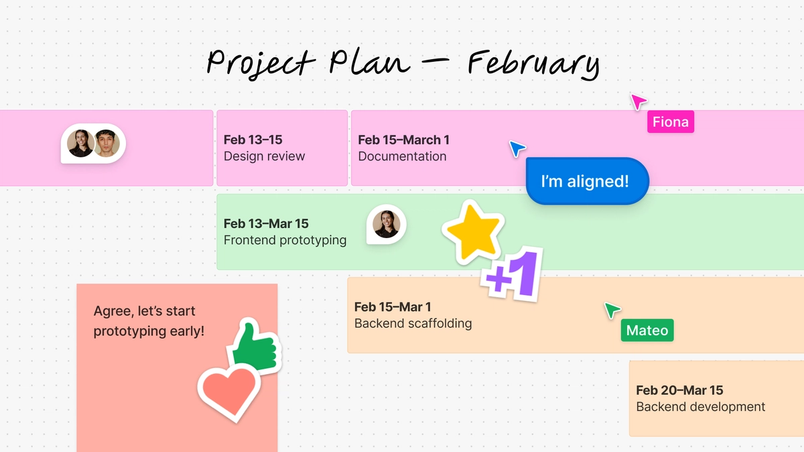
FigJam—where ideas take shape
Anthropic also released a UI kit for designing MCP apps for Claude, making it easier to design AI experiences in Figma, build with MCP, and deploy in Claude.
Closing the loop between thinking and execution means bringing people along in your process—and closing the gaps in your workflow. With FigJam in Claude, you can move ideas directly from a conversation into the spaces where the bulk of the strategic work is already happening.
Once inside the Figma ecosystem, those ideas travel further: polished in Figma Design, shared in Figma Slides, or even brought to life in code. Other ongoing improvements to FigJam diagramming—including more advanced shape collections and connector types—also give you greater control as ideas move from early exploration to more precise systems.

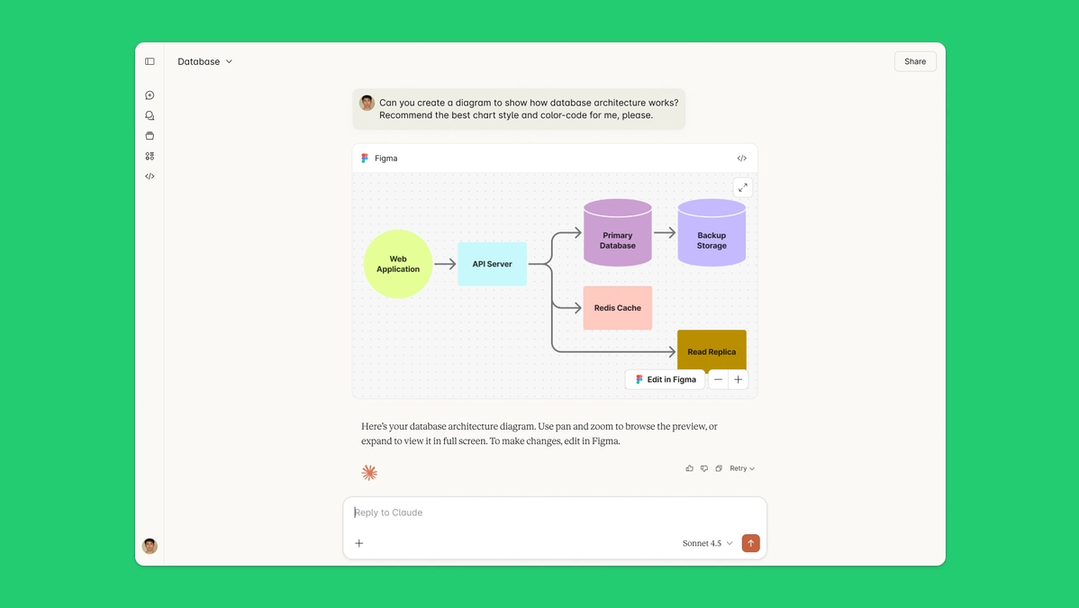
AI becomes a better collaborator
With AI as a thought partner, teams can use multi-turn context to quickly plot user journeys, explore prioritization tradeoffs, and refine implementation structures as projects evolve.
In FigJam, these diagrams become shared artifacts of early thinking—and as workflows mature, approaches like using MCP to map system context into diagrams point toward a future where complex systems are easier to reason about together. Claude can suggest alternate approaches to a problem, or even offer different chart styles—from decision trees, to Gantt charts, to sequence and state diagrams—to best convey your flow state.
When ideas take form, AI moves beyond one-off outputs and becomes part of how teams actually work. With FigJam and Claude turning conversations into editable diagrams, teams can think together—visually, collaboratively, and in motion—right where ideas take shape.
Learn more about the new diagramming feature and add the Figma Connector directly in Claude on browser or desktop (available in Claude Opus 4.5 and Sonnet 4.5).
Luke Zhang is the product manager for FigJam. He lives with his partner and two cats in San Francisco, California.