Dev Mode: Building a design tool that works harder for developers



How do you create a home for developers in a design tool? The Dev Mode team shares their early pivot away from a codegen-first approach, the acquisition that accelerated their efforts, and what it means to break down the handoff wall.
Share Dev Mode: Building a design tool that works harder for developers
Header illustration by Dominic Kesterton.
Even in the early days, we wanted Figma to be a space for product design teams—not just designers. Figma’s multiplayer technology expands the canvas to anyone who has the link so that product managers, developers, and other collaborators can solve problems together, core to our vision of making design accessible to all. We’ve done this by listening carefully to our users and delivering features that meet people where they are, while giving them the tools they need to push work forward.

Bridging design and code is something we’ve worked on, long before introducing Dev Mode. In 2017, Figma Co-founder and CEO Dyan Field introduced prototyping and how “Figma 2.0” sought to streamline workflows between designers and developers.
This was the case early on for developers. We saw designers inviting their developer counterparts into Figma to explore in-progress work. Even though Figma wasn’t exactly optimized for developer workflows, this shared view allowed them to experiment with different approaches to “handing off” files. We knew there was so much opportunity to make an even better experience for developers in Figma, so we’ve steadily worked on our offering for them. Mostly recently, we launched Dev Mode, a new tool for developers in Figma.

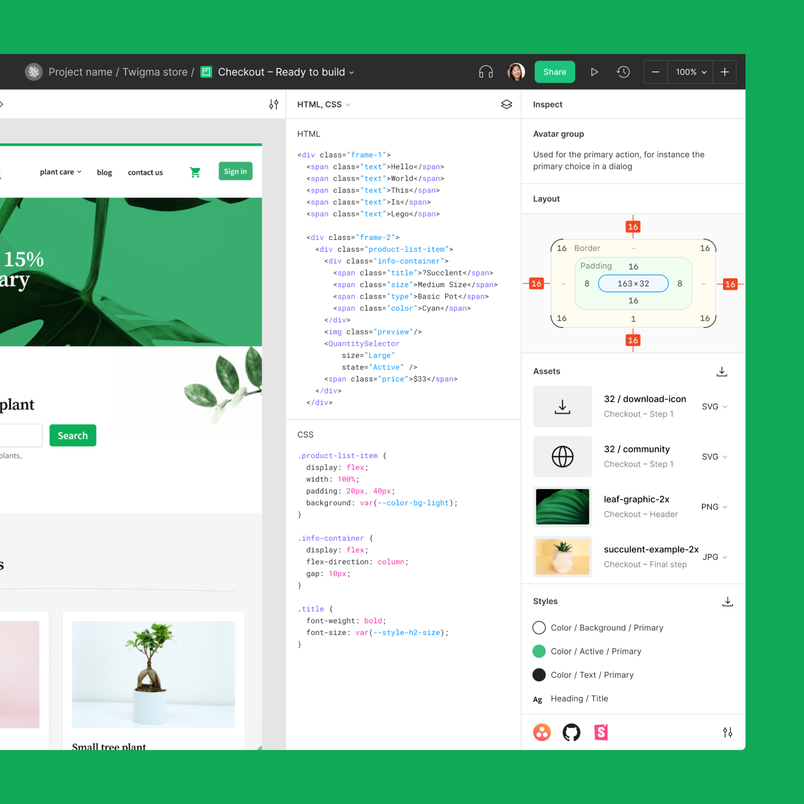
Dev Mode is a tool in Figma that allows you to inspect designs, compare changes, work in VS Code, and more.
Visly was founded in 2018 and went through Y Combinator before Figma acquired the company.
Today, developers account for a third of our users. So when we set out to build Dev Mode, we knew we still had so much to learn from these users about the nuances of developer workflows, toolchains, and preferences. “We talk to tons of developers, but that’s really different than having an intuition,” says Vice President of Product, Sho Kuwamoto. “You have to immerse yourself in that world.” We needed a team that lived and breathed development like we did design, so in 2021, we acquired Visly—eight designers and engineers who built a tool for developing UI components in React. The Visly team brought with them months of research on developer tooling and years of hands-on experience—in other words, the developer “intuition” we’d been looking for—which helped accelerate our work for developers in Figma. “It’s clear that everyone at Figma cares about developers,” says Visly co-founder Emil Sjölander. “When we joined, we brought the developer perspective.”

Emil Sjölander co-founded Visly and led the Dev Mode workstream at Figma. Listen to his interview with "The Changelog" podcast.
Making a design tool for everyone making products
The Visly team immediately brought a new perspective on how developers work across a variety of environments, as well as insights about how their own team used Figma. And while most developers’ experiences with design tools follow a similar arc—they are brought into Figma through their design team collaborations, but they don’t feel the tool is “made” for them—the Visly team offered a critical counterpoint: “Developers shouldn’t need to worry about learning all of the interactions in [design mode],” says Joel Miller, a product designer on the Visly team. “It’s more about tailoring the Figma experience to them.”
“We asked ourselves, ‘What would a design tool look like if it was built from the ground up with developers in mind?’
The team continues to think about which features to bring to Dev Mode based on feedback from the beta. Emil has a Slackbot that notifies him when customer requests come in every day.
The team set about creating a tailor-made experience in Figma where developers would be a core—not secondary—user. Instead of design-centric tools, they considered new features for Figma, like a component playground, code snippets, plugins for apps like GitHub and Storybook, and developer-specific resources. “We asked ourselves, ‘What would a design tool look like if it was built from the ground up with developers in mind?’” says Emil. “They’re not going to be living in a design tool.”
Translating designs to code, better and faster
Codegen is the process of generating code automatically, based on a defined set of rules or specifications.
Even though the direction was clear, the team still had to figure out how to navigate bringing it to life in Figma. In early iterations, they imagined Dev Mode as a codegen tool, thinking that would be the most practical approach. “The more designs easily translate to code, the faster you can iterate,” says Emil. Initially, the codegen direction worked, and when it worked well, it could shave hours—even days—off of a project.

However, getting codegen to work in a testing scenario is different than getting it to work in real life. Teams and companies are unique and have diverse structures and workflows. “You assume, ‘There are big companies and there are small companies, and I understand what big company needs are and what small company needs are,’” says Emil. “But Meta is very different from Wells Fargo. They’re both big companies, but they operate in extremely different spaces with extremely different constraints.” From differing security needs to different code base structures and maturity, the team had to understand the nuances of diverse user needs. For example, some teams use existing code that doesn’t work with generated code, and some designers might share more gestural sketches, which aren’t meant to translate so literally to code. Teams also use a unique mix of languages, platforms, and internal frameworks that we can’t always account for.
Moving away from codegen as a primary feature for Dev Mode was a major pivot. While codegen could continue to play an important role as a jumping off point in a developer’s workflow, actually translating design to code still required a human touch. “We took a step back and began trying to approach translating to code in a less literal way,” says Emil. This meant focusing more on supporting workflows by building features like diff support so that developers can compare changes as they inspect designs once a designer marks something as “ready for development,” or meeting them where they are with Figma for VS Code, which allows them to see notifications and comments without ever having to leave their coding environment.


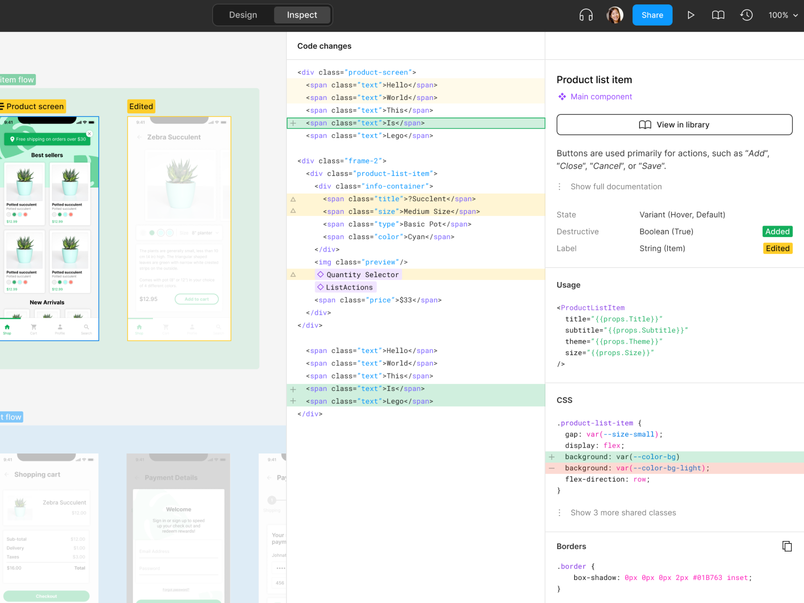
“Everybody wants this process to feel like magic—wouldn’t it be great if you pushed a button and it just worked? The reality is this magic button doesn’t exist; a lot of work goes into the process,” says Sho. “We thought less about making things automated. Now, it’s about how companies can customize the experience of moving from design to code so that it’s as good as it can be for them.”
The power of a developer mode
With an understanding of developers’ unique needs and challenges, the team turned to another key feature of the product experience: What should Dev Mode look and feel like? “We probably spent a year and a half on that question,” says Emil. “We went through a million iterations on this, all scattered across this spectrum between isolated versus integrated files.” The most siloed version mimicked a traditional handoff process, in which polished designs are handed off from design to development and built out independently. In that scenario, the developer doesn’t even have access to the original design files. “It’s a static view of the world, super isolated,” says Emil. On the integrated side of the spectrum, developers and designers would be co-creating in one integrated space, using developer-focused tools in Figma.

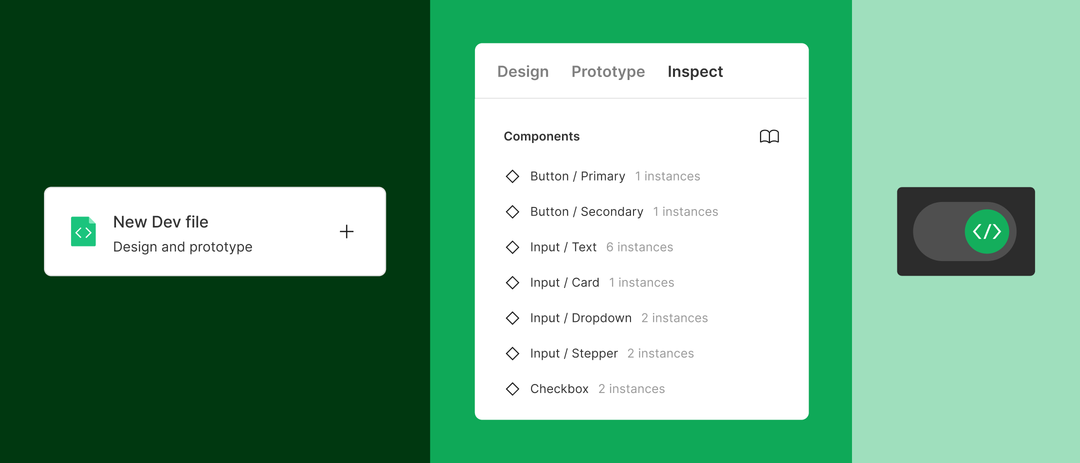
To determine where the tool would fall on the spectrum, the team used a series of questions to help guide the effort. When information transfers from a designer to a developer:
- Should it be a snapshot in time, or part of a living, evolving file?
- Do developers want to feel like they’re jumping into someone else’s file, or do they want their own experience?
- Does it make sense to focus on an individual screen?
- Is a “handoff” file the same as a design file?
One idea was to create a Dev File, a format which enabled designers to copy relevant information from Figma into a dedicated doc for developers. Another approach was to focus on a screen-by-screen interface, similar to Figma’s present mode. While helpful, it wasn’t rich enough to be the only view. The team ultimately moved away from the “single screen” direction because it felt like developers were fundamentally in a separate space than designers. More importantly, “The way that designers lay things out on the canvas is critical to understanding the UX and flow of a design,” says Joel. “You need to see all the pieces together, rather just in isolation.”
The result? A mode that would allow developers to go between design and development spaces, without switching tools or files entirely. “Initially the mode wasn’t a switch; it was closer to Figma’s prototyping functionality, where you can open in ‘present mode,’” says Joel. Soon, the team aligned on a toggle, allowing developers to switch the Figma editor into Dev Mode. This solution allowed them to get the best of both worlds—siloed enough that they could create tools and features optimized for developer needs, but integrated as a space within Figma so that developers have important context from their design counterparts.
Breaking down the handoff wall
As important as understanding the nuances of user needs, the team wanted to make sure that they also understood how teams worked together. “It was important to think about how developers ingest information, while focusing on improving the communication and overall workflow between designers and developers,” says Sho. After all, we want to empower developers to collaborate, iterate, and work together from the outset, not just when the work is ready for development. There was an opportunity to facilitate collaboration across the product development process. “One of the key pieces which required the most iteration and also lacks the most collaboration is between design and development,” says Emil.
If a designer sketches something that doesn’t work in practice, it’s far more helpful to know the implementation challenges sooner rather than later. Treating a handoff as an ongoing conversation, rather than a one-off baton pass, can increase iteration speed and, in turn, improve products. “Quality comes from iteration,” says Emil. “Dev Mode was designed with collaborative handoff in mind—that’s how we think teams want to work,” says Joel. “We wanted to get rid of this handoff ‘wall.’”
This extends to the broader product development team—the product managers, the researchers, the marketers, and many others. Emil says, “Products are designed by entire product teams.”
For more about how we built Dev Mode and a sneak peek at some of the features we’re launching soon, listen to Emil’s interview on the “The Changelog” podcast.
Alia Fite is a writer and editor on Figma's Content & Editorial team. She has previous experience at Stripe and Dropbox.