



From multi-day latency to near real-time insights: Figma’s data pipeline upgrade



After an exponential growth in users and data, daily synchronization tasks started taking hours or even days to complete. Here’s how rebuilding a data pipeline reduced latency to near real-time.
Share From multi-day latency to near real-time insights: Figma’s data pipeline upgrade
Illustrations by Cynthia Alfonso
Figma has grown rapidly over the last five years—including the launch of FigJam in 2021, Dev Mode in 2023, Figma Make in 2025, and full localization to serve the Brazilian, Japanese, Spanish, and Korean markets—but that growth comes with challenges. As our user base has expanded, so too has the volume and complexity of the data our platform generates every day.
Last year, we shared the inside story of how our Databases team horizontally scaled our online relational databases. But our legacy synchronization system—responsible for transferring data from our online databases to our analytical warehouse, which powers critical business insights, including top-line company KPIs—struggled to keep up.

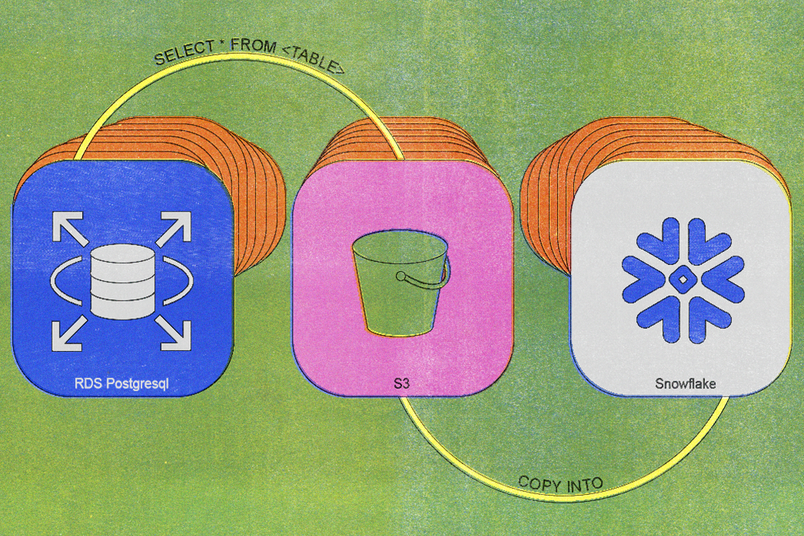
We built our first legacy synchronization process back in 2020, and the architecture was straightforward: A daily cron job executed a simple SELECT * FROM <TABLE> query, uploaded the resulting data to S3, and imported that data into Snowflake.
Initially, this worked well. As tables grew larger and more insert-intensive, however, the system's limitations became apparent. By 2023, daily synchronization tasks were taking around six hours to complete, and we had to maintain extra database replicas to support daily exports. Our largest tables experienced sync times of several days or more.
Eventually, it became nearly impossible to synchronize our data within a reasonable timeframe, severely hampering our ability to analyze data and make informed decisions.
We evaluated three solutions:
- Keeping our legacy synchronization process: This quickly became untenable, both because of the sync delays and because maintaining extra database replicas resulted in millions of dollars in unnecessary costs every year.
- Adding parallelism as a quick fix: We considered adding parallelism, which would have allowed the synchronization process to perform operations concurrently, but this proved unscalable.
- Overhaul the data synchronization process entirely: This would take a larger investment over a longer period of time, but it would be the most scalable approach and the most likely to last as Figma continues to grow.
Incremental synchronization is a data pipeline technique designed to efficiently keep analytical databases up to date by capturing and applying only recent changes from the source database, rather than repeatedly transferring entire datasets. This significantly reduces data transfer time and resource usage.
Looking at the options, our choice became clear: We shifted our focus toward the long term and started working on incremental synchronization—a solution that promised sustainable, efficient results.
Buy vs. build
To work, incremental synchronization requires support for database table snapshots, change data capture (CDC) streams, and incremental merge. The more we looked at the potential of incremental synchronization, the more we found we’d have to build it ourselves. We considered buying a proprietary end-to-end solution, but no option met our needs in terms of flexibility, cost, and scale.
Flexibility: Many generic SQL-compatible tools we found didn’t effectively use vendor-specific capabilities. The APIs for Amazon Relational Database Service (RDS) for PostgreSQL, for example, would have allowed us to produce snapshots directly without the overhead of maintaining a separate database replica, but the generic options didn’t take advantage of this. If we chose a vendor solution, we wouldn’t have the flexibility to optimize our workflow based on the existing technology we have.
Cost: Many options would have also cost a significant premium at our scale. When we priced out our options, we projected that proprietary solutions would cost five to ten times more than an in-house solution.
Scale: The cost might have been worthwhile if those tools could scale, but we found many weren’t scalable enough for our current and growing needs. We built our legacy synchronization process back in 2020, and Figma is still growing. By building in house, we ensure we’re able to rapidly innovate in response to future needs.
Building and combining lower-level components
By building a bespoke pipeline, we could find and combine lower-level components—either open-source or managed services—that aligned with our exact infrastructure requirements (and our team's expertise).
For snapshots, we use Amazon RDS, which can export to S3 for initial table copies. For CDC, we use Kafka Connect, which offers efficient streaming once integrated with a Snowflake Connector and hosted on Amazon Managed Streaming for Apache Kafka (MSK). For incremental merge, we implemented custom merge logic through Snowflake stored procedures and automated processes via Snowflake tasks.
Building a new pipeline architecture
With every new project, we outline design principles that guide the work, shaping our goals and decisions. For this project, we defined four principles:
- Latency: Reduce the time to synchronize data end-to-end.
- Cost: Reduce costs and keep them low even as we continue to grow.
- Compliance: Maintain compliance with all relevant data regulatory standards.
- Data integrity: Use workflows that ensure data remains accurate, complete, consistent, and trustworthy throughout the lifecycle.

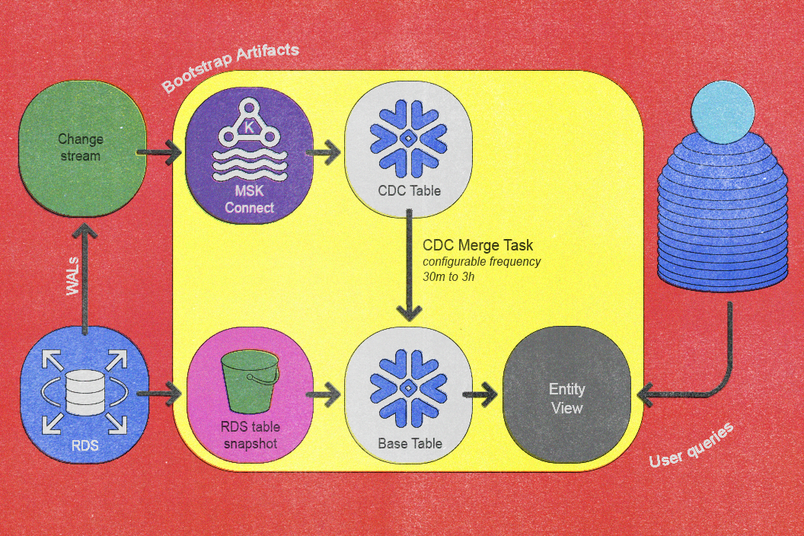
Ultimately, these principles translated into a reimagined data pipeline that achieves incremental synchronization via two fundamental workflows: a bootstrap workflow and a validation workflow. The bootstrap workflow integrates new tables into the pipeline, and the validation workflow verifies data correctness as data flows into the pipeline. Together, these two workflows ensure data flows efficiently and remains as consistent and correct as possible.
Bootstrap workflow
Our onboarding process for integrating new tables into the synchronization pipeline consists of the following automated and clearly defined steps:
- The existing CDC service captures the new table from Postgres and publishes events into Kafka’s per-table topics. We automated this step using our existing in-house CDC service and integrated it with the topology of the database system.
- We transfer the latest daily database snapshot to S3 using Amazon RDS's snapshot export process (which can be lengthy depending on the size of the table).
- Once the snapshot is successfully exported to S3, Snowflake’s
COPY INTO <table>query imports data from S3 into Snowflake’s dedicated per-entity base tables. - A Snowflake Sink Connector within MSK Connect streams Kafka topic contents into Snowflake’s per-entity CDC tables, ensuring the Kafka start offset precedes the snapshot timestamp.
- We schedule a Snowflake task to periodically execute a custom
MERGEstored procedure that we developed. - When synchronization sufficiently catches up to recent changes, we create a lightweight view on top of the base table for easy user querying, which completes the onboarding.
We implemented a zero-downtime re-bootstrap capability, which is crucial for managing events like schema evolution. To do this, we versioned all bootstrap artifacts except the final user-facing view, which allows parallel bootstrapping without disrupting live operations. Promotion to the new version occurs seamlessly via an atomic view update step.
Validation workflow
Despite robust designs, data pipelines inevitably risk data corruption from partial failures, misconfigured components, software bugs, or unexpected source data anomalies. Issues may emerge at various points—from snapshot exports and CDC event captures to incremental merges—and can cause silent data inconsistencies or incorrect analytical outcomes if left unchecked.
Therefore, another critical aspect of the architecture is a robust validation workflow dedicated to verifying data correctness, which operates as follows:
- Clone the live base table, which we designate as the source.
- Execute the bootstrap workflow, which we explicitly configured to export the base and CDC tables into a temporary schema, labeled as the target. This runs without initiating automated merges.
- Align source and target base tables to identical point-in-time positions using the exported CDC data to ensure consistency.
- Perform precise, cell-to-cell comparisons between source and target tables.
- Generate detailed outputs from these comparisons and integrate the results into our monitoring and alerting systems.
This rigorous, cell-level, and CDC-aware validation provides absolute confidence in data integrity, which substantially enhances reliability before and after service launch.
Investing in automation
Success here wouldn’t be possible without automation. The pipeline we built required extensive orchestration across numerous network calls and dependencies, and we needed both ad hoc and scheduled automation to make it all come together.
Using AWS Step Functions, we organized our automation into two categories:
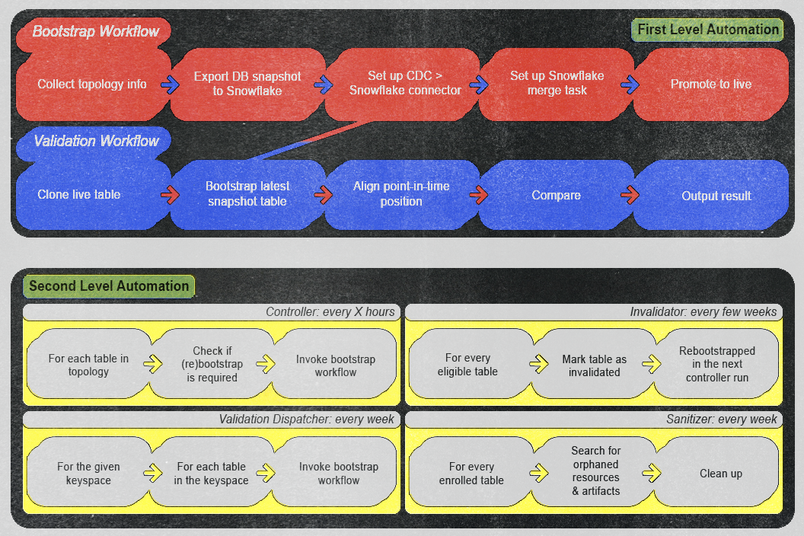
First-level automation: This category includes workflows we can trigger manually and ad hoc. We designed them to execute bootstrap or validation processes by providing only the entity name. Once executed, these workflows require no manual intervention unless monitoring generates an alert. We ensured the alerts are loud enough to prompt immediate operator action—whether it’s a real bug in the pipeline or a false positive in the validation logic—and provide clear action items to prevent recurrence and maintain high operational efficiency and reliability.
Second-level automation: This category includes workflows we designed to invoke first-level automations based on specific conditions and schedules. The first level does the heavy work, and the second level automatically checks the current states to see whether we need to trigger a first-level automation. Examples include:
- A controller workflow regularly checks every few hours for new entities available for onboarding or re-bootstrapping.
- A validation dispatcher workflow automatically initiates validation workflows for each table on a weekly basis.
- An invalidator workflow performs weekly re-bootstrap operations on each table to ensure data integrity.
- A sanitizer workflow routinely cleans up potentially orphaned artifacts every week, maintaining a tidy and efficient environment.

We took an aggressive approach to testing: A rigorous automation routine in our staging environment automatically re-bootstraps all tables every week to simulate and proactively uncover potential issues. This paid off when we identified a severe failure mode just one week into testing. This issue would have resulted in a site-wide outage that would have lasted at least twenty minutes had it reached production. By catching this early, we ensured stability during actual production deployments.
Cases like this supported our belief that full automation had to be our north star. Even when some workflows appeared challenging or risky to fully automate, we progressively worked toward full automation while implementing partial automation in the interim. This approach allowed us to make steady improvements in system reliability and reduce operational overhead over time.
Operations have remained seamless and zero major incidents during and after launch.
New features for better real-time insights
As we transitioned to this new architecture, our improved flexibility and automation capabilities unlocked opportunities to develop new features. Three key enhancements significantly improved our user experience and developer productivity.
Configurable freshness
Based on end-user feedback, we set the default merge frequency to every three hours so that we could balance the baseline freshness of all entities against Snowflake compute costs. Additionally, we introduced configurable overrides for tables that require more frequent updates. For example, our billing pipeline benefited significantly from half-hour overrides, which considerably reduced the overall end-to-end pipeline latency.
Sync-on-demand
We can safely trigger merges at any moment thanks to our merge job queueing system. This renewed safety allowed us to introduce a user-friendly CLI tool that enables manual, immediate data synchronization outside the regular automated schedule. This ensures timely access to fresh online database data in Snowflake whenever necessary.
CDC data inspection in Snowflake
Since CDC data was already imported into Snowflake for internal purposes, we exposed this data to end-users interested in deeper insights that explored the sequence of changes that led to an entity’s state, not just the current state of that entity. During incident response, this feature provides a secure offline environment for debugging unexpected database write activities. For example, developers can perform queries like "retrieve all email insert/update/delete events for users within a specific team over the past week." By also using our sync-on-demand feature, developers can query this data in Snowflake in near real-time. To adhere to data retention policies and prevent indefinite storage growth, CDC data is automatically purged after a predefined period.
Results
This project took a significant investment of time, effort, and resources—but the work has paid off, with results exceeding our expectations.
Improved data freshness
We dramatically improved data freshness. Previously, data was often 30 hours old or more. Now, data is three hours old or less, and users have the flexibility to configure freshness down to minutes.
Scalable performance
This pipeline now reliably handles tables over ten times larger than before, delivering consistent and predictable performance as Figma continues to grow.
Developer productivity
New tools always pose the potential for workflow disruption, so we built confidence with our team by interviewing them to identify their needs and integrating the pipeline with systems that our team knew well.
Once the work was complete, we were able to show a significant boost to developer productivity resulting from reducing operational overhead and enabling near real-time access to online data within the analytics warehouse.
Developers can now safely query both current state and change history—fresh within minutes—powering faster incident response, safer rollouts, and deeper insights.
Cost efficiency
Early into implementation, we prioritized support for horizontally sharded databases. This support offered a high return on investment since the horizontally sharded databases had fewer tables but utilized more database machines—each with its own batch replica. Now, this pipeline delivers multimillion-dollar annual savings by intelligently optimizing infrastructure and resource utilization, eliminating redundant processing, and scaling seamlessly with business growth.
Future opportunities
Our new architecture lays the foundation for several exciting opportunities to enhance and extend the data pipeline even further.
- Fully automated onboarding: Currently, onboarding requires a pull request to add tables to an allowlist, which creates friction in the onboarding process. Integrating our database topology directly into the pipeline would automate table onboarding entirely, streamlining the developer experience and reducing manual overhead.
- Point-in-time table support: We could provide the ability to query table states at any point-in-time position within our defined CDC retention window by using our CDC data. Implementing this feature would significantly improve debugging capabilities, incident response, and analytical flexibility.
- Incrementally refreshed downstream models: Many of our downstream analytical models are still built using traditional batch processes. Our new pipeline would allow us to refresh these incrementally, dramatically improving their efficiency and reducing latency throughout the entire analytical workflow.
This ambitious transformation was made possible by the incredible dedication and effort from current and past members of Figma’s Data Infrastructure team: Amadeo Casas, Alex Tian, Brandon Choi, Carter Bian, David Mah, Dorothy Chen, Ebuka Akubilo, Jimmy Xie, Krish Chainani, Merry Song, Michael Wu, Peng Wang, Raunak Agnihotri, Santosh Muthukrishnan, Xinxin Dai, Zubair Saiyed.
Special recognition and thanks also extend to our supportive partner teams: Asheesh Laroia, Dylan Visher, Gordon Yoon, Gustavo Angulo Mezerhane, Langston Dziko, Ping-Min Lin, Sammy Steele, Sean Rice, Yazad Khambata.


We're hiring engineers! Learn more about life at Figma, and browse our open roles.
Yichao Zhao is a software engineer at Figma with extensive experience in big data systems. He has contributed to several key teams, including Data Infrastructure and, most recently, Databases. Yichao specializes in solving complex distributed systems challenges and is passionate about supporting his colleagues to achieve success.