3 ways product teams are building conviction faster with Figma Make



From communicating complex behaviors to pushing the edges of an idea, product managers at ServiceNow, Ticketmaster, and Affirm are using Figma Make to prototype their way forward.
Share 3 ways product teams are building conviction faster with Figma Make
Hero illustration by Raven Jiang
Product managers have always been translators. They move between customer insights, design intent, and engineering constraints, using these inputs to align teams around concrete decisions. Tools like Figma Make are changing how that translation happens. Instead of relying on PRDs A growing number of product managers are finding that the fastest way to clarity is to build. Inside Figma Make, they’re pressure-testing assumptions early, building momentum, and rallying teams around something tangible.

Prototypes are the new PRDs
It’s not just about moving faster. When teams can see and interact with an idea earlier, they make more informed decisions and ship products that better meet real user needs. We spoke with product leaders at ServiceNow, Ticketmaster, and Affirm about how they’re using Figma Make to substantiate abstract concepts, gather feedback, and explore more broadly.


In "The PM field guide for the AI era," product leaders offer practical insights on how to guide teams from idea to shipped product. Dive into the guide to learn more.
1. Bringing complex product thinking into shared focus
ServiceNow Product Director Ram Devanathan focuses on shipping products that help IT teams monitor systems, troubleshoot issues, and optimize their operations. To do this, Ram works with a design team that supports multiple product groups across ServiceNow. This means that designers may have competing priorities. “They have a big portfolio,” Ram says, “so they can’t always pivot directly to my project.” Plus, when designers are pulled in, they don’t always have the same depth of knowledge as others on his product team.
Recently, Ram needed to redesign a complex configuration page on their customer dashboards with roughly 15 to 20 settings, ranging from simple toggles to more advanced technical options that required careful setup. For IT teams managing critical systems, adjusting these settings can change how issues are raised and prioritized, and how much strain is placed on the system. Without a clear structure and in-product cues to guide them, even experienced users could get confused. He set out to change this, but while collaborating with design, he found it difficult to convey the hierarchy, contextual guidance, and tone he wanted users to feel. The resulting mockup was functional but didn’t fully capture the nuance Ram had in mind.
For organizations with shared design resources like ServiceNow, Make templates offer a solution: Teams can publish templates with design systems and UX patterns built in, giving PMs a consistent starting point that reduces the need for designer involvement in early iterations.

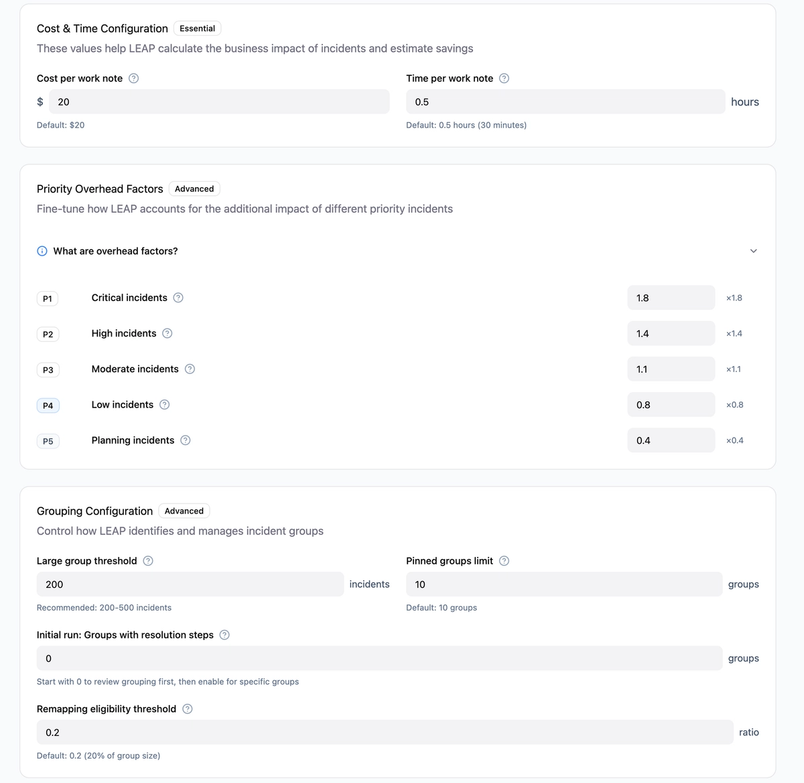
Ram needed a better way to communicate his intent. So, he brought a designer's initial mockup into Figma Make Here, we share our team’s favorite prompts, pro tips, and best practices for using Figma Make to help you get the most out of our recently launched prompt-to-code feature.

8 essential tips for using Figma Make
For Ram, this experience underscores a broader shift he’s seeing in product work. “I’m able to explain my ideas better,” he says. “I’m able to convince people faster. That reduces the whole cycle for me.”
Make helped me show what I meant rather than trying to describe it in the abstract.
2. Validating new features before building
When thousands of fans are eagerly trying to buy concert tickets at the same time, Ticketmaster relies on internal dashboards to monitor sales and troubleshoot issues in real time. Product Manager Brian Muehlenkamp is responsible for these tools. His primary dashboard supports roughly 400 Ticketmaster employees across client support, marketplace operations, and technical teams, all working to keep high-demand ticket sales running smoothly.
During live ticket launches, client support teams field real-time questions on calls about how the sale is performing. They need quick context—how this on-sale compares to the last one, or what happened in a previous sales window—so they can make decisions and respond confidently. To get answers, these teams had to request manual data pulls—meaning the information sometimes wasn’t available when it was needed, often in the middle of a client conversation. Brian set out to change that. Experimenting with Databricks’ natural-language query tool—a tool that translates plain-English questions into commands that pull the right data—he realized he could integrate it with Ticketmaster’s systems and embed it directly into the dashboard, bringing that AI assistant to where users already worked. The idea wasn’t on the roadmap, but a solution seemed clear.
Embedding a Figma Make prototype into FigJam, Figma Design, or Figma Slides makes it easier to align stakeholders around an idea and gather feedback in one place.
To determine how the feature would fit into the dashboard's existing UI, he turned to Figma Make to prototype a few directions. Should the chat experience take over the screen, or live as a side panel? If a side panel, should it push the dashboard over or sit on top of it? “The old way of prototyping meant presenting screenshots and pretending they were a wireframe,” Brian says. With Figma Make, he could put something in front of users that felt close to the real product—built using Ticketmaster’s design patterns and UI conventions. Power users confirmed the side panel felt intuitive and let them keep monitoring the dashboard while asking questions, and their feedback gave him the confidence to hand the feature off to engineering to get it built.

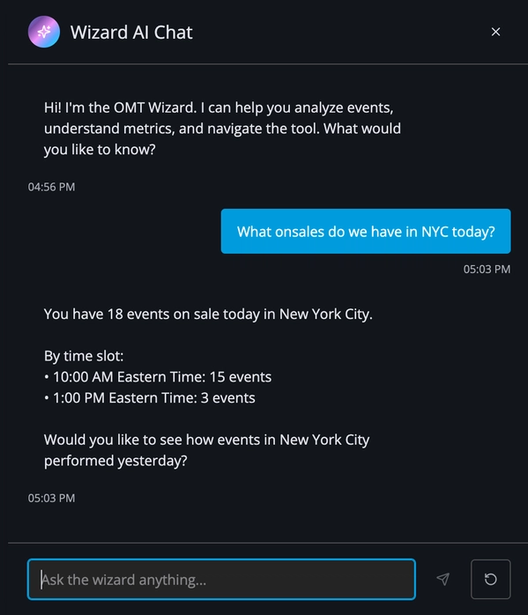
The resulting feature—dubbed "The Wizard" internally—has given teams a self-serve way to get answers without waiting on a data pull. Client-facing teams can now take questions directly from clients and get answers on the spot. “It's gone from ‘let me talk to the team and get back to you,’ to ‘I can tell you right now,’” says Brian. The engineering team saw a meaningful drop in ad-hoc data requests, which freed them up to focus elsewhere. Since then, Brian has prototyped four other new features in three months, and it’s been so effective in validating ideas that the leadership team has asked him to share the process with other PMs across the organization. “Figma Make has shortened the path from idea to finished feature in a way I can't imagine replacing,” Brian says.
Figma Make has shortened the path from idea to finished feature in a way I can't imagine replacing.
3. Making space for experimentation
Affirm was founded on the belief that financial products should earn trust through transparency. Affirm Senior Vice President of Product Vishal Kapoor helps his team translate that belief into product experiences. Instead of offering an open-ended line of credit, Affirm underwrites each transaction in real time and presents eligible shoppers with clear payment plans at checkout—typically options like 6 weeks, 6 months, or 12 months.
To understand how to help users choose the best plan for their needs, the team synthesized their customer insights. They knew that shoppers gravitated toward different plans for different reasons. Some scanned for 0% APR offers. Others preferred the shortest repayment period. Others optimized for flexibility to manage cash flow. The checkout flow needed badging to make those distinctions explicit. But which badges should be shown, and when? Should they all be shown at once, or would that overwhelm the customer?
Affirm loads its design artifacts into Figma’s MCP server, which connects those designs directly to coding tools like Cursor. That makes it easier to turn a prototype into a working, “good enough” version engineers can build from.
In the past, exploring that problem space would have meant writing a PRD, waiting for design mocks, and then going through engineering cycles before seeing live traffic. Instead, a product manager used Figma Make to quickly prototype different badge variations—signals like “0% APR” or “shortest plan”—and bring them into internal design and product reviews. “With tools like Figma Make, we are now able to quickly come to these prototypes,” Vishal says. “Instead of it taking six weeks for me to think about an idea and then see what it looks like in action, it takes just a few hours.”
Testing multiple iterations side-by-side and exploring every outstanding question is, says Vishal, key to craft and quality. “The real work lives in the variations, rabbit holes, and edge cases,” he says. “It requires a lot of thinking, a lot of precision, and a lot of love.” Figma Make gave the team a way to explore those variations more fully and test different options side by side before making a decision, instead of debating them in the abstract.
The real work lives in the variations, rabbit holes, and edge cases.
The team eventually shipped a variation of the idea, but more importantly, the ability to prototype quickly and follow their curiosity in many directions has changed how Vishal’s team approaches experimentation. “Figma Make has exploded the number of ideas that we can actually explore at any given time with high fidelity,” he says.
From validating ideas with users to aligning with developers and leadership, product managers are using Figma Make to move faster and build confidence in what they ship. Learn more about how to navigate the evolving landscape of PM work.

Figma Make is available for all users to try.
Emma Webster is a writer and editor on Figma’s Story Studio team. Previously, she’s worked as a writer at Faire and Audley Travel.