Agents, meet the Figma canvas



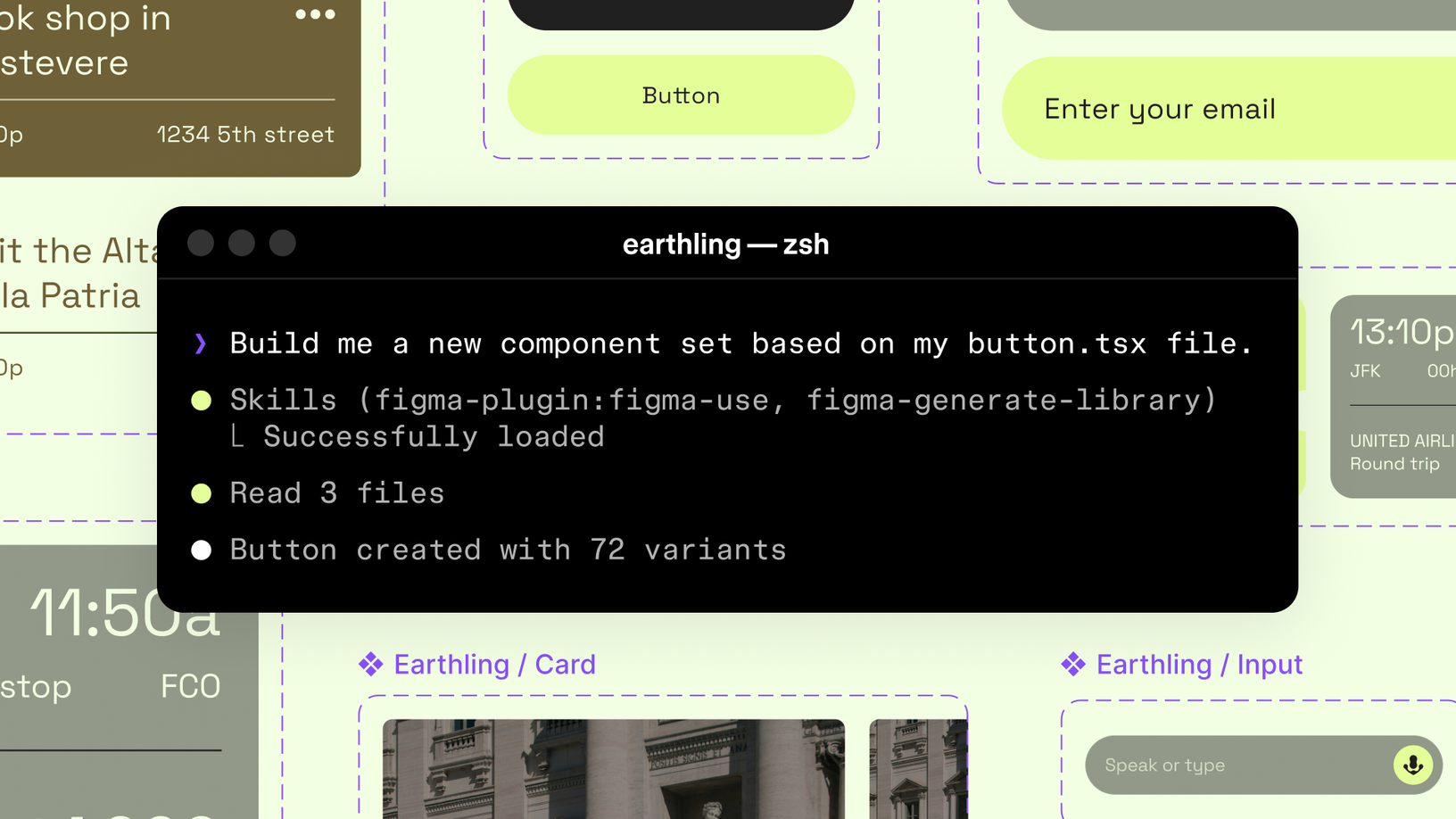
Starting today, you can use AI agents to design directly on the Figma canvas. And with skills, you can guide agents with context about your team’s decisions and intent.
Share Agents, meet the Figma canvas
We're quickly improving how Figma supports AI agents. This will eventually be a usage-based paid feature, but is currently available for free during the beta period.
Design decisions—from color palettes and button padding, to typography and interactivity—have always defined how products take shape. No matter how small, those decisions add up. They make your product and user experience stand out from the rest. To date, AI agents haven't had this context, which is why so many designs created by AI often feel unfamiliar and generic.
With Figma’s MCP server Today we’re announcing the beta release of the Figma MCP server, which brings Figma directly into the developer workflow to help LLMs achieve design-informed code generation.Introducing our MCP server: Bringing Figma into your workflow
use_figma tool, Claude Code, Codex, and other MCP clients can generate and modify design assets that are linked to your design system. No matter where product work starts—with a coding agent, in Figma, or from the command line—Figma is where it all comes into focus. "Teams at OpenAI use Figma to iterate, refine, and make decisions about how a product comes together," says Ed Bayes, design lead at Codex. "Now, Codex can find and use all the important design context in Figma to help us build higher quality products more efficiently.”
You can move fluidly between code and canvas, with agents operating in the same shared context. And skills—a set of instructions, written as markdown files—now directly shape how agents build on the Figma canvas. That expertise guides every piece of output and is more valuable now than ever.
Codex can find and use all the important design context in Figma to help us build higher quality products more efficiently.
Instruct your agents with skills
Working across code and canvas
Our existing generate_figma_design tool translates HTML from live apps and websites into editable Figma layers. Our new use_figma tool empowers agents to operate on the canvas using your design system, making this a step forward for agent workflows in Figma.
These tools are complementary. When designs fall out of sync with code, generate_figma_design brings the latest UI into Figma to iterate. From there, use_figma can edit those designs—or create new assets—using your components and variables.
Opening the canvas to AI agents unlocks access to your design systems and files. Skills define how agents use that access. They outline how a workflow is executed in Figma: which steps to take, what sequencing to follow, and which conventions to abide by. But beyond the workflow itself, skills ensure that agents have the specialized knowledge and context they need to produce durable, brand-aligned designs—and know what good looks like. They bridge the knowledge gap so agents know how to work in Figma. "The best products come from teams who care deeply about the details," says Cat Wu, head of product for Claude Code. "Many design teams shape their work in Figma and bring those products to life with Claude Code. Skills teach Claude Code how to work directly in the design canvas, so you can build in a way that stays true to your team’s intent and judgment."
Anyone can author a skill and writing one doesn’t require building a plugin or writing code. Several of the skills launching today come from practitioners in the community who are building these workflows and defining what great design looks like in practice. At the core is a foundational Figma skill—/figma-use—which all other skills build on. It gives agents a shared understanding of how Figma works, from its structure to its core principles. Teams can then customize and iterate on this capability to shape how their agents work.
Here are nine example skills that you can explore today:
/figma-generate-library: Create new components in Figma from a codebase/figma-generate-design: Create new designs in Figma using existing components and variables/create-voice: Generate screen reader specs (VoiceOver, TalkBack, ARIA) from UI specs (Ian Guisard, Uber)/cc-figma-component: Generate Figma components from a structured JSON contract (Nick Villapiano, One North)/apply-design-system: Connect existing designs to system components (Chris Goebel, Edenspiekermann)/rad-spacing: Apply hierarchical spacing with variables and fallbacks (Nolan Perkins, Rad Collab)/edit-figma-design: Orchestrate Figma design workflows using Warp and Oz (Warp)/sync-figma-token: Sync design tokens between code and Figma variables with drift detection (Firebender)/multi-agent: Run parallel workflows and implement designs in Augment (Augment Code)
Skills don’t just define what you build in concert with agents. They also shape how output is refined through self-healing loops. When an agent generates a screen, it can take a screenshot and iterate on what does not match. Because it’s working with real structure, components, variables, and auto layout, those adjustments interact with the system itself, not just the visual output.
AI models are inherently non-deterministic, so the same prompt can produce different results. Skills make that behavior more predictable by encoding specific steps, guidelines, and code to follow. Your conventions are no longer static documentation. They become rules agents follow as they work—applied through components, variables, and the structure you’ve already defined.
Skills teach Claude Code how to work directly in the design canvas, so you can build in a way that stays true to your team’s intent and judgment.
A step toward a more powerful canvas
Learn more about implementing Code Connect in your design system.
Since this capability is native to the Figma MCP server, it benefits from Figma’s security and reliability, while opening access to surfaces like Code Connect Today, we’re announcing beta for Code Connect, a feature built to improve design system adoption by making code more accessible and useful for developers.

The right code for your design system
Looking ahead, we’re expanding what agents can do in Figma—making the canvas more powerful with native AI functionality and making skills easier to use and share. We’ll also continue adding more functionality to this tool, working toward parity with the Plugin API, starting with image support and custom fonts. Read our guide to the Figma MCP server to start using this tool, or explore our developer docs to learn how to create a skill. We can't wait to see what you and the agents you use design and build together.
We’re very excited about what this feature means for the future of design. We started this as an expansion of code to canvas There isn't just one way to build. For the best ideas to move forward, we need the power of code and the canvas. Claude Code to Figma is just one way we’re giving builders more choice.
The future of design is code and canvas
Matt Colyer is a product leader at Figma building tools for designers and developers. Previously, he led product teams at Shopify, Adobe, GitHub, and Abstract, working on developer platforms, design collaboration, and AI-powered products.