



How HP powers up design handoff with Dev Mode


HP’s design system team reveals how they used Figma to streamline processes, break down silos, and save developers time.
Share How HP powers up design handoff with Dev Mode
HP, a titan in the electronics industry, faces the challenge of maintaining a cohesive user experience across its diverse offerings, from printers and laptops to gaming systems. To address this, HP developed a comprehensive design system called Veneer and leveraged Figma’s Dev Mode to transform how their teams collaborate and build products. We sat down with HP’s Gilson Hoffmeister, Design Systems Strategist, and Andrei Garcia, Senior Design Manager, to learn how they’re using Veneer and Dev Mode to drive consistency at scale.


Get in touch with our Sales team for tailored guidance on how to leverage Dev Mode for your team.
Building a multilayered design system for a complex ecosystem
“HP is a big company with more than 100 diverse product lines. Each HP product has a unique DNA,” explains Gilson. This diversity posed a significant challenge for maintaining consistency across the company’s digital experiences. Andrei adds, “We had challenges with the many different business units at HP, each doing their own thing and focusing on their own needs. They often worked in isolation without much coordination on how HP should look and feel digitally.”
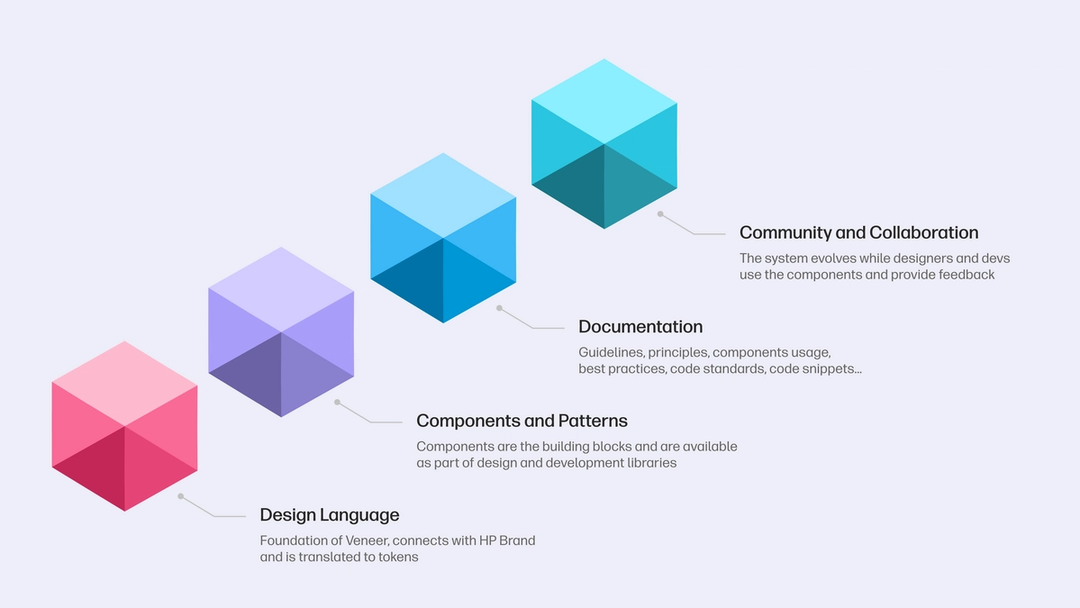
To address these challenges, the team developed Veneer. “What began as merely a ‘frontend component library’ has evolved into a multifaceted system that saves time, prevents redundant work, and creates cohesion,” says Andrei. Veneer provides teams with end-to-end support, including a design language, components and patterns, documentation, and a governance model.

Measuring adoption and impact
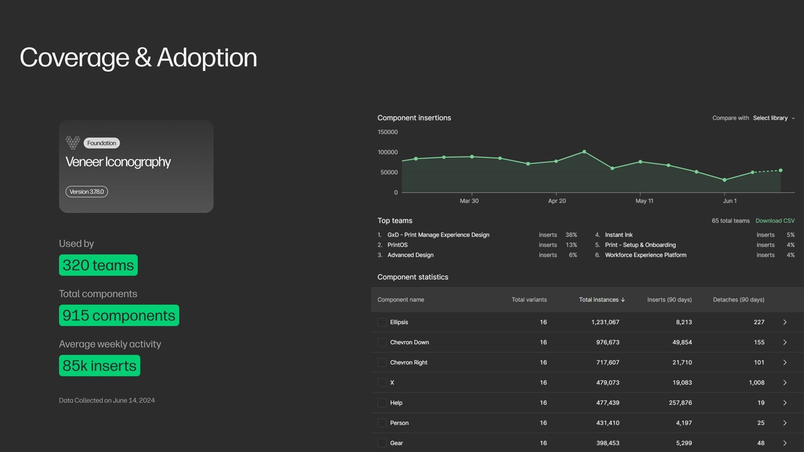
The team uses a combination of quantitative and qualitative metrics to measure Veneer’s adoption and impact. Gilson shares an impressive statistic: “With our Iconography library, we see that 915 icon components are utilized by 320 teams across HP with an average of 85,000 inserts per week.”

This 50% benchmark mirrors external comparisons, such as an IBM study that noted a 47% faster development time for simple forms when using a design system compared to starting from scratch.
The impact on efficiency has been substantial. “From January to December of 2023, we saw that using Veneer saved projects 500% more time compared to what was spent to create it,” Gilson reports. Andrei adds, “According to our VP of Engineering, Gaurav Roy, using Veneer has cut development time by 50% for certain projects.”
However, driving adoption wasn’t always easy. Andrei explains, “A significant issue was—and still is—the multitude of sub-brands HP has. It’s impossible to support this scenario with a single-layered design system.” The team had to structure Veneer to be flexible enough to support a multi-brand strategy.
Gilson adds, “Getting designers to use Veneer posed a hurdle because they cared so much about their products and users. When something from the outside tries to touch what they’ve been building, it raises a red flag for them.” The team had to demonstrate how a unified design system could empower designers to focus on more creative and unique aspects of their projects.
Enter Dev Mode: Bridging the design-development gap
Figma’s Dev Mode has been a game-changer for HP. “Dev Mode has streamlined the way our developers access these design specifications within Figma, reducing the need for extensive back-and-forth discussions and meetings, and making the transition from design to code smoother than ever,” Gilson explains.
The team has found several features particularly useful:
- Compare changes: “It’s super helpful for seeing what’s changed from one design version to another, especially when we’re updating our existing products,” says Andrei.
- Ready for development: This feature allows designers to mark specific parts of the design as ready for implementation, focusing developers’ efforts and reducing confusion.
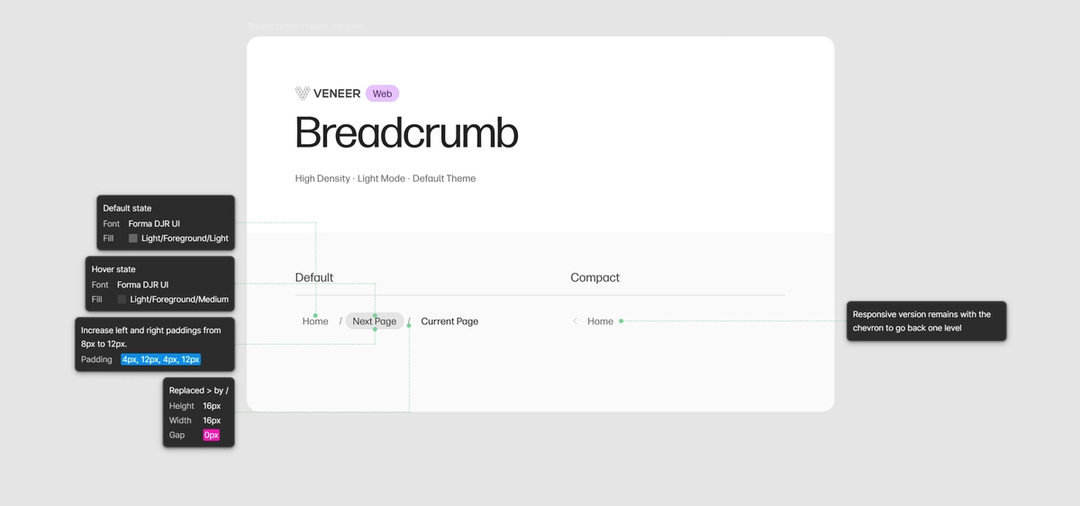
- Variables: HP uses variables linked to primitive or semantic tokens, which scale across different themes and modes. “Our Foundation team manages Veneer’s core elements, including leveraging automation to streamline the transition from design to code,” Andrei explains. “They have successfully built a robust bridge that connects design and development by using the Figma API to read these variables directly from the designs.”

Code Connect: Reducing context switching
Code Connect is the developer bridge from your component codebase to Figma. With Code Connect, bring your design system component code directly into Figma’s Dev Mode. Preview example components that mirror the framework of your production code.
As early adopters of Code Connect Today, we’re announcing beta for Code Connect, a feature built to improve design system adoption by making code more accessible and useful for developers.

The right code for your design system
The team has gone a step further by automating processes like changes to components. Gilson explains, “We have a source file where all icons are in their ‘editable’ version. We watch for changes on the source file via automation—where we flatten them and create a dictionary with the SVG code, which is used to create our Iconography Figma library, and shared with development to be added to the development libraries.”
The result? “What we love about Code Connect is that it reduces so much of the context switching that developers had to do before,” says Gilson. “Now with Code Connect, they can just click on a component in Figma and see code snippets with all the right settings. This really speeds up how quickly we can develop and integrate Veneer.”
What we love about Code Connect is that it reduces so much of the context switching that developers had to do before.
Measurable impact and team feedback
The impact of Dev Mode has been significant. In a survey of 400 HP employees using Dev Mode, the team found:
- 80% of respondents saw an efficiency gain
- 90% agreed that it increased their quality of work
- On average, users saved 98 minutes per week from reduced context switching
Developers have praised the tool, with one noting, “Dev Mode cuts down the time I spend on routine tasks, letting me focus on enhancing functionality.” Another added, “The ability to generate and use code snippets directly has significantly sped up our development cycles.”
Looking ahead: A new era of collaboration
Beyond the tangible time savings and efficiency gains, Dev Mode is fostering a cultural shift at HP. “With Dev Mode, we’ve also had a big mindset change,” Andrei reflects. “It’s helping designers and developers speak the same language, and helps us rethink the process of how they build products.”
As HP continues to innovate across its diverse product lines, Veneer and Dev Mode are proving to be invaluable tools in maintaining consistency, driving efficiency, and fostering collaboration. The success story of HP demonstrates the transformative power of a well-implemented design system, coupled with tools that bridge the gap between design and development.
Learn more about Dev Mode We built Dev Mode to make product development more efficient, from idea to code. Today, Dev Mode moves out of beta. Learn more about our product philosophy, how we’re improving the experience for developers and designers, and what’s next.Everything you need to know about Dev Mode