



How Razorpay sharpened developer workflows


Razorpay’s design systems team developed Blade to keep user experiences consistent and intuitive while supporting multiple products across platforms.
Share How Razorpay sharpened developer workflows






As one of India’s largest and fastest growing financial services companies, Razorpay serves 10 million businesses. Blade, Razorpay’s design system, allows the design and development teams to keep up with that level of scale, while building smoothly and collaboratively. Here, we sit down with Razorpay’s design systems team to learn about their approach to adoption and measurement, how they tackle collaboration challenges, and the private plugins that help developers work more efficiently.
How is your team and platform structured?
We have around 70 designers and 100 front-end developers. Within those teams, three designers and five engineers are dedicated to our design system.
Our product surfaces include desktop and mobile web, and iOS and Android apps. We have one single design system, Blade, that works cross-platform with the same API and same set of properties. If a developer switches from web to mobile app development, they can bring their knowledge of web code to the mobile app. We took this approach because we don't want to invest time in rebuilding for different platforms.
What problems has your design system solved?
Before we rolled Blade out, it was easy for teams to miss a lot of small nuances like different button states, or how an error within a text field should be handled. Teams would try to hard-code and build everything custom, and in doing so, they might leave something out by mistake. There was a lot of ad hoc, repetitive development work and the customer experience suffered. This is important for a product like ours, where businesses trust you with their money. A smooth product experience helps establish that trust.
Also, Razorpay has multiple products across different domains, so we need to make sure that the user experience is consistent across these products and domains. Having a design system and shared language lets us do it from the ground up with a lot more agility. It also ensures that all Blade's components are fully accessible for all our users.
Because we work on design systems, both developers and designers at Razorpay are our customers, in addition to Razorpay’s end users. With Blade, everyone speaks the same language, which reduces friction between teams and speeds up time to market. What you see in design is what you get in code.
How has your team approached design system adoption?
This is the trickiest part of any platform tool. We have taken multiple steps to encourage and reduce points of friction:
- Getting leadership buy-in: Aligning and influencing leadership is crucial at every stage, from inception, to funding the team, to encouraging their own teams to adopt Blade.
- Identifying key metrics: Using internal tools and scripts, we track qualitative and quantitative metrics, like the number of projects onboarded to Blade or the percent of apps built with design system components. This makes it easier for leadership and the working group to track progress.
- Supporting consumers: We hold office hours and monitor a Slack channel where customers can post queries or issues. We also formed an advocacy group, which includes designers from teams who use Blade. They help make decisions about components and champion it within their own teams.
- Evangelizing within our org: We announce new components with a demo video and an update to a component status page.
How do you measure your team's impact?
Our north star is to enable teams to ship modern, elegant UI while the design system takes care of the rest. Our target goal is for teams building new features to use Blade for 70% of their design; we change that target to 50% for existing product surfaces. This KPI is shared by design and development, and both teams are motivated to chase it together.
Our north star is to enable teams to ship modern, elegant UI while the design system takes care of the rest.
However, what we learned is that real coverage starts at the design phase. If the designs aren’t built with Blade’s components, developers won’t know that they have to use those too. To tackle this, we created a Blade Coverage plugin that shows designers how much they’re deviating from the design system. Using the plugin, designers can better predict their launch timelines, and reduce friction during handoff as they get feedback earlier on the components they're using.
Quantitative metrics alone can’t fully capture a design system’s adoption and impact, so we also rely on internal surveys and focus groups. These more qualitative measures help us understand sentiment, like whether teams feel like they can ship faster with Blade, and their feedback on user experience, documentation, training sessions, and collaboration between designers and developers. All of this ladders up to a Net Promoter Score that we track annually.
Before your team started using Dev Mode, what was collaboration like during handoff and build?
When handoff happens, developers are expected to inspect each element and copy the properties accordingly. The previous experience was not ideal. Developers would click, click, click, until they accidentally landed on the right component, identify the components, see their props, and then implement the same in code.
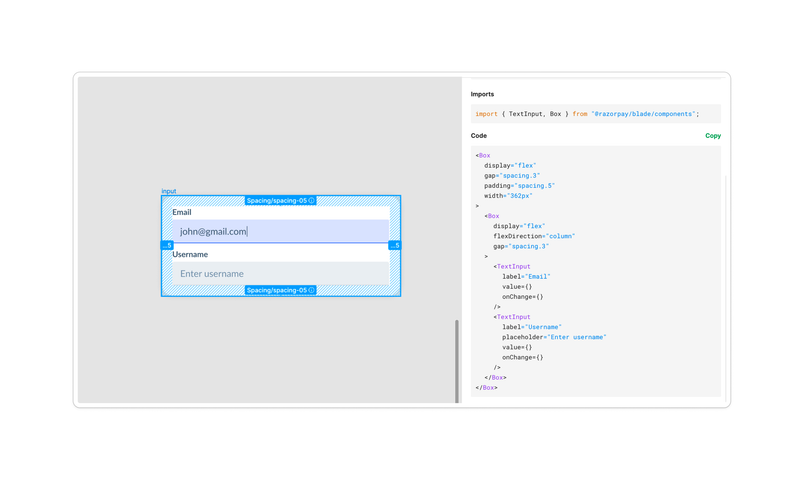
To address these inspection inefficiencies, one of our developers built a private plugin called RazorSharp. It took two to three months as a side project. This allowed us to auto generate the equivalent code for the designs. From there, the developers could simply copy-paste it.
Our RazorSharp plugin solved some of the friction, but not all. Before Dev Mode, plugins in Figma could only be run if you had edit access to the file, but most of our developers didn’t have this. So that meant if a designer handed them a Figma file, a developer would need to take the extra step of cloning it in a new file so they could run the RazorSharp plugin.
How have you addressed these pain points?
Now, the majority of our inspection issues are gone. When Figma launched Dev Mode, we updated RazorSharp to run as a Dev Mode plugin, so that our developers can use the RazorSharp plugin without needing to worry about editing files to see the code implementation. Because the functionality was already there, it only took two days to make it Dev Mode compatible.

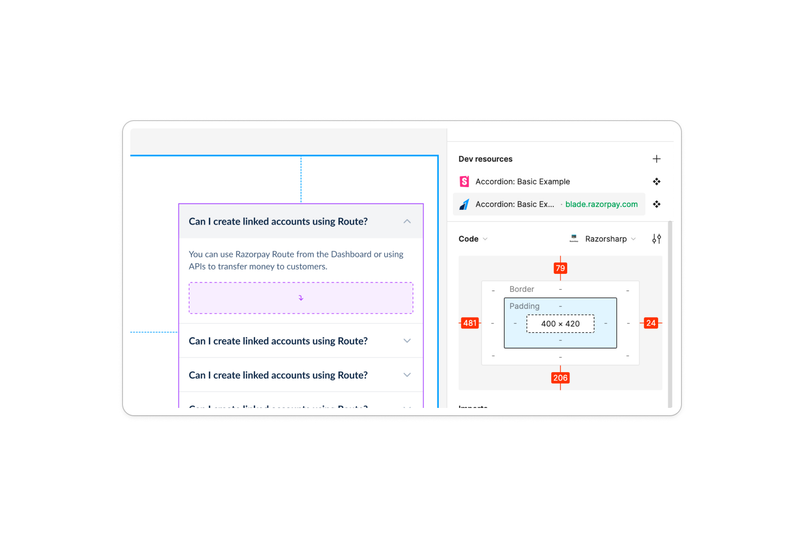
We are also using Dev Mode to embed Storybook links for each component to make it easier for our design system consumers to navigate to the code playground on Storybook for that component.

We are in the process of transitioning our tokens to variables. While it’s still early, we are starting to see some advantages in how our developers work.
Copying tokens from design to code is now seamless. Instead of removing slashes from the tokens names (surface/text/subtle) we can now assign a developer-friendly structure (surface.text.subtle) accordingly. Also, we now have spacing tokens mapped to variables, which was a constant ask from our consumer teams.
Out of the box, light and dark mode can be implemented without re-creating designs from scratch for both modes. Another previous problem that we faced with Blade on Figma was the massive memory consumption it required due to multiple modes (light/dark) on multiple themes (payment/banking) for each of our components. This really hindered our designer productivity due to the sheer slowness of the systems during design. However with the introduction of variables we have been able to streamline Blade into a single theme which massively boosts designer productivity.
There are a few other features that have made our workflows better. Using the VS Code plugin our developers can write code without losing their context while switching between Figma and code. The box model helps developers visualize the designs closer to the code inside Figma itself. With compare changes and version history, developers have more transparency on when a file has changed. That helps them to freeze the files and scope things to avoid missing timelines due to last-minute changes.
How have these changes impacted productivity and design system adoption?
We surveyed our designers and developers, and 80% said that they felt more productive when using our Blade design system versus without it. Dev Mode has played a large role in making our design system easier to understand and adopt.
Developers who have started using Dev Mode have seen improvements to their workflows—either reducing friction between design and dev or increasing productivity overall.
If you'd like to explore our own private plugin for codegen, read Figma’s dev docs, or use our codegen plugin sample on GitHub.