Designing for security and usability: Figma's modern endpoint strategy




At Figma, security doesn’t have to slow you down. We’ve designed our corporate endpoint security with UX in mind, making it seamless and self-serve.
Share Designing for security and usability: Figma's modern endpoint strategy
Illustrations by Jose Flores
A common misconception in security is that stricter measures alone lead to stronger protection. In fact, usability is just as crucial in keeping systems safe. When security policies slow people down, they often find workarounds that introduce risk. Take complex password policies as an example. When forced to create complex, frequently changing passwords, people resort to insecure behaviors like writing them down on sticky notes or reusing passwords across accounts.
Endpoint security protects company devices, like laptops, from threats. It keeps systems safe with tools like monitoring, access controls, and malware prevention.
When we implement corporate security initiatives at Figma, we keep the user experience for Figmates top-of-mind. This helps protect us from anti-patterns and non-compliance, and it’s also the right thing to do for the company. Security is about helping the company succeed, and we can’t succeed if poorly designed controls get in the way of Figmates doing their best work. On the flip side, if they are bought into the security that helps them do their jobs, then they’re more likely to work with us—and ultimately make the security program more effective.
Device quarantine, allowlisting, and access controls
Endpoint security is often associated with friction and frustration for employees: being locked out of your device, blocked from your application, and waiting for IT to resolve your ticket. But it doesn’t have to be this way. The following examples explore how we design for usability when implementing controls that protect employees’ devices.
Endpoint Security Baseline: Self-service solutions to protect company devices
Figma’s Endpoint Security Baseline (ESB) is a set of security controls that keep corporate devices secure. Functions include keeping browsers updated, disabling remote login functionality, and ensuring no kernel extensions are running. Our goal in designing the ESB was to enforce rigid security policies, preventing out-of-compliance devices from accessing internal systems—and we wanted to provide a great UX for Figmates at the same time.
A kernel extension is a bundle that lets developers load code directly into the macOS kernel, where it can perform low-level tasks like exfiltrating data, disabling security protections, and stealing credentials.
The ESB immediately detects important security risks, like a kernel extension being installed on a user’s device, using OSQuery, a SQL-like query tool for system-level data. When such an issue is found, the ESB puts the device into quarantine, preventing it from accessing privileged systems like AWS, GitHub, and GSuite.
At this point, rather than requiring the user to file a ticket with IT, the ESB goes a step further. We automate as much as possible, attempting to automatically fix the issue before messaging the user. If we still need the user's help, the ESB messages the user in Slack and provides self-service remediation options. When it detects that the device is in a safe state, it immediately restores access.

This approach ensures that Figmates remain productive and secure—devices can recover quickly, and never have access to sensitive data while in a vulnerable state.
Santa rollout: Enhancing security without disrupting workflows
Santa is a binary allowlisting tool for macOS that’s quickly gaining traction in the security engineering community. It works to protect a fleet of devices from malware risks by ensuring that only approved applications can run. It also has advantages like being open source, flexible, and tamper resistant, as it operates as a protected system extension.
As we looked to adopt Santa for the reasons above, we wanted to be careful about how we rolled it out to all Figmates. Figmates run a range of applications and programs, and rolling out an allowlist would hinder productivity.
So we took a data-driven approach to the rollout using Santa’s Monitor Mode. This feature lets you observe which binaries are being run before you enter Lockdown Mode and turn on your allowlist.
Here’s what we learned from the data:
- Perhaps unsurprisingly, the vast majority of binaries and applications were coming from Figmates in Engineering. Most Figmates in other departments ran standard apps like Slack and Chrome. We could easily compile a short allowlist of these apps.
- During development, each time a program is compiled and run, it creates a new binary. This meant we needed to build a way to automatically allowlist binaries that our engineers created.
- Engineers use a lot of productivity tools! We built a list of the common ones and gave them a security review, then added them to the allowlist.
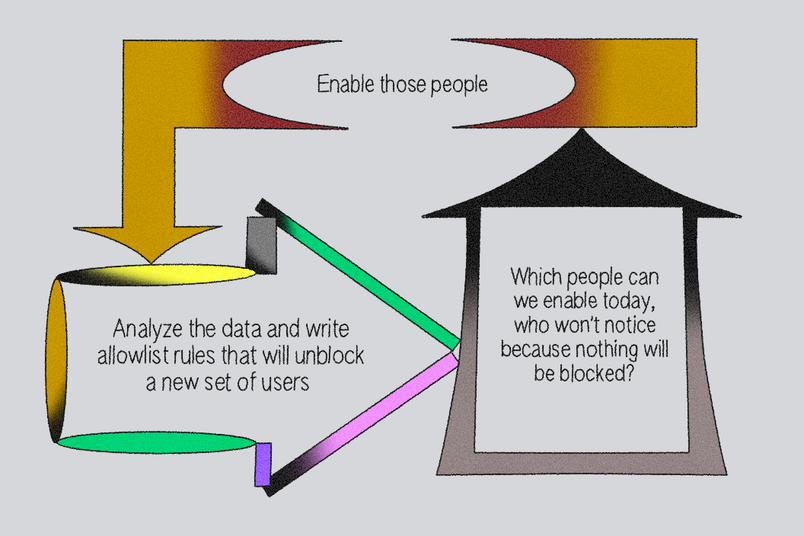
After building our data-driven allowlist, we ran the numbers: if we turned on Lockdown Mode for everyone, 90% of devices wouldn’t have a single program blocked. To address the remaining long tail of applications, we built a self-service approval workflow in Slack.
With this approach, we gradually rolled out Santa to all the engineers who had been at Figma for over six months, drastically improving the security of our devices—and most people didn’t even notice!

Just-in-time access with Opal
When it comes to controlling access to corporate resources, like SaaS apps and production environments, companies often end up in one of two modes:
- Wild West: There are very few guardrails, making it easy for anyone to gain access to production. This approach allows companies to move fast, but has obvious security risks and can lead to breaches.
- Locked down by process: Most engineers who’ve worked at large companies will be able to call to mind a few times they had to jump through burdensome hoops to gain access to the applications or environments they needed to get work done. This impacts productivity, and worse, it causes anti-patterns like running production services out of development environments or deploying “shadow IT,” which accounts for 11% of all security incidents.
To avoid falling into either of these camps, we implement just-in-time (JIT) role-based access controls using Opal. This allows people to request access when they need it, and if they are pre-approved based on their role, they’ll receive access that automatically expires after a period of time that we’ve configured, such as one hour. JIT access balances UX and security: There’s less process required to get access, and we reduce the number of privileged credentials sitting around on Figmates’ devices where they can be scooped up by malware.
Furthermore, with Opal, we can write our access policies using Config as Code (CAC), ensuring that they’re version-controlled, auditable, and easily adapted as needed.
module "app_users" {
  source      = "modules/group"
  name        = "#GitHub"
  description = "Access to Github"
  approvals = [{ type="PREAPPROVE", val=module.rbac.roles["Dept-DataScience"]}]
  autoadd = [ module.rbac.roles["Dept-Engineering"] ]
  review_settings = {
    review_stages = [{ type="VP_ENGINEERING_REVIEW" }]
  }
}Better UX leads to better security
By designing systems with usability in mind, it’s possible to create security policies that employees will actually follow. Here are a few key lessons from our approach:
- Prioritize usable security: Security shouldn’t frustrate users. Instead, find ways to build security into workflows without adding unnecessary friction.
- Automate where possible: Removing manual processes makes security enforcement faster and less disruptive.
- Leverage self-service tools: Giving employees the ability to resolve security issues on their own speeds up response times and improves compliance.
- Roll out changes gradually: Security initiatives are more successful when introduced progressively, rather than forcing abrupt, disruptive changes.

We're hiring engineers! Learn more about life at Figma, and browse our open roles.