6 skills every engineer needs for the AI era


Beyond boosting efficiency, the strongest software developers use AI to explore the problem space and find more creative solutions. Figma’s Vice President of Software Engineering Marcel Weekes and Developer Advocate Jake Albaugh share the crucial skills engineers should learn to meet the moment.
Share 6 skills every engineer needs for the AI era
As powerful AI tools unlock rapid code generation, engineers must adapt their roles and accommodate new workflows. This shift is just as much about embracing change as it is about knowing what stays constant. Marcel Weekes, Vice President of Software Engineering at Figma, recently joined Jake Albaugh, Developer Advocate at Figma, in a talk at the code and culture conference RenderATL about the skills needed to thrive in today’s product development landscape. Distilled from their conversation, the learnings below outline how engineers can most effectively leverage AI and incorporate it into their workflows.
Use AI for more than automation
“If you’re looking at AI as a way to reduce costs, you’re looking at it wrong,” says Marcel, paraphrasing Aaron Levie, CEO of Box. “AI is a way to maximize the upside of what you can do—to be more productive and leverage the skillset you already have.” After all, software developers are responsible for much more beyond writing code. At a higher level, they must figure out what problems to solve and the best way to solve them, which relies on building empathy for the end user and upholding a level of craft and care.
“We have all these opportunities for automation to make our lives easier, but what we’re not automating is the meaningful thing,” says Jake. “Automating more tedious tasks allows us to stay focused on why we’re building what we’re building.” Employers, he says, are interested in people who understand the meaning and value of their work, and who are willing to collaborate with their coworkers to evolve their ideas.
What we’re not automating is the meaningful thing.
Vibe code your way to new possibilities
According to Marcel, the utility of vibe coding Developers are embracing a new way of building software that’s more conversation than code. But is it more mayhem than magic? Today we’re introducing Figma Make, a new prompt-to-app capability to help you quickly explore, iterate, and refine—whether it's generating high-fidelity prototypes or getting into the details in design and code.Double click: When coding becomes conversation

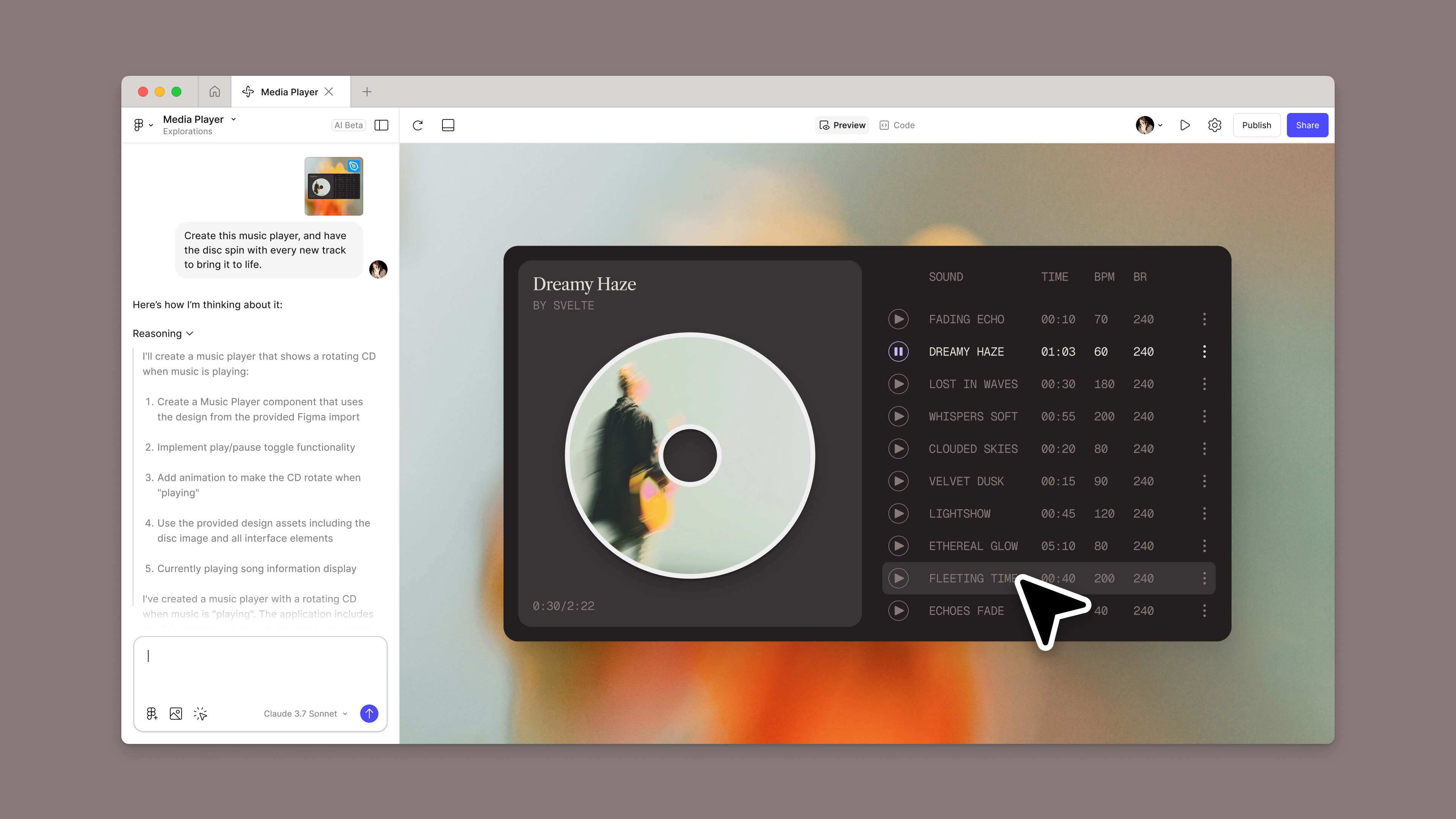
Introducing Figma Make: A new way to test, edit, and prompt designs
Jake adds that by frontloading the process, product teams can ensure they’re designing something that best serves their users: “That’s really cool because it’s a user experience consideration story that is enabled by AI, as opposed to it being automated away.”
Harness agentic capabilities for better outputs
Model Context Protocol (MCP) The sudden boom in MCP has kicked excitement about the agentic web into high gear. Is this the missing link we’ve needed between AI and all our other tools? Today we’re announcing the beta release of the Figma MCP server, which brings Figma directly into the developer workflow to help LLMs achieve design-informed code generation.Double click: What does MCP mean for agentic AI?
Introducing our MCP server: Bringing Figma into your workflow
Audit your own Pull Requests
LLMs can be an effective sounding board. Marcel shares that Figma engineers sometimes pre-review a Pull Request (PR) by putting it into the LLM, so they can make changes before it goes out for review. “Because these LLMs are aware of our codebase, they can find things like: ‘You rewrote something here that already has an implementation here,’” he says. In some cases, the person doing the review may not be aware of that redundancy. “People are using this to accelerate their workload and throughput, and it’s been very impressive so far,” says Marcel.
Handle a team of AI agents
The strongest developers are learning how to break down problems into smaller chunks for multiple agent developers to work on, and then tying together the solutions they get back as a result. “No one’s an expert at this yet, but one of the key skills we’ll see going forward is spending time on markdown files and providing additional instruction and context to LLMs, almost like you would help an intern ramp up on a problem,” says Marcel. “This looks like: ‘Please think about this, consider this part of the problem, and look at this part of our solution space that we’ve already developed.’”
Push past what you think you know
As with most skills, the best way to learn is by doing. “Use AI tools as much as you can,” advises Marcel. “Play around with them and push the limits, and see where you surprise yourself. We all have preconceived notions of what these tools can and can’t do.” Jake agrees, sharing that it took actually using the Figma MCP server to fully grasp its utility. “When you build something that’s already been designed, you’re trying to do more than use the right component,” he says. “One of the first things I do as a developer when I come to a design file is to zoom out and look at it at a high level. I use our MCP server to do the same—to tell me roughly what I should be thinking about to implement a big design.”
Just like digital natives had a competitive edge 20 years ago, familiarity with AI will make you stand out to potential employers. While it may seem that everyone is becoming fluent in AI, Marcel reminds us what the broader landscape looks like: “Most software developers working in various functions have not leveraged AI yet, so if you spend time learning what its capabilities are, that’s a skill in itself that you’re bringing to the workplace.”
As AI grows more prevalent and more powerful, the most successful engineers will know how to leverage the tool not just for automation, but augmentation. Working more efficiently is part of its promise, but more importantly, engineers can now spend more time focused on what really matters—solving problems, meeting user needs, and ensuring high quality.